📝Link Layer Discovery Protocol ( LLDP ) Explained with Commands & Practical Examples


🧠 What is LLDP?
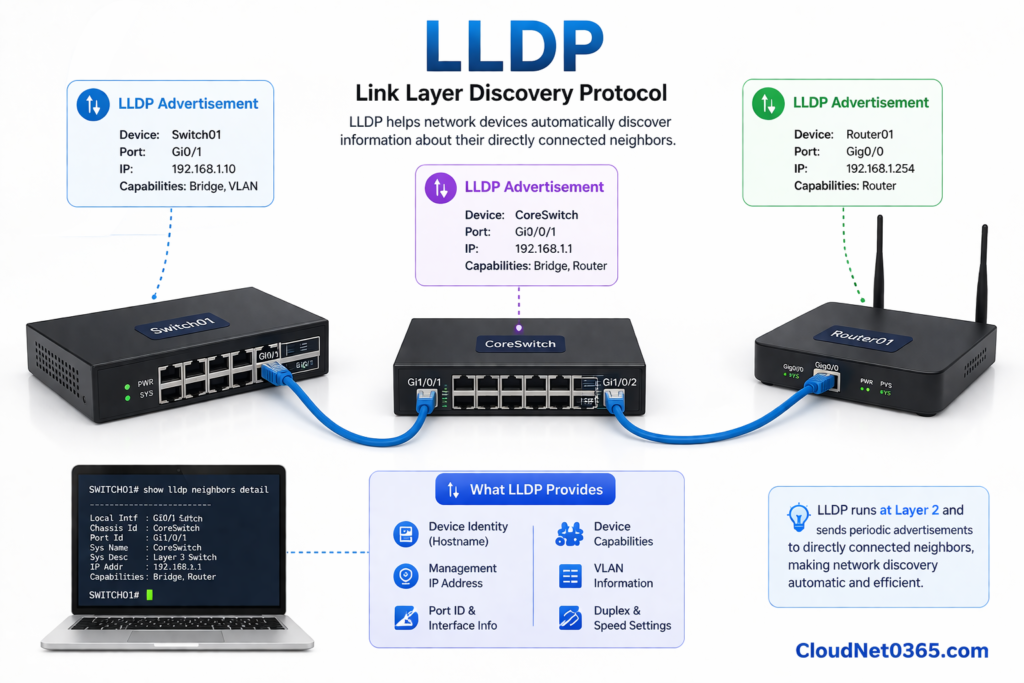
Link Layer Discovery Protocol (LLDP) is a vendor-neutral Layer 2 protocol (IEEE 802.1AB) that allows network devices to advertise their identity and capabilities to directly connected neighbors.
👉 In simple terms:
LLDP helps devices automatically identify neighboring devices, regardless of vendor.
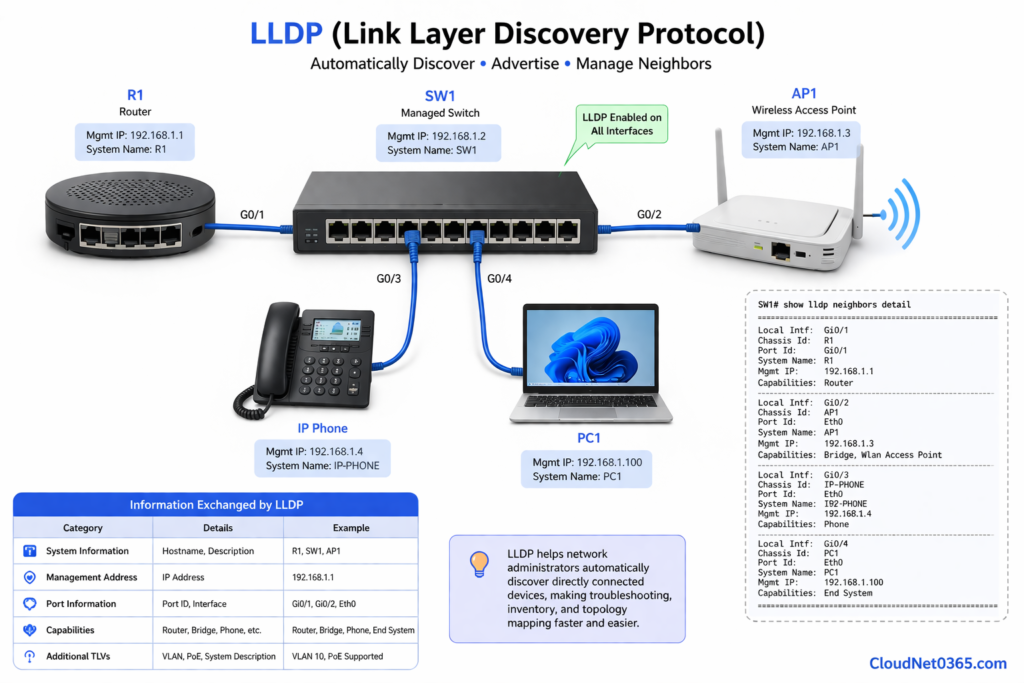
LLDP provides detailed neighbor information that helps in troubleshooting and network mapping:
- System Name (Hostname)
- Management IP Address
- Port ID and Interface
- Device Capabilities (Switch, Router, etc.)
- VLAN Information
- Duplex and Speed
- PoE Capabilities
👉 This makes LLDP extremely useful in multi-vendor environments
⚙️ How LLDP Works
- Operates at Layer 2 (Data Link Layer)
- Sends updates every 30 seconds (default)
- Uses TLV (Type-Length-Value) format
- Stores data in a neighbor table
- Works only with directly connected devices
💻 LLDP Configuration & Commands (Proper Structure)
Below is a clean and professional breakdown of LLDP commands, exactly how you should present in a technical blog.
🔧 1. Enable / Disable LLDP Globally
Enable LLDP
(config)# lldp run
👉 Activates LLDP on the device.
Disable LLDP
(config)# no lldp run
👉 Completely disables LLDP (recommended in secure environments).
🔧 2. Enable LLDP on Interface
(config)# interface g0/1
(config-if)# lldp transmit
(config-if)# lldp receive
👉 Allows the interface to:
- Send LLDP packets
- Receive LLDP packets
🔧 3. Disable LLDP on Interface
(config)# interface g0/1
(config-if)# no lldp transmit
(config-if)# no lldp receive
👉 Best practice for:
- User-facing ports
- External connections
🔧 4. Verify LLDP Status
show lldp
👉 Displays global LLDP information and status.
🔧 5. View LLDP Neighbors
show lldp neighbors
👉 Shows:
- Neighbor devices
- Local interfaces
- Port IDs
🔧 6. View Detailed Neighbor Information
show lldp neighbors detail
👉 Provides:
- IP address
- System description
- Capabilities
👉 Most useful command for troubleshooting
🔧 7. Check LLDP Interface Status
show lldp interface
👉 Displays interfaces where LLDP is enabled.
🔧 8. View Local Device Information
show lldp local-information
👉 Shows what your device is advertising to neighbors.
🔧 9. LLDP Timer Configuration (Optional)
(config)# lldp timer 30
(config)# lldp holdtime 120
👉 Controls:
- Advertisement interval
- Neighbor information retention
🏢 Real-World Use Case
Scenario: Mixed Vendor Network
You connect to a switch and:
- No documentation available
- Devices from different vendors
- Unknown topology
👉 Run:
show lldp neighbors detail
✔ Instantly discover devices
✔ Identify IP addresses
✔ Understand topology
👉 This saves significant troubleshooting time
⚠️ Limitations of LLDP
- Works only with directly connected devices
- Requires LLDP enabled on both ends
- Cannot map entire network topology
🔐 Security Considerations
LLDP exposes:
- Device identity
- IP address
- Network structure
👉 Best practice:
- Disable LLDP on user-facing ports
- Enable only on infrastructure links
🔄 LLDP vs CDP
Here is a detailed comparison of LLDP vs CDP or Link Layer Discovery Protocol vs Cisco Discovery Protocol.
In real-world networking, LLDP is essential for multi-vendor environments, while CDP provides deeper visibility in Cisco-based infrastructures.
| Feature | LLDP (Link Layer Discovery Protocol) | CDP (Cisco Discovery Protocol) |
|---|---|---|
| Standard | IEEE 802.1AB (Open Standard) | Cisco Proprietary |
| Vendor Support | Multi-vendor (Cisco, HP, Juniper, etc.) | Cisco devices only |
| Default Status | Usually disabled by default on many devices | Enabled by default on Cisco devices |
| Layer | Layer 2 (Data Link Layer) | Layer 2 (Data Link Layer) |
| Discovery Scope | Direct neighbors only | Direct neighbors only |
| Packet Structure | Uses TLV (Type-Length-Value) | Uses TLV (Type-Length-Value) |
| Default Timer | 30 seconds | 60 seconds |
| Holdtime | 120 seconds (default) | 180 seconds (default) |
| Information Detail | Standardized, moderate detail | More detailed (Cisco-specific) |
| VLAN Mismatch Detection | Limited support | Detects VLAN mismatches,Supported (CDPv2) |
| Duplex Mismatch Detection | Limited support | Supported (CDPv2) |
| Security Risk | Moderate (exposes device info) | Higher (more detailed exposure) |
| Configuration | Requires manual enabling | Enabled by default |
| Use Case | Multi-vendor enterprise networks | Cisco-only environments |
💡 Pro Tips (From Experience)
- Use LLDP in multi-vendor networks
- Combine LLDP with CDP for full visibility
- Always check detailed neighbor output
- Disable LLDP on untrusted interfaces
❓ Frequently Asked Questions (FAQ)
Q1: What is LLDP used for?
LLDP is used to discover directly connected network devices in multi-vendor environments.
Q2: What is the default LLDP timer?
Default LLDP update interval is 30 seconds.
Q3: Can LLDP replace CDP?
LLDP is preferred in multi-vendor networks, but CDP is still useful in Cisco-only environments.
🔗 Next Steps in Networking
👉 To strengthen your networking skills, explore our Cisco Discovery Protocol (CDP) and Basic Switch Configuration guides for deeper understanding and practical labs.
For official standards, refer to IEEE LLDP documentation from Cisco.
One can also refer to LLDP, explained by Wikipedia.
🧠 Final Thoughts
LLDP is one of the most practical and widely used protocols in modern networking environments.
It helps you:
- Discover devices quickly
- Simplify troubleshooting
- Understand network topology
👉 Mastering LLDP will significantly improve your efficiency as a network engineer.