🧠 Introduction: Switch Hardware, Types, and Initial Configuration (Complete Beginner Guide)
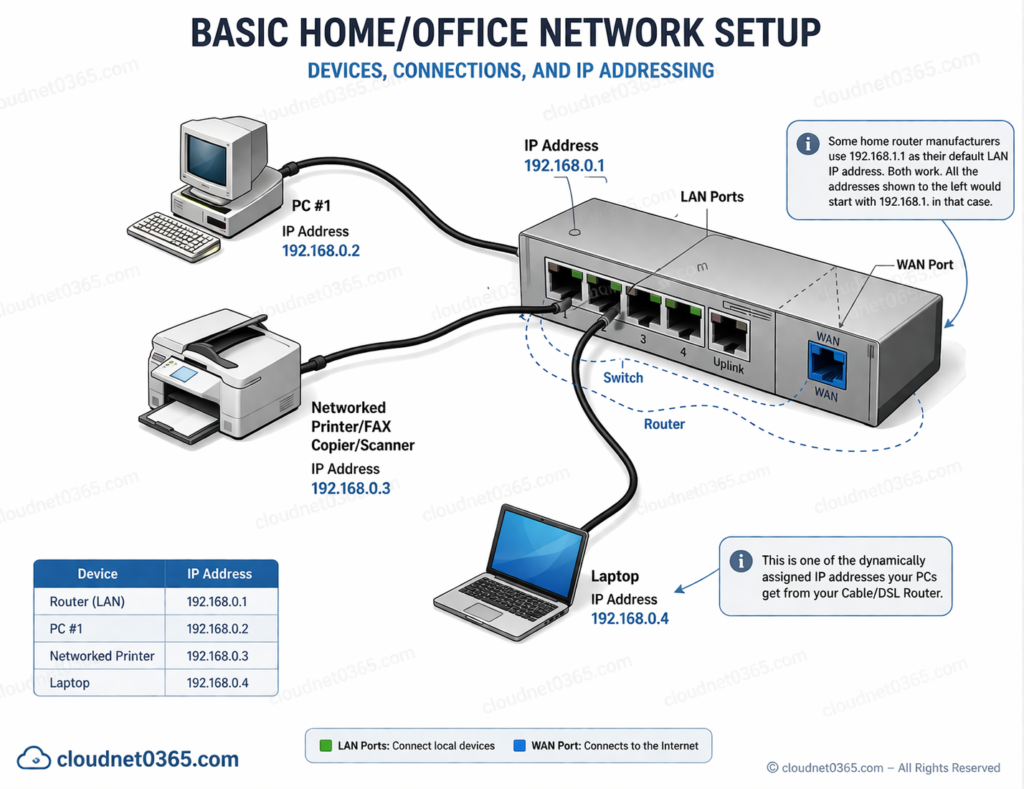
Network switches are one of the most important devices in modern networking. They are used to connect multiple devices within a local network and ensure efficient communication.
Switch is a plug and play device.
We can assign IP address on a switch.
In production network every switch will have an ip address for telnet access.In order to access remotely from the lan.
In this guide, you will learn:
- Switch hardware components
- Types of switches
- Difference between manageable and unmanageable switches
- Cisco hierarchical design model
- Basic switch configuration commands
🔧Switch Hardware Components
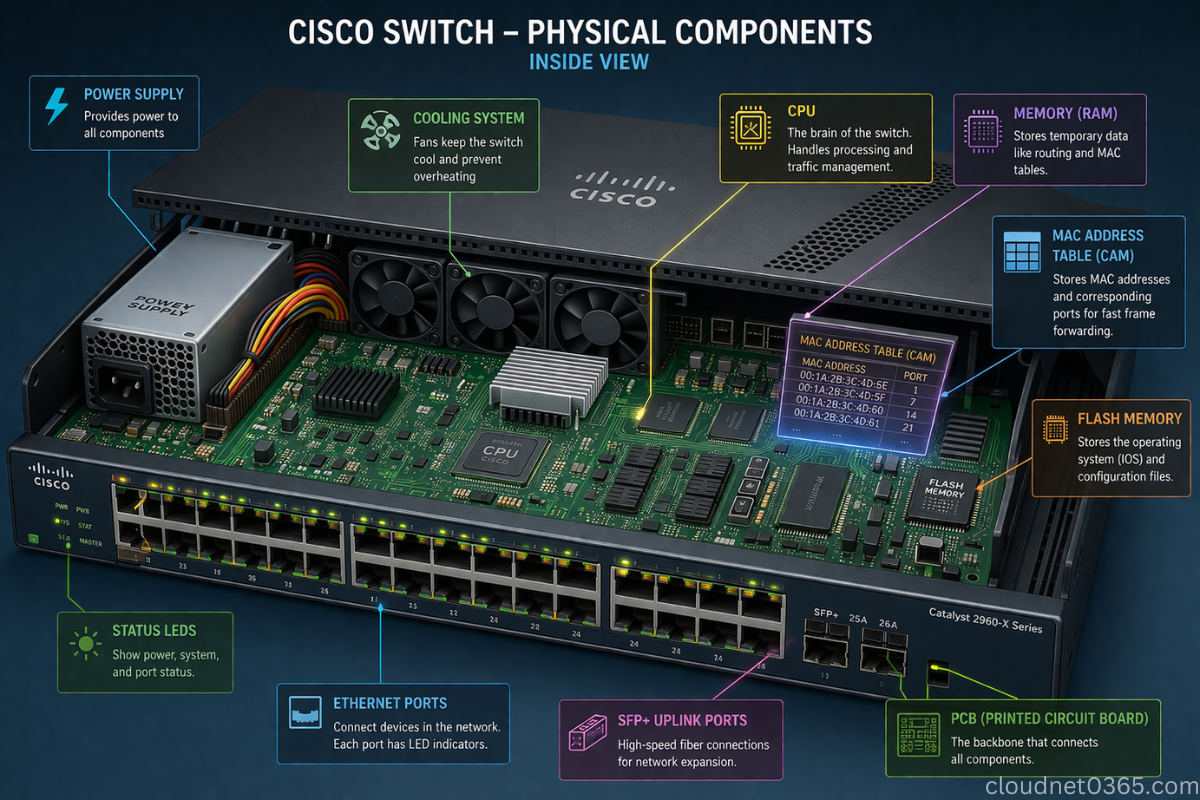
A network switch consists of several important hardware parts:
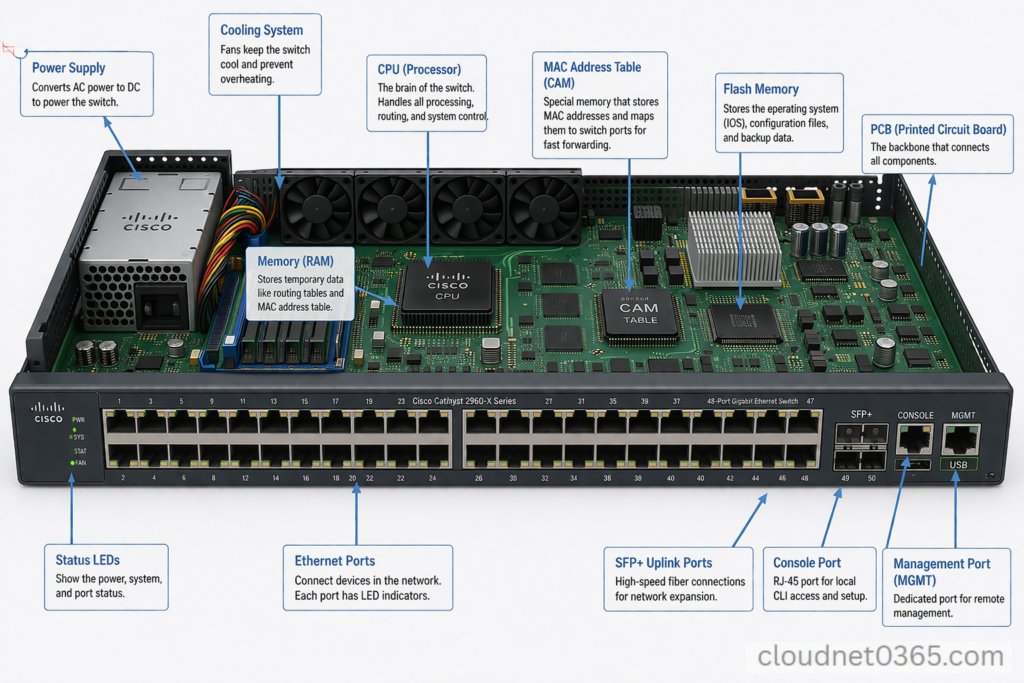
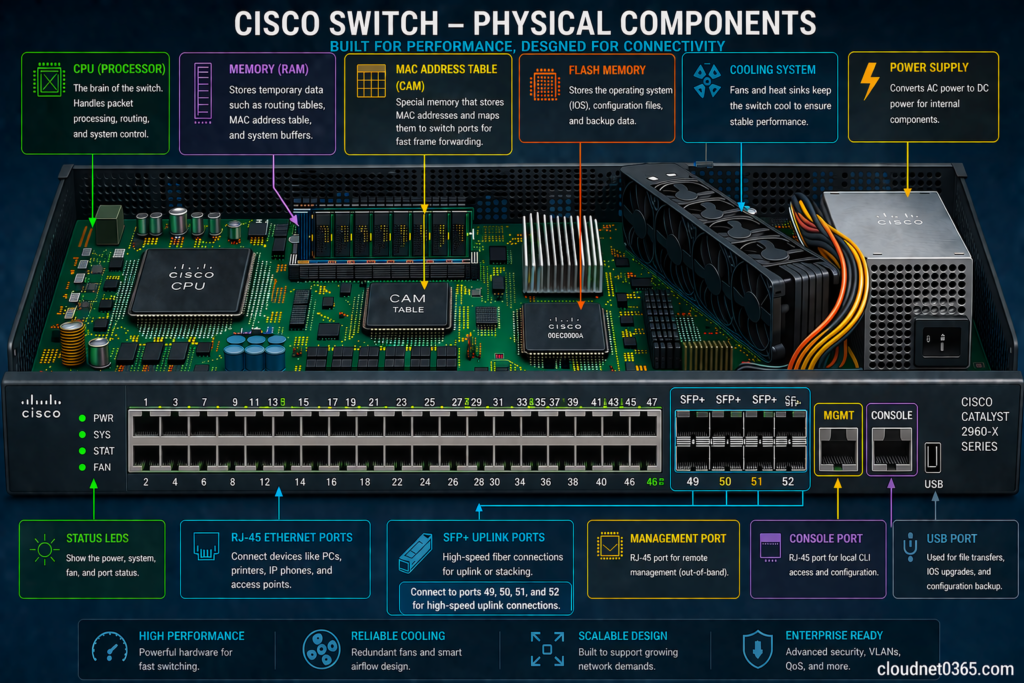
🔹 1. Ports
- Ethernet ports used to connect devices
- Can be Fast Ethernet, Gigabit, or 10G
🔹 2. MAC Address Table (CAM Table)
- Stores MAC addresses of connected devices
- Helps in forwarding frames efficiently
🔹 3. CPU and Memory
- CPU handles processing
- RAM stores temporary data
- Flash stores configuration
🔹 4. Power Supply
- Provides power to the switch
- Some switches support redundant power supply
🔹 5. Cooling System
- Fans to prevent overheating
⚙️ Types of Switches
🔹 1. Layer 2 Switch
- Works using MAC address
- Used in local networks
- Performs switching only
🔹 2. Layer 3 (Multilayer) Switch
- Works using MAC + IP address
- Can perform routing
- Used in larger networks
🔹 3. PoE (Power over Ethernet) Switch
- Provides power to devices (IP phones, cameras)
- No need for separate power cables
📊 Key Difference between Manageable vs Unmanageable Switches
| Feature | Managed Switch | Unmanaged Switch |
|---|---|---|
| Configuration | Fully configurable, we can verify,modify and can implement configurations | No configurations can be done |
| Control | High control | No control,these switches are just plug and play |
| VLAN Support | Yes | No |
| Console Port | It has a console port and CLI access | Their is no console port |
| VLAN Support | Yes | No |
| Security | Advanced | Basic |
| Cost | Higher | Lower |
| Use Case | Enterprise networks | Home / small office |
🎯 Simple Explanation
👉 Manageable Switches
- You can configure everything
- Used in professional networks
👉 Unmanageable Switches
- Plug and play
- No setup required
🏗️ Cisco Hierarchical Network Design Model
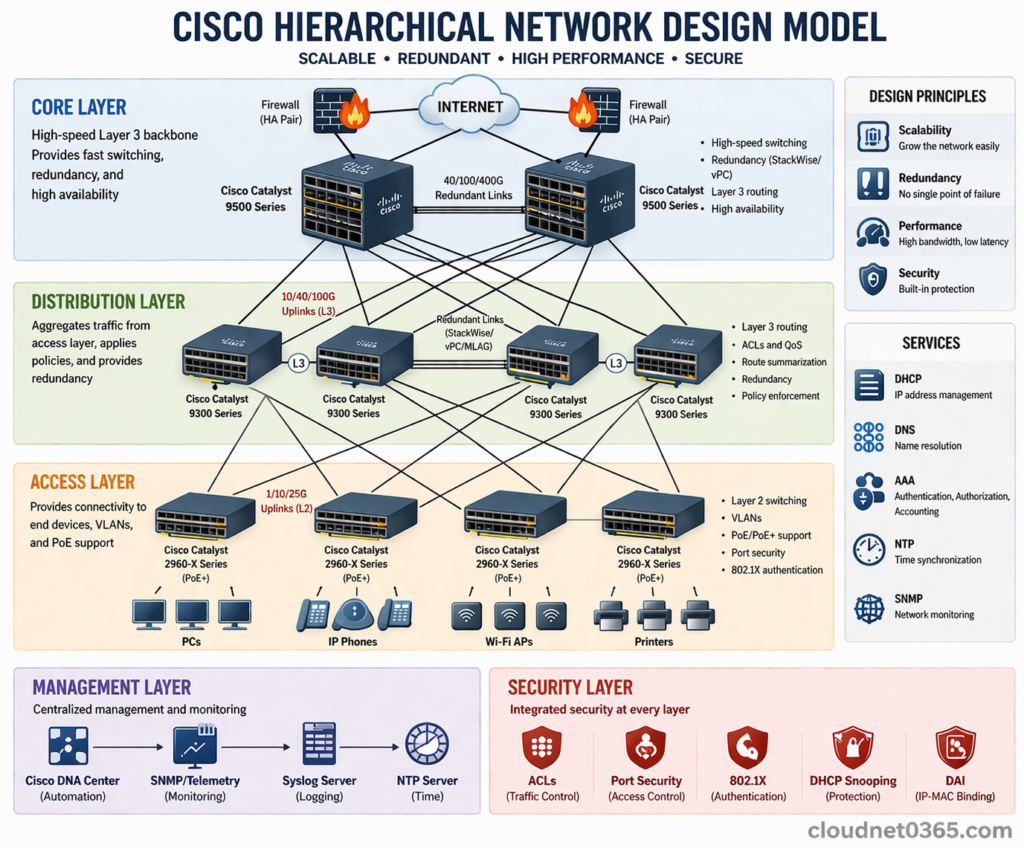
Cisco uses a 3-layer design model:
🔹 1. Access Layer Switches
- These are low-end switches
- Used at end locations (users connect here)
- Works mainly at Layer 2
✔ Connects:
- PCs
- Printers
- Laptops
- Other switches and routers
💡 Key Features:
- Layer 2 switching
- VLAN support
- Port security
- PoE support
✅ Common Models: Access Layer Switches
- Cisco Catalyst 2960 Series
- Cisco Catalyst 2960-X / XR Series
- Cisco Catalyst 9200 Series
- Cisco Catalyst 1000 Series
🔹 2. Distribution Layer Switches
- These are Layer 3 / Multilayer switches
- Better hardware and processing capabilities as compared to access layer or Layer 2 switches.
- The ports can work as a Layer 2 ( works based on mac address) as well as Layer 3 ( works based on ip address) port.
Some routing configurations can be done in Distribution layer switches.
💡 Key Features:
- Layer 3 (routing support)
- Inter-VLAN routing
- ACLs & QoS
- Better performance than access layer
- Aggregates access layer switches and applies policies
- Works on MAC + IP
- Can perform routing
- Supports policies and filtering
✅ Common Models: Distribution Layer Switches
- Cisco Catalyst 3560 Series
- Cisco Catalyst 3750 Series
- Cisco Catalyst 3850 Series
- Cisco Catalyst 9300 Series
🔹 3. Core Layer Switches
These are
- High-end switches
- Very fast and powerful
💡 Key Features:
- High-speed switching
- Redundancy
- High availability
- Very high throughput
- High performance
- Handles large traffic
- Backbone of network
✅ Common Models: Core Layer Switches
- Cisco Catalyst 4500 Series
- Cisco Catalyst 6500 Series
- Cisco Catalyst 9500 Series
- Cisco Nexus 7000 / 9000 Series
👉 Some switches can be used in multiple layers depending on network size:
- Catalyst 9300 → Distribution or Core (small networks)
- Catalyst 9200 → Access or small Distribution
Core Level Switches are same as Distribution Layer Switches but with more processing and hardware capabilities and much more reliable.
The selection of switch models depends on network size and requirements, and some Cisco switches can operate across multiple layers in smaller or medium-sized networks.
⚙️ Basic Switch Initial Configuration (Cisco)
👉 When you first access a switch:
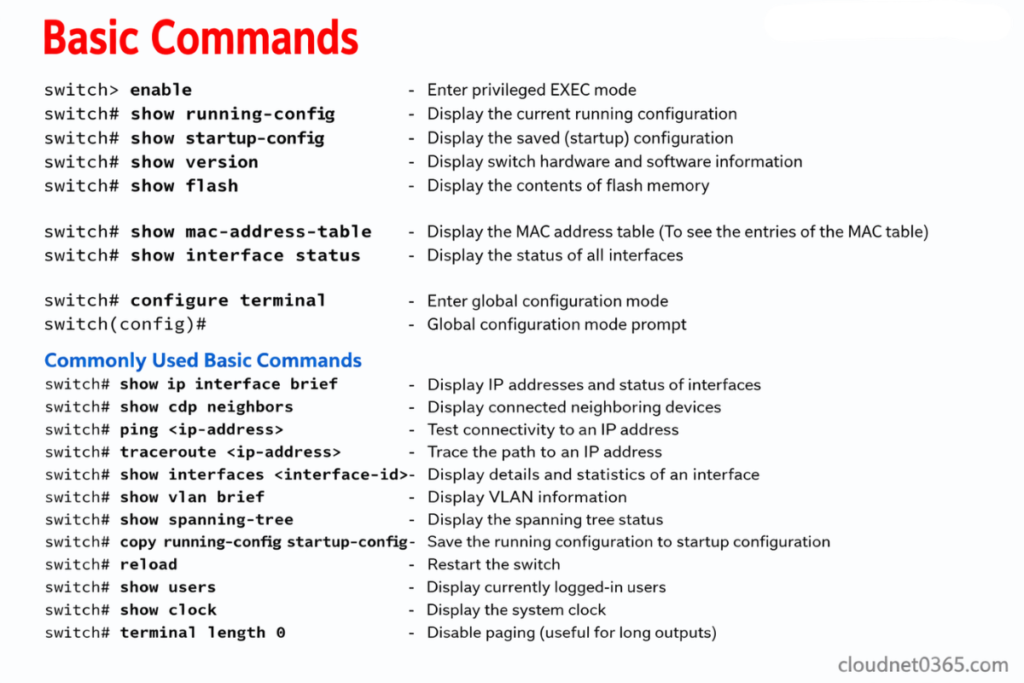
🔹 Enter Configuration Mode
SW>enable This is User mode
SW#show startup-configSW#show running-configSW#show flashSW#show versionSW(config)# This is global configuration mode
🔹 Set Hostname
hostname Switch1
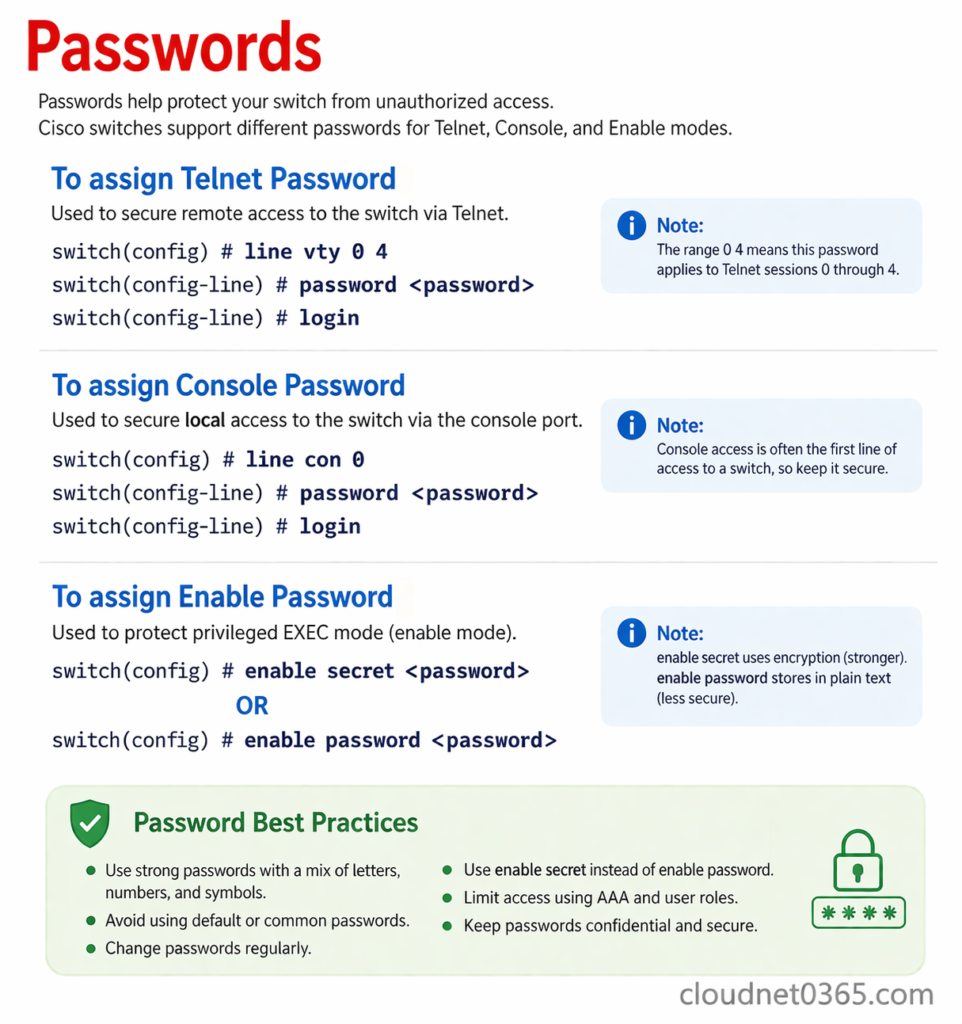
🔹 Set Password
enable secret yourpassword
🔹 Configure Console Access
line console 0
password cisco
login
🔹 Configure VTY (Remote Access)
line vty 0 4
password cisco
login
For telnet access the requirements are :
1. Their should be Network connectivity between the pc and the switch.
2. IP address configured on the switch.The IP address should be on the same network.
3. VTY password and enable password should be configured on the switch.
🔹 Assign IP Address (Management)
interface vlan 1
ip address 192.168.1.2 255.255.255.0
no shutdown
🔹 Save Configuration
write memory
⚠️ Important Points to Remember
✔ Switch works on MAC address (Layer 2)
✔ Layer 3 switch can perform routing
✔ Managed switches offer more control
✔ Cisco model improves scalability
🧾 Conclusion
Understanding switch hardware, types, and configurations is essential for building efficient networks. With the Cisco hierarchical design model, networks can be structured in a scalable and organized way.
📚 Further Reading
- How Switch Learns MAC Address
- What is ARP (Address Resolution Protocol)?
- Router vs Switch – Explained
- Network Switches – Cisco