🧠 Introduction: Switch Hardware, Types, and Initial Configuration (Complete Beginner Guide)
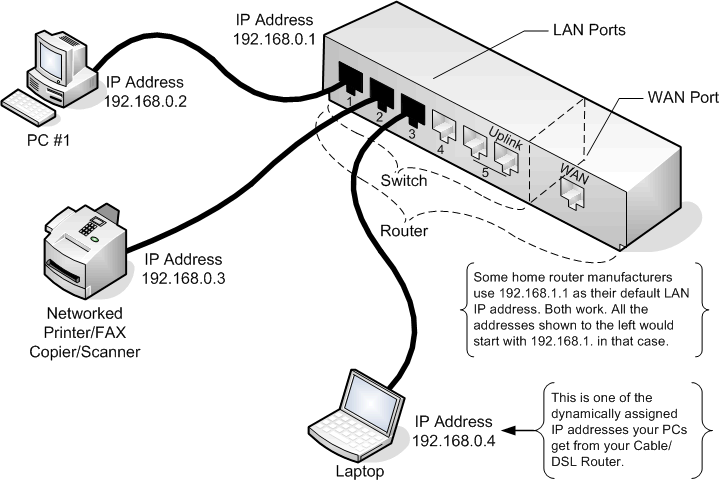
Network switches are one of the most important devices in modern networking. They are used to connect multiple devices within a local network and ensure efficient communication.
In this guide, you will learn:
- Switch hardware components
- Types of switches
- Difference between manageable and unmanageable switches
- Cisco hierarchical design model
- Basic switch configuration commands
🔧Switch Hardware Components
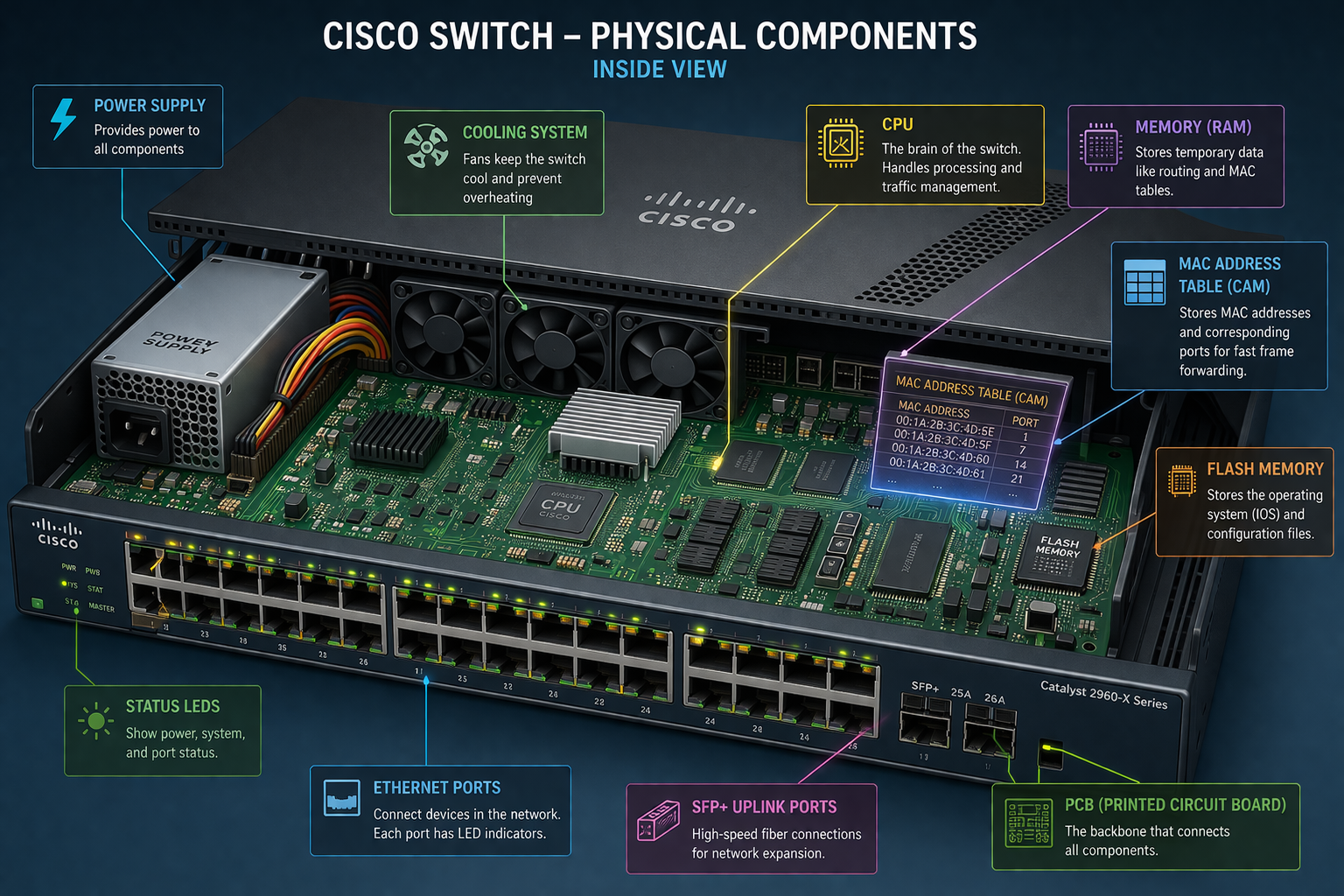
A network switch consists of several important hardware parts:
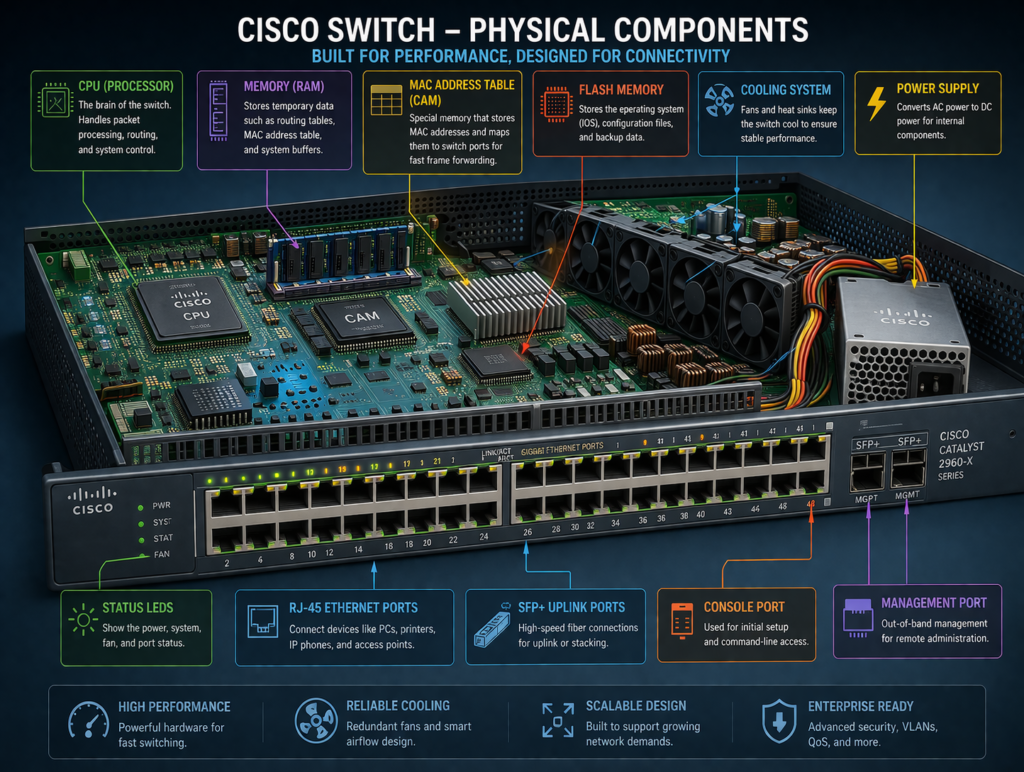
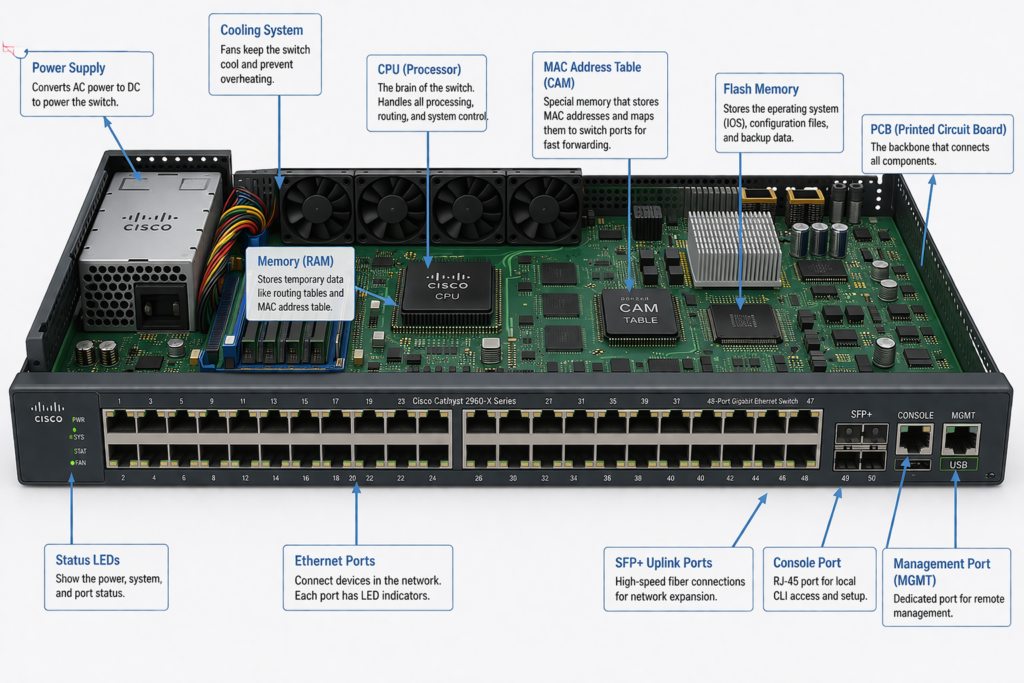
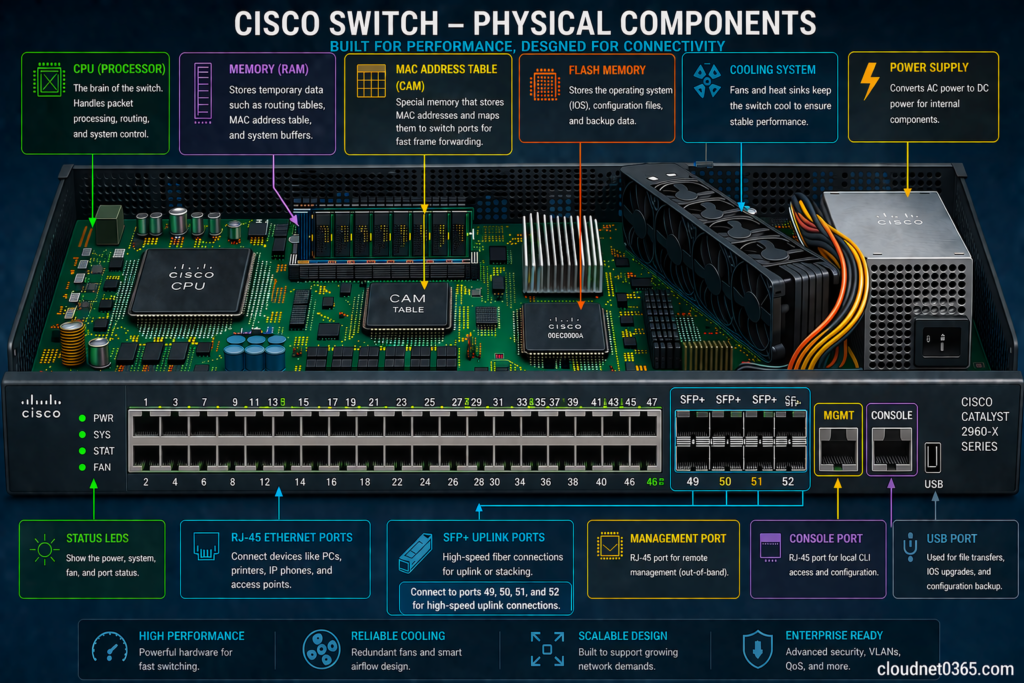
🔹 1. Ports
- Ethernet ports used to connect devices
- Can be Fast Ethernet, Gigabit, or 10G
🔹 2. MAC Address Table (CAM Table)
- Stores MAC addresses of connected devices
- Helps in forwarding frames efficiently
🔹 3. CPU and Memory
- CPU handles processing
- RAM stores temporary data
- Flash stores configuration
🔹 4. Power Supply
- Provides power to the switch
- Some switches support redundant power supply
🔹 5. Cooling System
- Fans to prevent overheating
⚙️ Types of Switches
🔹 1. Layer 2 Switch
- Works using MAC address
- Used in local networks
- Performs switching only
🔹 2. Layer 3 (Multilayer) Switch
- Works using MAC + IP address
- Can perform routing
- Used in larger networks
🔹 3. PoE (Power over Ethernet) Switch
- Provides power to devices (IP phones, cameras)
- No need for separate power cables
📊 Key Difference between Manageable vs Unmanageable Switches
| Feature | Managed Switch | Unmanaged Switch |
|---|---|---|
| Configuration | Fully configurable, we can verify,modify and can implement configurations | No configurations can be done |
| Control | High control | No control,these switches are just plug and play |
| VLAN Support | Yes | No |
| Console Port | It has a console port and CLI access | Their is no console port |
| VLAN Support | Yes | No |
| Security | Advanced | Basic |
| Cost | Higher | Lower |
| Use Case | Enterprise networks | Home / small office |
🎯 Simple Explanation
👉 Manageable Switches
- You can configure everything
- Used in professional networks
👉 Unmanageable Switches
- Plug and play
- No setup required
🏗️ Cisco Hierarchical Network Design Model
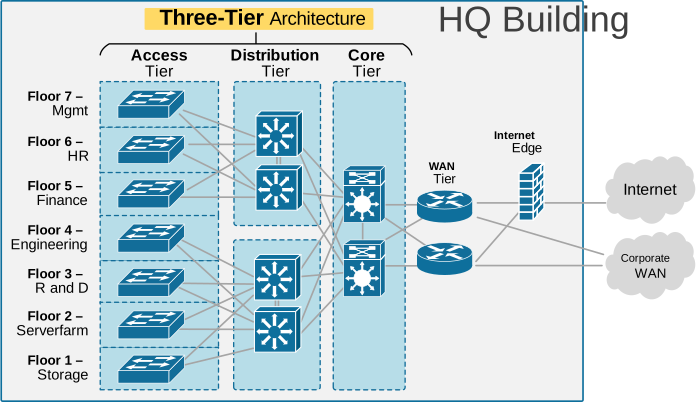
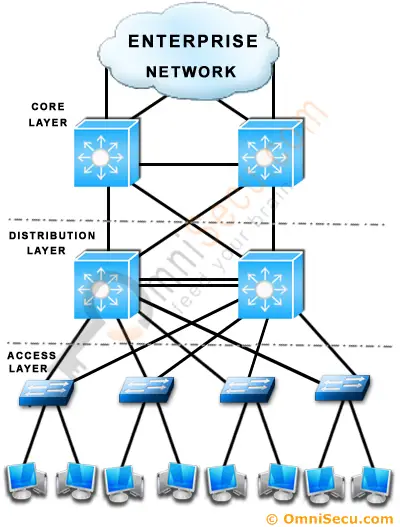

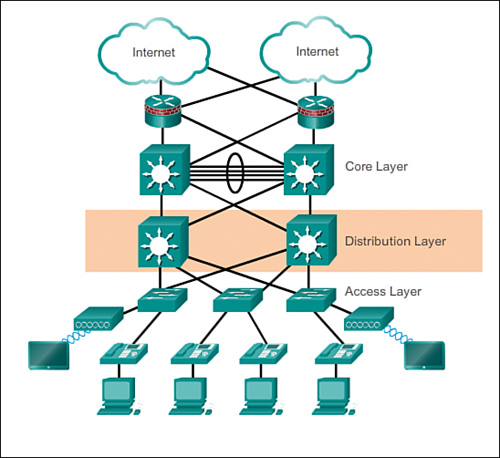
Cisco uses a 3-layer design model:
🔹 1. Access Layer Switches
- These are low-end switches
- Used at end locations (users connect here)
- Works mainly at Layer 2
✔ Connects:
- PCs
- Printers
- Laptops
- Other switches and routers
🔹 2. Distribution Layer Switches
- These are Layer 3 / Multilayer switches
- Better hardware and processing capabilities as compared to access layer or Layer 2 switches.
- The ports can work as a Layer 2 ( works based on mac address) as well as Layer 3 ( works based on ip address) port.
Some routing configurations can be done in Distribution layer switches.
✔ Features:
- Works on MAC + IP
- Can perform routing
- Supports policies and filtering
🔹 3. Core Layer Switches
- High-end switches
- Very fast and powerful
✔ Features:
- High performance
- Handles large traffic
- Backbone of network
👉 Your point (refined):
Core Level Switches are same as Distribution Layer Switches but with more processing and hardware capabilities and much more reliable.
⚙️ Basic Switch Initial Configuration (Cisco)
👉 When you first access a switch:
🔹 Enter Configuration Mode
SW>enable This is User mode
SW#show startup-configSW#show running-configSW#show flashSW#show versionSW(config)# This is global configuration mode
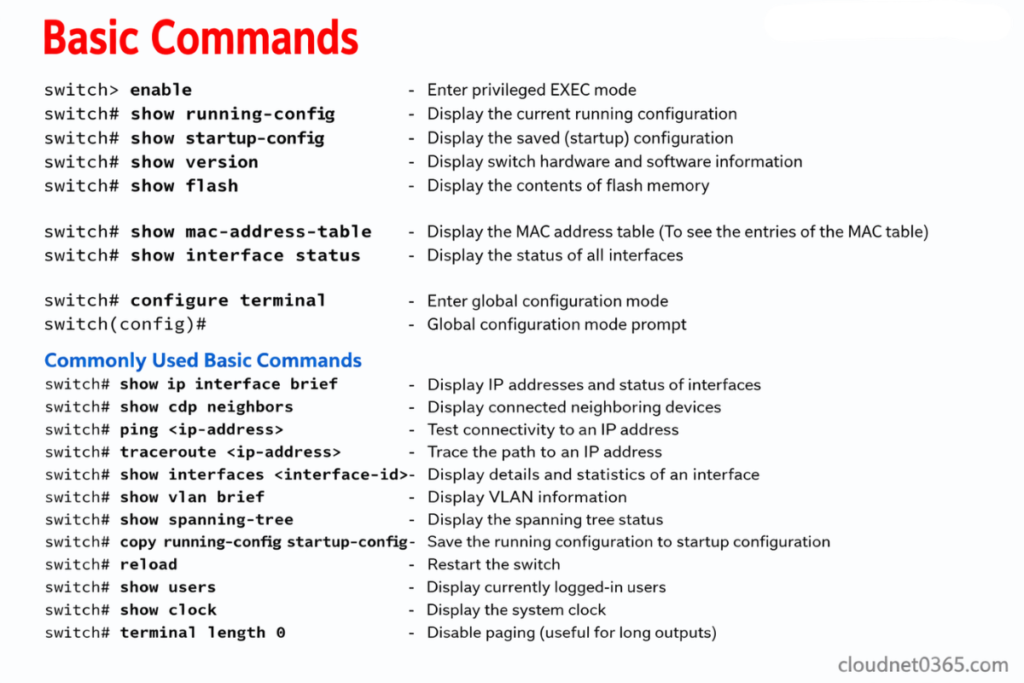
🔹 Set Hostname
hostname Switch1
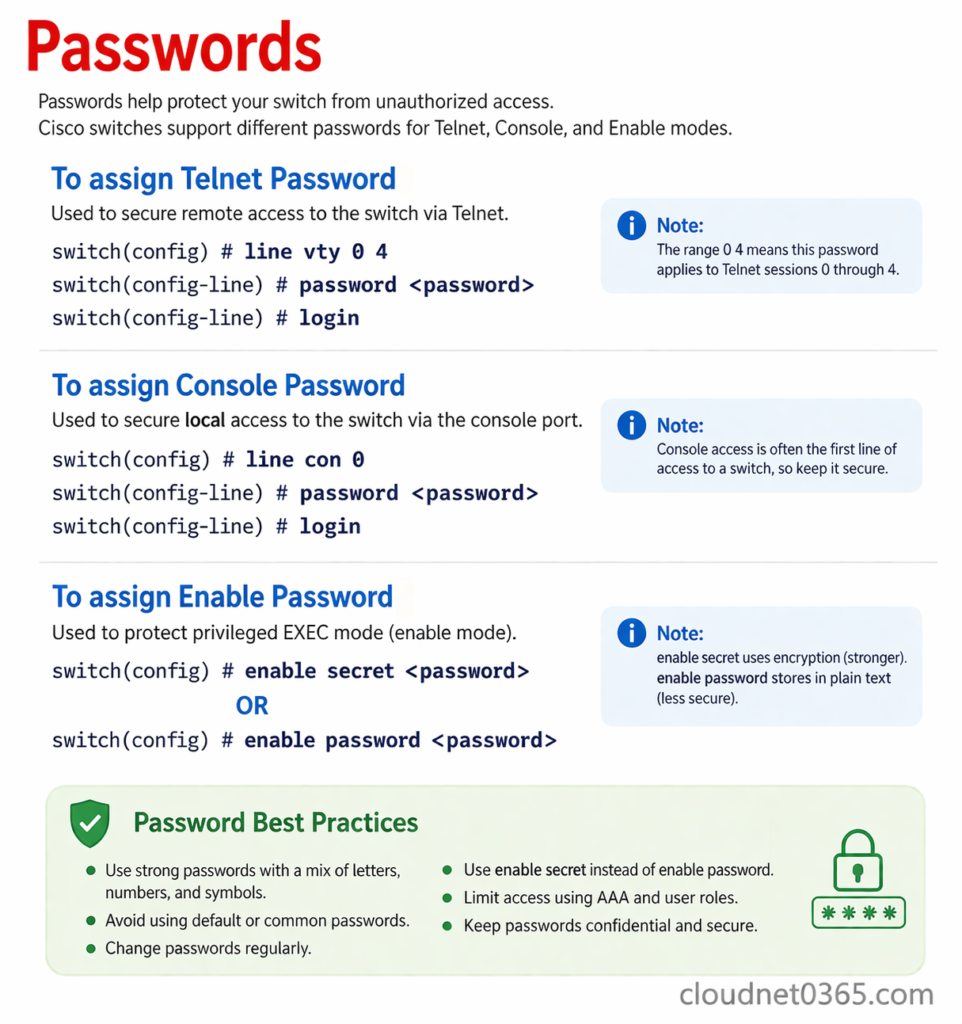
🔹 Set Password
enable secret yourpassword
🔹 Configure Console Access
line console 0
password cisco
login
🔹 Configure VTY (Remote Access)
line vty 0 4
password cisco
login
🔹 Assign IP Address (Management)
interface vlan 1
ip address 192.168.1.2 255.255.255.0
no shutdown
🔹 Save Configuration
write memory
⚠️ Important Points to Remember
✔ Switch works on MAC address (Layer 2)
✔ Layer 3 switch can perform routing
✔ Managed switches offer more control
✔ Cisco model improves scalability
🧾 Conclusion
Understanding switch hardware, types, and configurations is essential for building efficient networks. With the Cisco hierarchical design model, networks can be structured in a scalable and organized way.
📚 Further Reading