
🌐 What is VLAN? Complete Guide with Examples, Commands & Use Cases
🔍 Introduction (Real Problem)
In modern computer networks, one of the biggest challenges is unnecessary traffic and poor performance caused by excessive broadcasting.
Imagine you have a network with 200+ devices across departments like IT, HR, Sales, and Finance.
👉 What happens when one device sends data?
- The switch broadcasts it to all devices
- Even unrelated departments receive it
This leads to:
- Network congestion
- Network becomes slow and insecure
- Security risks
👉 This is where VLAN (Virtual LAN) comes into the picture.
VLAN helps divide a single large network into multiple smaller and efficient networks, improving both performance and security.
🧠 What is VLAN?
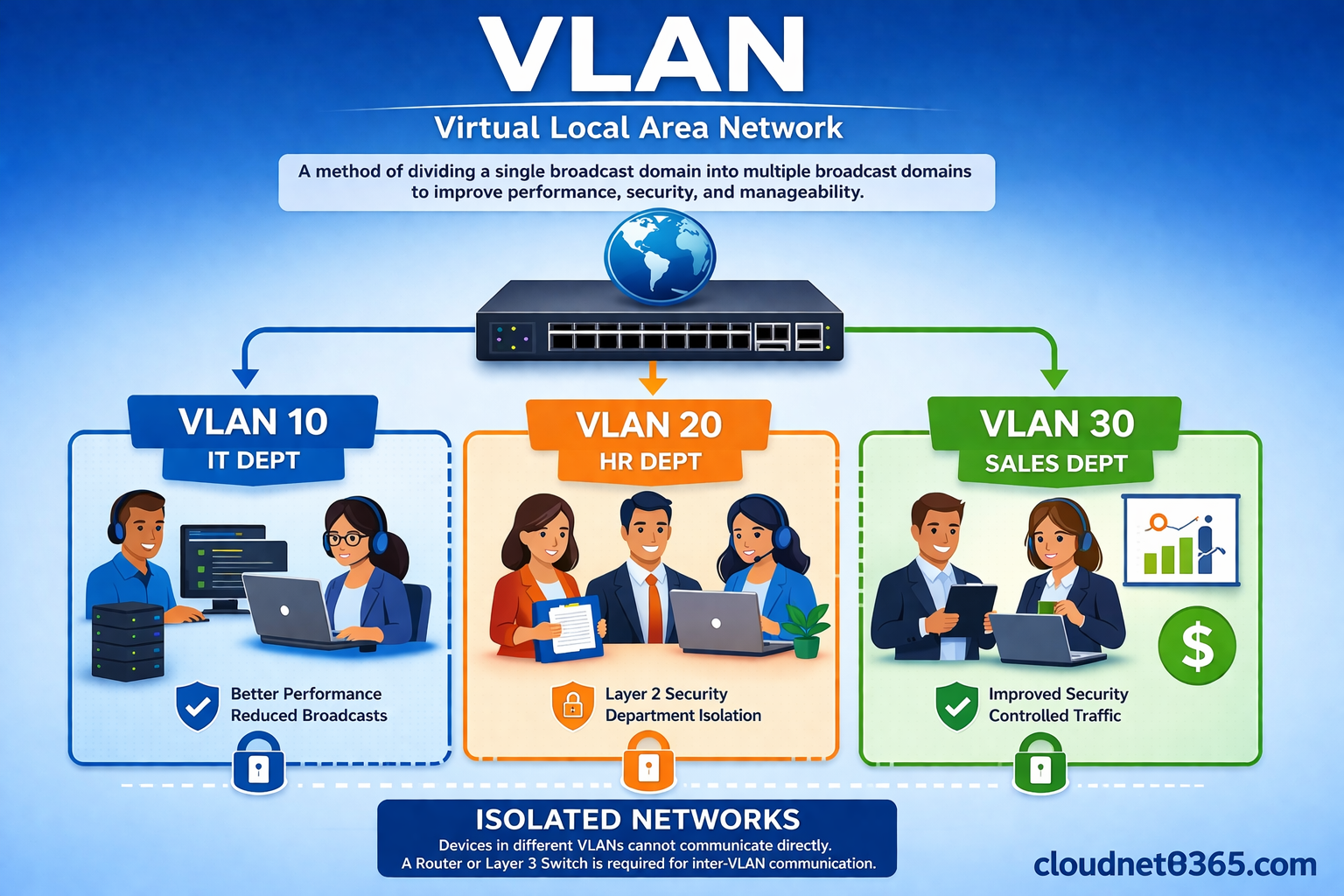
VLAN (Virtual Local Area Network) is a method of dividing a single broadcast domain into multiple broadcast domains.
👉 In simple words:
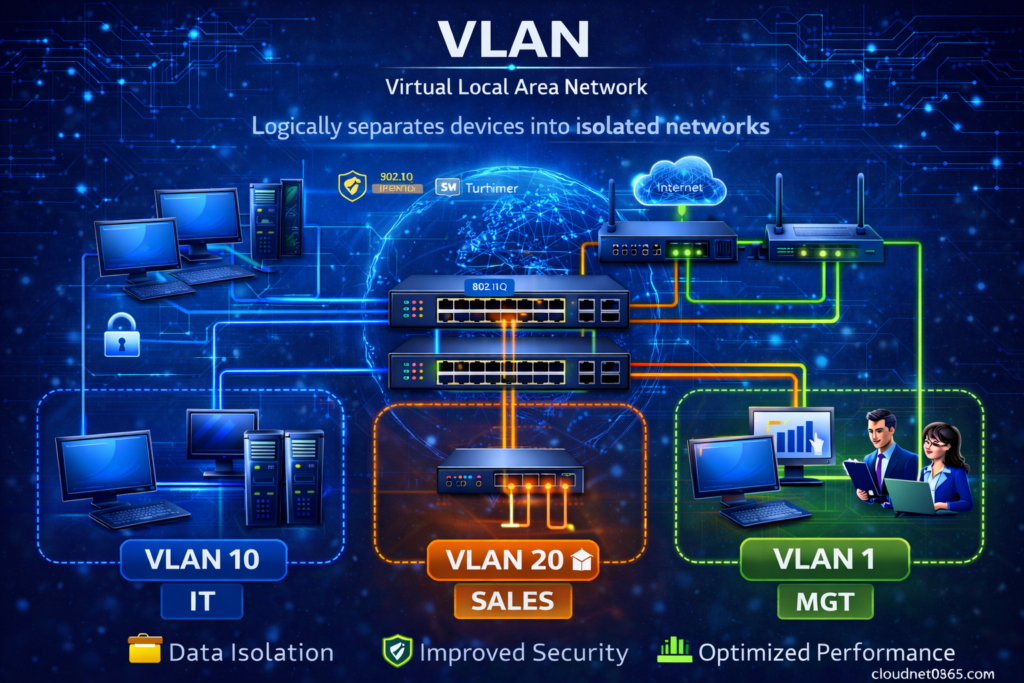
- It allows you to create multiple logical networks within the same physical network.
- Each VLAN works like a separate network
⚙️ Why VLAN is Needed?
By default:
- A switch has only one broadcast domain
- All devices receive broadcast traffic
👉 Problem:
- Too much unnecessary traffic
- Reduced performance
- No separation between departments
🔄 How Network Works Without VLAN
🧪 Example Scenario
- Device A sends data to Device B
- Switch checks MAC address table
❌ If MAC not found:
- Switch performs broadcast (flooding)
- Sends packet to all ports
👉 In a network of 200 devices:
- All 199 devices receive the broadcast
🚨 Problems Without VLAN
- High broadcast traffic
- Poor network performance
- No security between departments
- Network congestion
🚀 How VLAN Solves This Problem or how VLAN Works ?
👉 Here below, you can see as how VLAN works and solves this problem.
It divides a single large network into multiple smaller networks.
For example, suppose in a real office there are few departments like IT, HR, Accounts and etc. So here VLAN is configured and each departments are logically separated or isolated from each other. Here below IT is put in VLAN 10, HR in VLAN 20 , Accounts in VLAN 30 and so on.
| Department | VLAN ID |
|---|---|
| IT | 10 |
| HR | 20 |
| Accounts | 30 |
👉 Even if all devices are connected to the same switch:
- IT devices → communicate only within VLAN 10
- HR devices → communicate only within VLAN 20
✔ This creates logical separation without changing physical setup
✅ With VLAN:
- Network is divided into smaller groups
- Broadcast is limited within each VLAN
- Devices in different VLANs do NOT receive irrelevant traffic
✅ Result:
- Devices in VLAN 10 cannot see VLAN 20 traffic
- Broadcast stays within VLAN only
- Network becomes faster and secure
⚙️ VLAN Configuration Commands (Cisco)
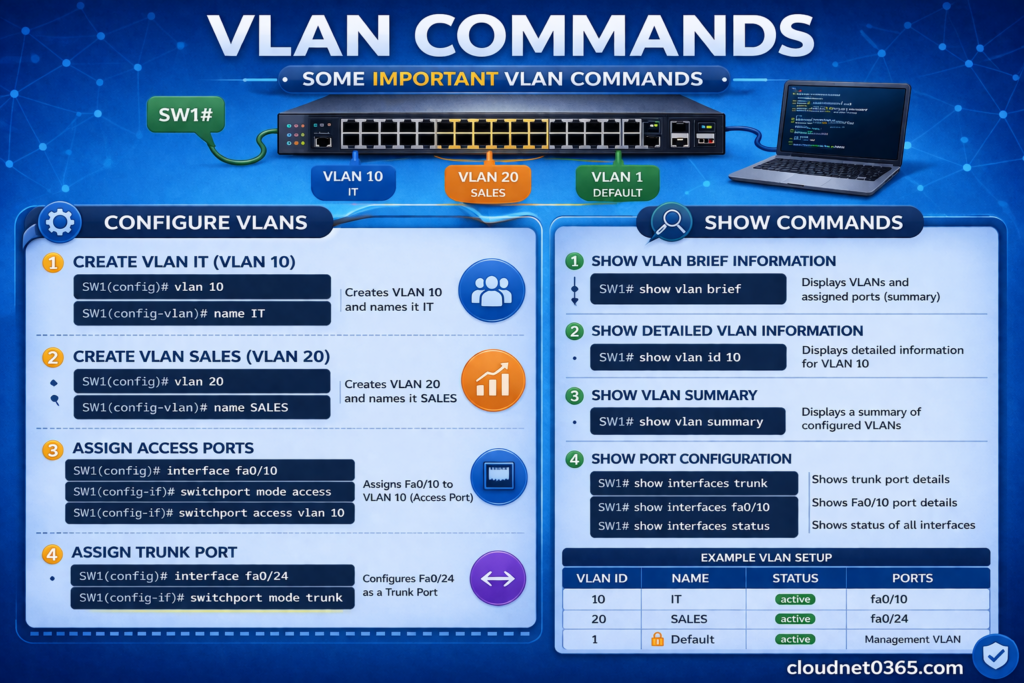
🔧 Create VLAN
Switch(config)# vlan 10
Switch(config-vlan)# name IT
🔧 Assign VLAN to Port
Switch(config)# interface fastethernet 0/1
Switch(config-if)# switchport mode access
Switch(config-if)# switchport access vlan 10
🔧 Verify VLAN
Switch# show vlan brief
🔧 Check MAC Table
Switch# show mac address-table📌 Real-Life Example of VLAN or Virtual LAN
Imagine a company with:
- 200 employees
- Departments: IT, HR, Sales, Finance
❌ Without VLAN:
- All devices are in one network
- If 1 device sends data → 199 devices receive it
- Heavy network congestion
✅ With VLAN:
- IT → VLAN 10
- HR → VLAN 20
- Sales → VLAN 30
- Finance → VLAN 40
👉 Now:
- Each department communicates within its own VLAN
- No unnecessary broadcasting
- Better performance and security
🌍 Real-World Use Cases of VLAN or Virtual LAN
🏢 1. Office Network Separation
- IT, HR, Finance separated logically
- Prevents unnecessary communication
🔒 2. Security Improvement
- Sensitive departments isolated
- Reduces risk of unauthorized access
📈 3. Performance Optimization
- Broadcast traffic reduced
- Faster network performance
🏫 4. Schools / Colleges
- Separate VLANs for:
- Students
- Staff
- Administration
📊 VLAN vs Normal Network (Comparison)
| Feature | Without VLAN | With VLAN |
|---|---|---|
| Broadcast Domain | Single | Multiple |
| Network Traffic | High | Reduced |
| Security | Low | High |
| Performance | Poor | Improved |
| Control | Limited | Better |
⭐ Benefits of VLAN
✅ 1. Reduces Broadcast Traffic
Broadcast is limited to a specific VLAN, reducing unnecessary network load.
✅ 2. Improves Network Performance
Less traffic = faster communication and better efficiency.
✅ 3. Provides Layer 2 security
Departments are isolated, preventing unauthorized access.
✅ 4. Logical Network Segmentation without extra hardware
No need to change physical wiring—everything is virtual.
✅ 5. Cost Effective
No need to create separate physical networks.
✅ 6. Better network management
Helps in easy administration.
📌 Important Technical Points
- By default, a switch has only one VLAN (VLAN 1)
- VLAN operates at Layer 2 (Data Link Layer)
- Devices in different VLANs cannot communicate directly
- Router or Layer 3 switch is required for inter-VLAN communication
❓ Frequently Asked Questions (FAQ)
Q1. What is VLAN in simple terms?
VLAN is a way to divide one network into multiple smaller networks to improve performance and security.
Q2. Why is VLAN important?
It reduces broadcast traffic, improves speed, and enhances security in a network.
Q3. Can devices in different VLANs communicate?
No, not directly. They require a router or Layer 3 switch.
Q4. What is a broadcast domain?
A broadcast domain is a group of devices that receive broadcast messages from each other.
Q5. Does VLAN require multiple switches?
No, a single switch can have multiple VLANs.
Q6. Can devices in different VLANs communicate?
👉 Not directly
👉 Requires Layer 3 routing (Inter-VLAN routing)
Q7. What is default VLAN?
By default, all ports are in VLAN 1.
Q8. Does VLAN improve security?
Yes, it isolates departments and prevents unauthorized access.
⚠️ Common Mistakes & Myths
❌ Myth 1: VLAN requires new hardware
✅ Reality: VLAN works on existing switches (managed switches)
❌ Myth 2: VLAN is only for large companies
✅ Reality: Even small networks benefit from VLAN
❌ Myth 3: VLAN completely blocks communication
✅ Reality: Communication is possible via routing
🧾 Conclusion
VLAN is one of the most important concepts in networking that transforms a large, inefficient network into a structured, secure, and high-performance system.
👉 It helps you:
- Reduce broadcast traffic
- Improve performance
- Increase security
👉 Instead of one large network, VLAN allows you to create multiple efficient and controlled networks.
👉 Start implementing VLAN in your network to improve performance, reduce traffic, and enhance security.
Whether you are a beginner or an IT professional, understanding VLAN is essential for managing modern networks.
🔗 Related Articles (Internal Linking)
- Router vs Switch Explained
- What is MAC Address
- OSI Model Explained
- What is Subnetting
- What is VLAN in Networking?- Explained By Cisco
- VLAN Concept – By Wikipedia
To go deeper into VLAN, continue with:
- VLAN Configuration in Cisco Switch (step-by-step)
- VLAN Tagging (802.1Q explained)
- VLAN Troubleshooting Guide
👉 These will help you move from theory to practical expertise
🚀 Next Move
Now we proceed smartly.
👉 I recommend next:
Post #2: How VLAN Works (Deep + Packet Flow Explanation)