
🌐 Types of VLAN Explained (Data, Voice, Management,Assignment Methods – Static & Dynamic,Concepts – Default and Native VLAN)
🚨 Introduction: Why VLAN Types Confuse Everyone
Many beginners understand VLAN basics but often get confused when they hear or search terms like ” types of VLAN ” or search terms like :
- Default VLAN
- Data VLAN
- Voice VLAN
- Management VLAN
- Native VLAN
- Static VLAN
- Dynamic VLAN
👉 Result?
- Beginners get confused ❌
- Wrong concepts in interviews ❌
- Poor network design decisions ❌
👉 The common question is:
“Are these different VLANs or just categories?”
👉 The answer is : They are not the same category.
👉 In real IT environments, wrong VLAN design can break communication or expose sensitive data.
Without understanding VLAN types, you may Mis configure the networks,which will Reduce network performance and can Create security risks.
Simply knowing VLAN is not enough — you must understand different types of VLANs and when to use each.
In this guide, you will learn:
- Different VLAN types
- All properly classified
- Where each is used
- Real-world practical examples
🔍 What is a VLAN?
A VLAN (Virtual Local Area Network) is a logical segmentation of a physical network.
Key Idea:
- Devices in the same VLAN communicate as if they are on the same network
- Even if they are physically connected to different switches
Benefits:
- ✅ Improved security
- ✅ Better performance
- ✅ Easy network management
- ✅ Traffic isolation
👉 VLAN separates network traffic logically to improve security, performance, and management.
🧠 VLAN Classification (MOST IMPORTANT)
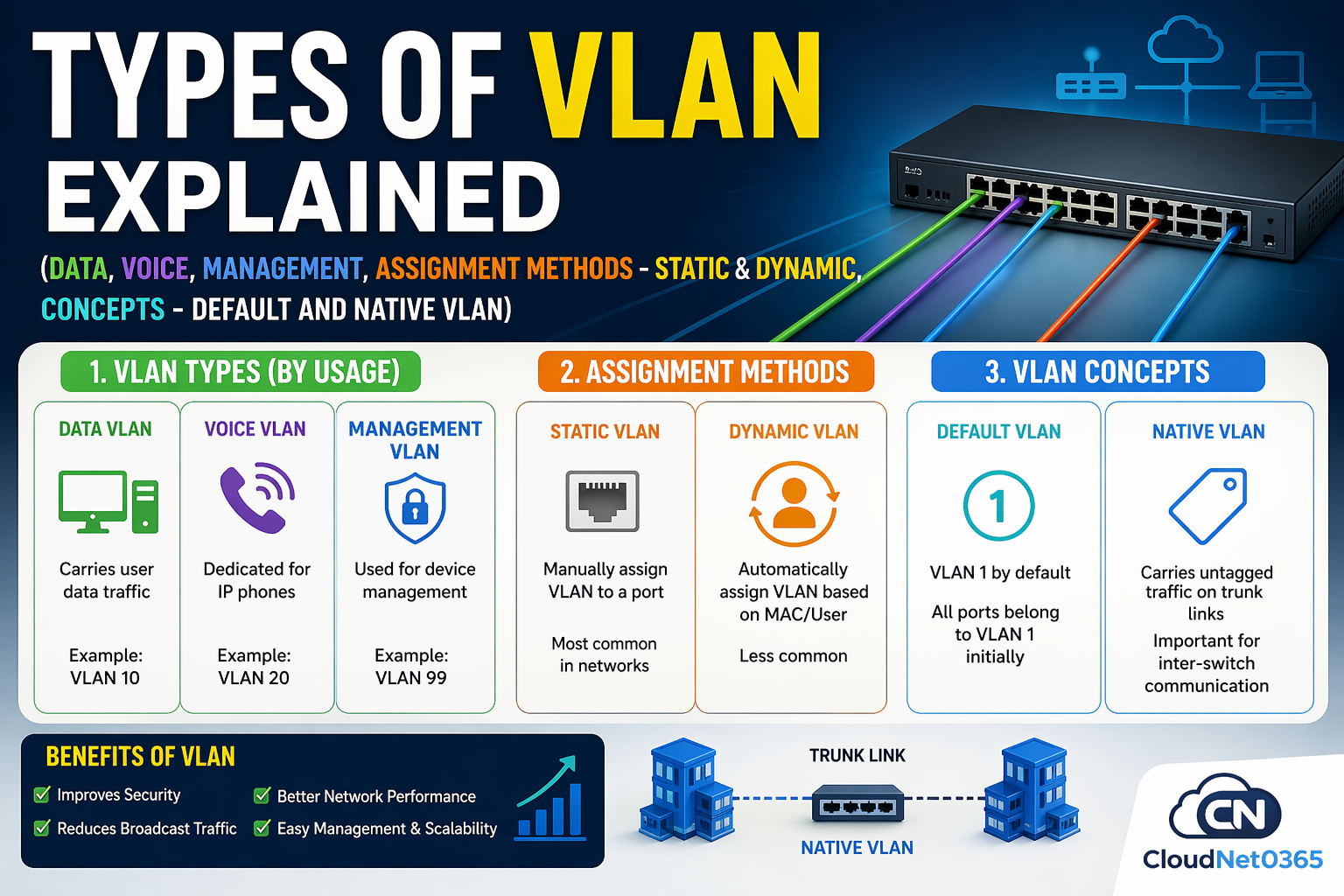
👉 To avoid confusion, VLANs are divided into 3 categories:
| Category | Includes |
|---|---|
| ✅ VLAN Types (Usage-Based) | Data, Voice, Management |
| ⚙️ Assignment Methods | Static, Dynamic |
| 🔐 VLAN Concepts | Default, Native |
⭐ Types of VLAN (Quick Answer)
There are 3 main types of VLAN used in networking:
- Data VLAN → Used for user traffic (PCs, laptops)
- Voice VLAN → Used for VoIP traffic (IP phones)
- Management VLAN → Used for device administration
👉 Others are:
- Assignment Methods → Static, Dynamic
- Static → It is manually assigned to switch ports
- Dynamic → It is assigned automatically (MAC/user-based)
- Concepts → Default, Native
- Default VLAN → All ports belong by default (VLAN 1)
- Native VLAN → Carries untagged traffic on trunk links
📊 VLAN Comparison Table (Super Clear)
| VLAN Name | Category | Purpose | Usage Level |
|---|---|---|---|
| Data VLAN | Type | User traffic | ⭐⭐⭐⭐⭐ |
| Voice VLAN | Type | VoIP traffic | ⭐⭐⭐⭐ |
| Management VLAN | Type | Device control | ⭐⭐⭐⭐⭐ |
| Static VLAN | Method | Manual assignment | ⭐⭐⭐⭐⭐ |
| Dynamic VLAN | Method | Automatic assignment | ⭐ |
| Default VLAN | Concept | VLAN 1 | ⭐⭐⭐ |
| Native VLAN | Concept | Untagged trunk traffic | ⭐⭐⭐⭐ |
🔹 1. VLAN Types (Based on Usage)
👉 These are the REAL VLAN types used in production.
1️⃣ Data VLAN
📌 Definition
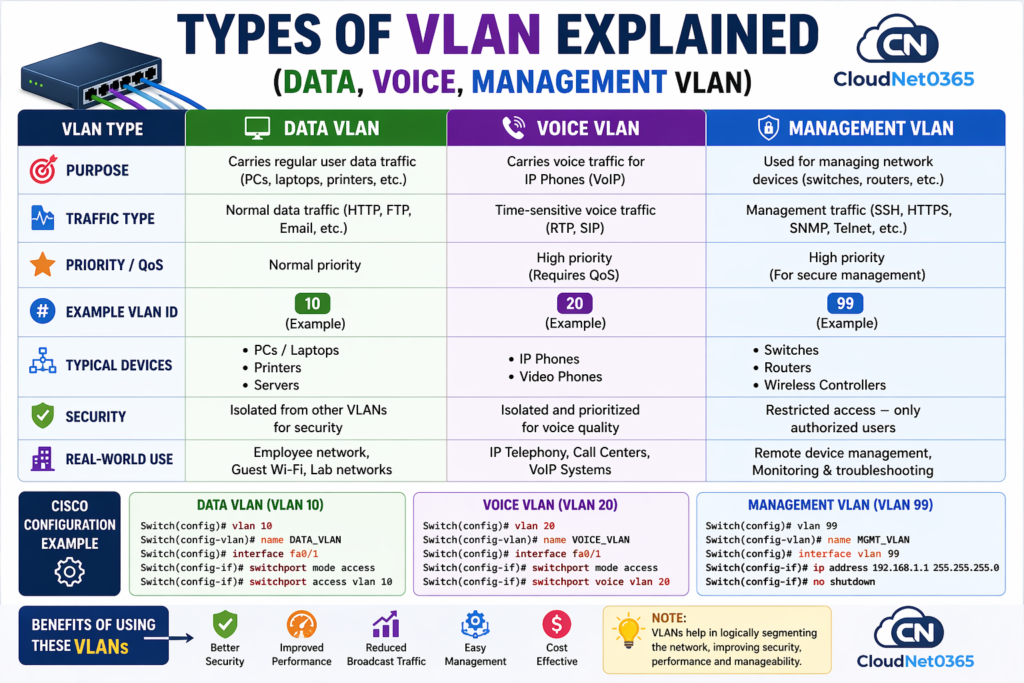
- Used for normal user data traffic (PCs, laptops, printers)
✅ Example:
- HR systems → VLAN 10
- IT systems → VLAN 20
👉 These are Data VLANs used in daily operations.
💻 Configuration Example
Switch(config)# vlan 10
Switch(config-vlan)# name DATA_VLAN

Switch(config)# interface fa0/1
Switch(config-if)# switchport mode access
Switch(config-if)# switchport access vlan 10
🎯 Key Benefits:
- Separates user traffic
- Improves network efficiency
- Enhances security
- Reduces congestion
2️⃣ Voice VLAN
📌 Definition
- It is a dedicated VLAN for IP phones (VoIP traffic)
- Voice VLAN is specifically designed for IP phone and voice communication traffic.
⚡ Why Needed?
Voice traffic is sensitive to:
- Delay (latency)
- Jitter
- Packet loss
Voice traffic requires Low delay (latency) and High priority.
💻 Configuration Example
Switch(config)# vlan 20
Switch(config-vlan)# name VOICE_VLAN

Switch(config)# interface fa0/2
Switch(config-if)# switchport mode access
Switch(config-if)# switchport voice vlan 20
🎯 Features:
- QoS (Quality of Service) enabled
- Prioritized traffic
- Clear voice calls
3️⃣ Management VLAN
📌 Definition
- Used for remote management of network devices
💡 Used For:
- SSH / Telnet access
- SNMP monitoring
- Network administration
💻 Configuration Example
Switch(config)# vlan 99
Switch(config-vlan)# name MGMT_VLAN

Switch(config)# interface vlan 99
Switch(config-if)# ip address 192.168.99.1 255.255.255.0
Switch(config-if)# no shutdown
🔐 Benefits:
- Secure management access
- Isolates admin traffic
- Prevents unauthorized access
👉 Never use VLAN 1 for management in production networks.
⚙️ 2. VLAN Assignment Methods
👉 Defines how devices are assigned to VLANs
🟡 Static VLAN (Port-Based)
✔ Definition
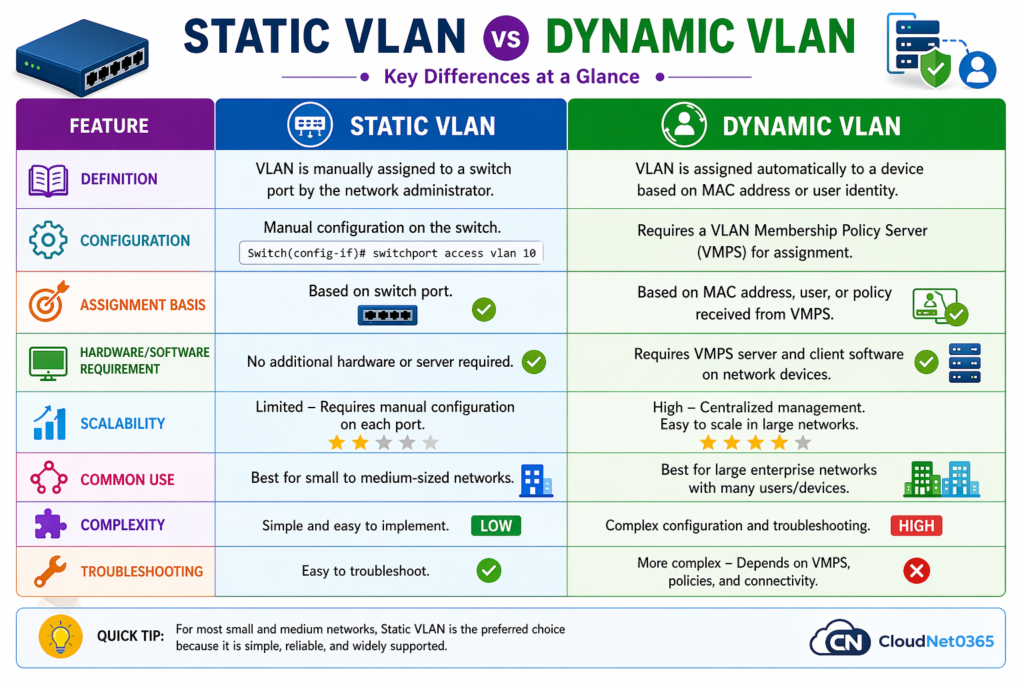
- VLAN is manually assigned to switch port
✔ Why It’s Popular
- Simple and reliable
- Predictable
- Most widely used
🔧 Example
Switch(config)# interface fa0/2
Switch(config-if)# switchport access vlan 10
💡 Pro Tip
👉 In real-world networks, 95% setups use Static VLANs.
🟠 Dynamic VLAN
✔ Definition
- VLAN assigned automatically (MAC/user-based)
✔ Uses
- VMPS server
❗ Reality Check
- Rarely used in modern networks
- Complex setup
⚠️ Common Mistake
👉 Many beginners think Static & Dynamic are “types” — they are NOT.
🔐 3. VLAN Concepts (Often Misunderstood)
👉 These are NOT types, but essential behaviors.
🔘 Default VLAN
✔ Key Points
- All ports belong to VLAN 1 by default
- Cannot be deleted
⚪ Native VLAN
✔ Definition
- Carries untagged traffic on trunk ports
🔧 Example
Switch(config)# interface g0/1
Switch(config-if)# switchport mode trunk
Switch(config-if)# switchport trunk native vlan 99
⚠️ Security Tip
👉 Always change native VLAN from default to avoid VLAN hopping attacks.
📊 Difference between Native VLAN vs Default VLAN (Concept)
Here below is a detailed Classification of Native Vlan vs Default Vlan which is often confusing.
| Feature | 🟣 Native VLAN | 🔴 Default VLAN |
|---|---|---|
| Definition | Handles untagged traffic on trunk ports | All ports belong by default (VLAN 1) |
| Usage | Trunk communication | Initial setup only |
| Security | Medium | Low ⚠️ |
| Best Practice | Change from VLAN 1 | Avoid using in production |
⚠️ Small But Important Clarification (Expert Level)
👉 Native VLAN is NOT exactly like other VLAN types
- It is not for traffic segregation
- It is used in trunk links for untagged frames
⚠️ Why People Get Confused
👉 Because by default:
- Default VLAN = VLAN 1
- Native VLAN = VLAN 1
👉 So they look the same initially… but their roles are completely different
📊 Difference between Default vs Data vs Voice vs Management VLAN
Here below is a detailed comparison of all VLans (Default vs Data vs Voice vs Management).
| Feature | ⚪ Default VLAN | 🟢 Data VLAN | 🟣 Voice VLAN | 🟠 Management VLAN |
|---|---|---|---|---|
| Definition | All ports belong by default (VLAN 1) | Handles user-generated traffic | Dedicated for IP phone traffic | Used for device management |
| Primary Use | Initial communication | PCs, laptops, printers | VoIP calls | SSH, Telnet, SNMP |
| Traffic Type | Mixed / unsegmented | User data | Real-time voice | Administrative traffic |
| Security Level | ❌ Low | 🟡 Medium | 🔐 High | 🔒 Very High |
| Performance Priority | ❌ None | Normal | 🚀 High (QoS enabled) | Medium |
| Best Practice | ❌ Avoid using in production | ✔ Use for all users | ✔ Separate for voice | ✔ Always isolate |
| Example VLAN ID | 1 | 10 | 20 | 99 |
| Devices | All ports (default) | End-user devices | IP phones | Switches, routers, admin PCs |
| Risk Level | ⚠️ High risk | Low risk | Very low risk | Minimal risk |
🌍 Real-World Use Cases
🏢 Office Network Design
| Department | VLAN Type | VLAN ID |
|---|---|---|
| Employees | Data VLAN | 10 |
| IP Phones | Voice VLAN | 20 |
| Network Admin | Management | 99 |
| Trunk Link | Native | 999 |
Result:
- Smooth communication
- Secure admin access
- High-quality voice calls
- Organized network
🏫 Educational Institution
- Separate VLANs for:
- Students
- Faculty
- Admin
🏭 Enterprise Setup
- Static VLAN → Servers
- Voice VLAN → Call center
- Native VLAN → Trunk links
❌ Common VLAN Mistakes
- ❌Ignoring management VLAN security
- ❌Overcomplicating with Dynamic VLAN
- ❌ Using VLAN 1 for user traffic
- ❌ Native VLAN mismatch between switches
- ❌ Not configuring QoS for voice VLAN
- ❌ Mixing management and user traffic
- ❌ Forgetting trunk configuration
👉 These are real-world issues engineers face daily.
💡 Pro Tips (Expert Level)
👉 Always:
- Change Native VLAN from default
- Use separate Management VLAN
- Prefer Static VLAN in real networks
❓ FAQs
Q1. Can I delete default VLAN?
✔️ No, VLAN 1 cannot be deleted
Q2. Can one port have multiple VLANs?
✔️ Yes, using trunk mode
Q3. Why separate voice VLAN?
✔️ To ensure call quality and prioritize traffic
Q4. What happens if native VLAN mismatches?
✔️It Causes communication issues and security risks
Q5. Is Management VLAN mandatory?
✔️ Not mandatory but highly recommended
Q6. What are the types of VLAN?
✔️ Default, Data, Voice, Management, and Native VLAN.
Q7. Why is VLAN 1 not recommended?
✔️ Because it is vulnerable and used by control protocols.
Q8. What is native VLAN?
✔️ It carries untagged traffic in trunk links.
Q9. Static vs Dynamic VLAN?
- ✔️ Static → Manual
- ✔️ Dynamic → Automatic
Q10. How many types of VLAN are there?
👉 3 main types: Data, Voice, Management
Q11. Is Static VLAN a type of VLAN?
❌ No
👉 It is a VLAN assignment method
🎯 Key Takeaways
👉 Only 3 VLANs are real types: Data, Voice, Management
👉 Static & Dynamic = Assignment methods
👉 Native & Default = Concepts
👉 Proper classification = Better networking
🔗 Related Articles
- 👉 VLAN Configuration Step-by-Step (Beginner to Advanced)
- 👉 VLAN vs Subnet (Complete Comparison)
- 👉 Inter-VLAN Routing Explained (Router-on-a-Stick & Layer 3 Switch)
- 👉 VLAN Tagging (802.1Q) Made Simple
🔚 Conclusion
Understanding VLAN types is essential for building secure, scalable, and high-performance networks.
It becomes simple when you don’t mix categories.
✅ Key Takeaways:
Remember :
✔ Types → Data, Voice, Management
✔ Methods → Static, Dynamic
✔ Concepts → Default, Native
Also,
- Avoid Default VLAN for production
- Use Data VLAN for users
- Use Voice VLAN for IP phones
- Use Management VLAN for secure access
- Configure Native VLAN carefully
👉 Mastering these will take your networking skills to professional level.