
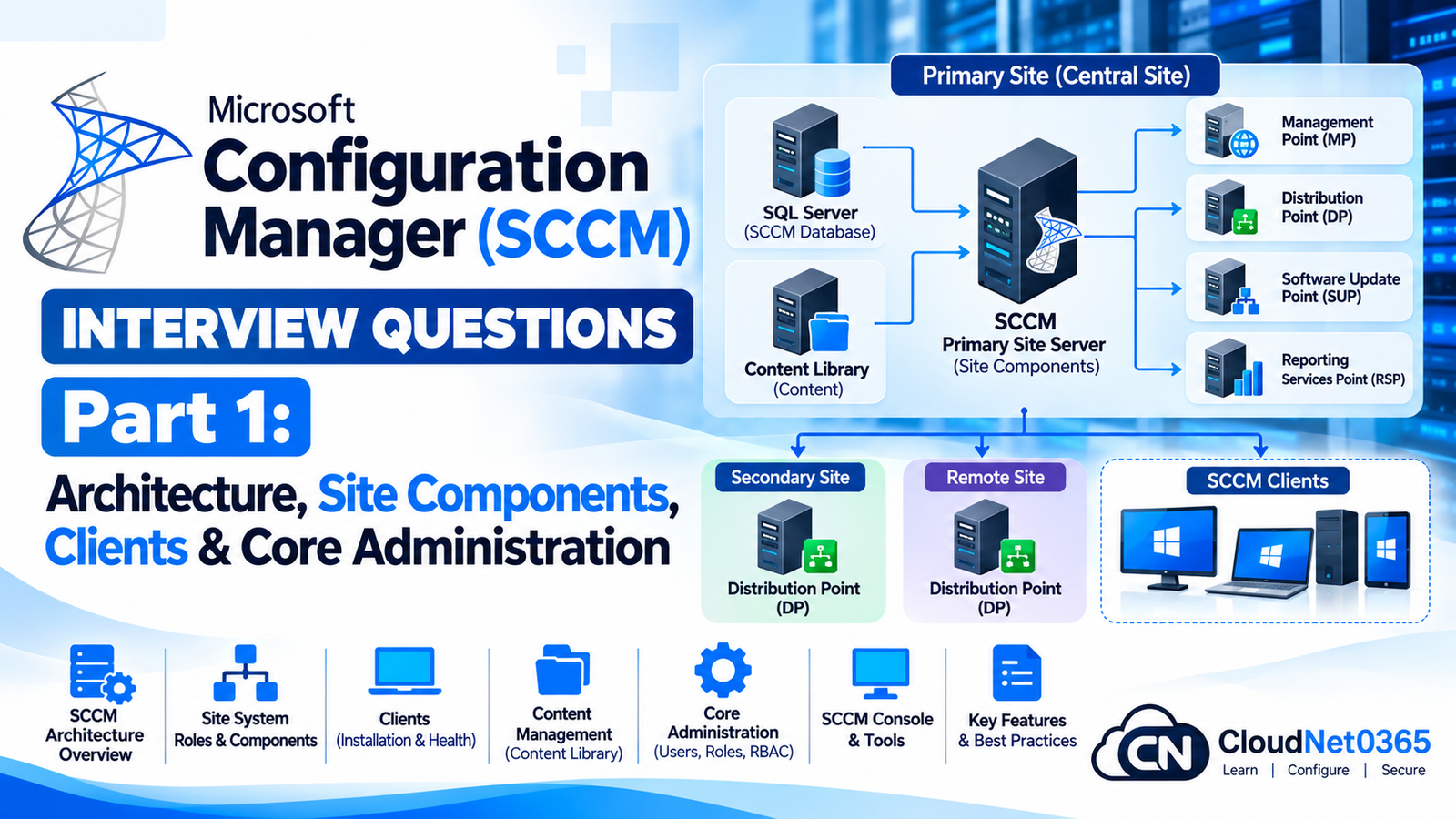
Microsoft Configuration Manager, historically known as System Center Configuration Manager (SCCM) and later branded Microsoft Endpoint Configuration Manager, remains an important enterprise endpoint-management platform.
Although Microsoft increasingly promotes cloud-based management through Intune, Configuration Manager continues to be widely used in enterprises for:
- Windows operating-system deployment
- Application deployment
- Software updates
- Hardware and software inventory
- Compliance settings
- Device collections
- Remote administration
- On-premises infrastructure management
- Co-management
- Cloud attach
For a senior System Administrator or Endpoint Administrator, knowing where to click in the Configuration Manager console is not enough.
You should understand:
- Site architecture
- Site hierarchy
- Management points
- Distribution points
- Software update points
- Database architecture
- Boundaries and boundary groups
- Client installation
- Discovery
- Collections
- Policies
- Content distribution
- Client communication
- Troubleshooting methodology
This part establishes the foundation. Later parts will move into application deployment, operating-system deployment, software updates, advanced troubleshooting and production scenarios.
Configuration Manager Architecture
Q1. What is Microsoft Configuration Manager?
Microsoft Configuration Manager is an enterprise endpoint-management platform used to manage devices, applications, operating systems, updates, compliance and inventory.
It can manage:
- Windows clients
- Windows servers
- Applications
- Software updates
- Operating-system deployments
- Hardware inventory
- Software inventory
- Compliance settings
It can operate as an on-premises management platform and can integrate with Microsoft cloud services.
Q2. What is the difference between SCCM, MECM and Microsoft Configuration Manager?
These names largely refer to different branding generations of the same Microsoft product family.
Historically:
SMS
 ↓
SCCM
 ↓
System Center Configuration Manager
 ↓
Microsoft Endpoint Configuration Manager
 ↓
Microsoft Configuration Manager
In technical discussions, administrators still commonly use SCCM and MECM.
Therefore, if an interviewer says:
“How would you troubleshoot an SCCM client?”
they are referring to Configuration Manager.
Q3. What is a Configuration Manager site?
A site is a logical management boundary within Configuration Manager.
A site contains:
- Site database
- Site server
- Site system roles
- Configuration Manager clients
- Configuration data
- Policies
- Administrative configuration
The site provides the infrastructure through which Configuration Manager manages clients.
Q4. What are the main Configuration Manager site types?
The major site types are:
Central Administration Site — CAS
Used in very large Configuration Manager hierarchies.
Primary Site
Provides the main management functionality for clients.
Secondary Site
Used in specific distributed environments, particularly where network conditions or client scale justify additional site infrastructure.
For many organizations, a single primary site is sufficient.
Q5. What is a Central Administration Site?
A Central Administration Site, or CAS, is the top-level site in a multi-primary-site hierarchy.
It provides centralized administration and reporting across multiple primary sites.
Conceptually:
              CAS
               │
       ┌───────┴───────┐
       │               │
 Primary Site A   Primary Site B
       │               │
   Clients          Clients
A CAS is not normally required for a typical single-site enterprise.
For a smaller or moderately sized environment, introducing unnecessary hierarchy complexity is undesirable.
Q6. What is a Primary Site?
A Primary Site is the main Configuration Manager site that manages clients and site-wide operations.
It contains:
- Site database
- Management Point
- Software Update Point where configured
- Distribution Points where configured
- Client management
- Collections
- Policies
- Discovery
- Application and package administration
A primary site is the central component of many Configuration Manager deployments.
Q7. What is a Secondary Site?
A Secondary Site is an additional site installed under a primary site.
It can be useful in specific scenarios involving:
- Large numbers of clients
- Distributed locations
- Limited WAN bandwidth
- Content distribution
- Client communication optimization
However, a secondary site should not be deployed simply because an organization has multiple offices.
Microsoft recommends evaluating whether a distribution point, peer caching or other content-management architecture can solve the problem before introducing a secondary site.
Q8. When would you choose a single primary site instead of multiple primary sites?
I would prefer a simpler hierarchy whenever one primary site can adequately support:
- Number of clients
- Network architecture
- Database workload
- Administrative requirements
- Distribution requirements
For example:
Corporate Network
       │
       ▼
Primary Site
   │       │
   ▼       ▼
 MP       DPs
   │       │
   └── Clients
A simple architecture is easier to:
- Maintain
- Troubleshoot
- Upgrade
- Back up
- Monitor
The goal should be to use the simplest architecture that meets the organization’s requirements.
Site System Roles
Q9. What is a Site System Role?
A site system role is a specific Configuration Manager service/function installed on a Windows Server.
Examples include:
- Management Point
- Distribution Point
- Software Update Point
- Reporting Services Point
- State Migration Point
- Application Catalog roles in older architectures
- Service Connection Point
Different roles provide different functionality.
Q10. What is a Management Point?
The Management Point, or MP, is one of the most important Configuration Manager roles.
It provides the communication path between Configuration Manager clients and the Configuration Manager site.
Clients use the Management Point for functions such as:
- Obtaining policy
- Sending client information
- Reporting state
- Locating management services
- Communicating with the Configuration Manager infrastructure
Conceptually:
                Configuration Manager
                       │
                       ▼
                Management Point
                       │
          ┌────────────┼────────────┐
          ▼            ▼            ▼
       Client A     Client B     Client C
Q11. What is a Distribution Point?
A Distribution Point, or DP, stores Configuration Manager content so that clients can download it.
Content can include:
- Applications
- Packages
- Software-update content
- Operating-system deployment content
- Boot images
- Operating-system images
The DP helps prevent every client from downloading content directly from the central site infrastructure.
Q12. What is the difference between a Management Point and a Distribution Point?
This is a very common interview question.
| Role | Primary Function |
|---|---|
| Management Point | Client communication and policy |
| Distribution Point | Content storage and delivery |
Example:
Client
  │
  ├──── Request policy ────► Management Point
  │
  └──── Download content ──► Distribution Point
Remember:
MP = Management communication
DP = Content distribution
Q13. What is a Software Update Point?
A Software Update Point, or SUP, integrates Configuration Manager with Windows Server Update Services (WSUS) for software-update management.
It is used for:
- Software-update synchronization
- Update metadata
- Update classification
- Update deployment
- Compliance evaluation
Conceptually:
Microsoft Update
       ↓
      WSUS
       ↓
      SUP
       ↓
Configuration Manager
       ↓
Clients
The SUP is therefore a critical component of Configuration Manager software-update management.
Q14. What is the Service Connection Point?
The Service Connection Point connects the Configuration Manager environment with Microsoft cloud services.
Depending on the configuration, it can support:
- Cloud attach
- Updates and servicing
- Upload of diagnostic and usage information
- Cloud service integration
It is generally configured in online or offline mode depending on the environment’s requirements.
Q15. What is the Reporting Services Point?
The Reporting Services Point integrates Configuration Manager with SQL Server Reporting Services (SSRS).
It enables Configuration Manager reporting such as:
- Hardware inventory
- Software inventory
- Application deployment
- Update compliance
- Client status
- Collection information
The underlying data is stored in the Configuration Manager database and exposed through reporting.
Configuration Manager Database
Q16. What database does Configuration Manager use?
Configuration Manager uses Microsoft SQL Server for its site database.
The database stores information such as:
- Devices
- Users
- Collections
- Deployments
- Policies
- Inventory
- Site configuration
- Application information
- Software-update information
Q17. Why is SQL Server important to Configuration Manager?
Configuration Manager is heavily dependent on its SQL database.
Problems with SQL can affect:
- Console operations
- Collection evaluation
- Reporting
- Application deployments
- Inventory
- Site processing
- Policy generation
Therefore, database health is a critical part of Configuration Manager administration.
The exact impact depends on the duration and component involved.
Existing clients may continue functioning with previously received policies for some time, but server-side operations can be affected significantly.
Potential symptoms include:
- Console errors
- Collection processing failures
- Delayed policy processing
- Reporting failures
- Deployment processing issues
- Site component errors
A senior administrator should investigate:
- SQL Server service
- SQL connectivity
- Database state
- Disk space
- SQL error logs
- Configuration Manager component status
Do not immediately reinstall Configuration Manager.
Boundaries and Boundary Groups
Q19. What is a boundary in Configuration Manager?
A boundary represents a network or Active Directory location that Configuration Manager can use to associate clients with a location.
Common boundary types include:
- Active Directory site
- IP subnet
- IP address range
- IPv6 prefix
- VPN
Boundaries help Configuration Manager determine where a client belongs from a management perspective.
Q20. What is a boundary group?
A boundary group groups one or more boundaries together and associates them with site systems.
A boundary group can be used to determine:
- Assigned site
- Management points
- Distribution points
- Content locations
For example:
Branch Office A
      │
      ▼
Boundary
      │
      ▼
Boundary Group
      │
 ┌────┴────┐
 ▼         ▼
MP        DP
Q21. Why are boundary groups important?
Boundary groups help ensure clients use appropriate infrastructure.
For example:
A branch office should ideally download a 5 GB application from a local DP rather than across a WAN link from headquarters.
Correct design:
Branch Client
     ↓
Branch Boundary
     ↓
Branch Boundary Group
     ↓
Local DP
Poor design:
Branch Client
     ↓
WAN
     ↓
Headquarters DP
     ↓
5 GB Download
Boundary groups are therefore important for both performance and WAN optimization.
Q22. What happens if a client is not associated with the correct boundary group?
Potential symptoms include:
- Wrong Distribution Point selected
- Slow application downloads
- WAN traffic
- Incorrect Management Point selection
- Client assignment problems
- Content-location errors
When troubleshooting a branch deployment issue, boundary configuration should be one of the first areas checked.
Q23. Can a boundary group contain multiple boundaries?
Yes.
For example:
Boundary Group: Delhi-Office

 ├── 10.10.10.0/24
 ├── 10.10.11.0/24
 └── VPN Range
The boundaries can then be associated with appropriate site systems.
Q24. Can one boundary belong to multiple boundary groups?
Yes.
This can be useful when designing fallback and content-location behavior.
However, overlapping boundary-group design should be deliberate.
Poorly designed overlaps can make troubleshooting more difficult.
Discovery
Q25. What is Discovery in Configuration Manager?
Discovery identifies users, computers, groups and other resources that can be imported into Configuration Manager.
Discovery helps Configuration Manager learn:
“What resources exist in my environment?”
Common discovery methods include:
- Active Directory Forest Discovery
- Active Directory Group Discovery
- Active Directory System Discovery
- Active Directory User Discovery
- Heartbeat Discovery
- Network Discovery
Q26. What is Active Directory System Discovery?
Active Directory System Discovery discovers computer objects from Active Directory.
It can provide information such as:
- Computer name
- Operating system
- Active Directory location
- Organizational unit information
- Other discovery-related properties
It is commonly used to populate Configuration Manager with Windows computer resources.
Q27. What is Active Directory User Discovery?
Active Directory User Discovery discovers user accounts from Active Directory.
It can populate Configuration Manager with:
- User accounts
- User properties
- Organizational information
- Group-related information depending on configuration
This can be useful for user-targeted deployments.
Q28. What is Active Directory Group Discovery?
Active Directory Group Discovery discovers security groups and their membership.
It can be used to discover:
- AD groups
- Group members
- Group relationships
This is particularly useful when collections and deployments are based on Active Directory groups.
Q29. What is Heartbeat Discovery?
Heartbeat Discovery is a client-based discovery method.
Configuration Manager clients periodically send discovery data to the site.
This can help:
- Keep device records current
- Maintain client information
- Trigger discovery-data updates
It is different from Active Directory System Discovery because it relies on the Configuration Manager client.
Collections
Q30. What is a collection in Configuration Manager?
A collection is a logical grouping of resources.
Resources can include:
- Computers
- Users
- User groups
- Devices
Collections are fundamental because many Configuration Manager actions are targeted to collections.
Examples:
All Windows 11 Devices
Finance Computers
HR Users
Pilot Devices
Servers
Laptops
Q31. What is the difference between a device collection and a user collection?
Device Collection
Contains computer/device resources.
Useful for:
- Software deployment
- OS deployment
- Configuration
- Update deployment
User Collection
Contains user resources.
Useful for:
- User-targeted applications
- User-based deployments
- User-specific policies
The target type should match the deployment requirement.
Q32. What is a limiting collection?
A limiting collection defines the scope from which a collection can draw its members.
For example:
All Systems
     ↓
Limiting Collection
     ↓
Windows 11 Devices
A collection cannot contain members outside the scope allowed by its limiting collection.
Q33. What is a direct membership collection?
Direct membership means an administrator manually adds resources to a collection.
Example:
Pilot Devices
 ├── PC001
 ├── PC002
 └── PC003
This is useful for:
- Small pilot groups
- Testing
- Temporary deployment groups
However, manually maintaining thousands of devices is inefficient.
Q34. What is a query-based collection?
A query-based collection dynamically identifies resources based on criteria.
For example:
Operating System = Windows 11
or:
Manufacturer = Dell
The collection membership can update automatically as devices meet or stop meeting the query criteria.
Q35. Why should collection design be carefully planned?
Because collections can drive:
- Application deployment
- Software updates
- Configuration
- Operating-system deployment
- Security policies
A badly designed collection can therefore cause a large production incident.
For example:
Incorrect Query
      ↓
10,000 devices
      ↓
Application deployed
      ↓
Production outage
For production deployments, collection membership should be predictable and tested.
Configuration Manager Client
Q36. What is the Configuration Manager client?
The Configuration Manager client is software installed on managed devices.
It allows the device to:
- Receive policy
- Evaluate deployments
- Install applications
- Perform inventory
- Report status
- Evaluate compliance
- Communicate with Configuration Manager infrastructure
The client is therefore the endpoint-side component of Configuration Manager.
Q37. What are important Configuration Manager client components?
Important components include:
- CcmExec — Configuration Manager client service
- Software Center
- Client policy engine
- Hardware inventory
- Software inventory
- Application evaluation
- Update management components
The primary client service is:
SMS Agent Host
Service Name: CcmExec
You can check it with:
Get-Service CcmExec
Q38. How do you check whether the Configuration Manager client is installed?
Use:
Get-Service CcmExec
You can also check:
Get-CimInstance Win32_Service -Filter "Name='CcmExec'"
Another useful check is:
Get-CimInstance -Namespace "root\ccm" -ClassName SMS_Client
If the client is installed and functioning, the Configuration Manager WMI namespace and client components should generally be present.
Q39. What is Software Center?
Software Center is the user-facing application installed with the Configuration Manager client.
Users can use it to:
- Install available applications
- View required applications
- Initiate supported actions
- Review deployment status
- Install software updates where configured
- Access available operating-system tasks where applicable
Software Center is therefore the primary end-user interface for many Configuration Manager deployments.
Q40. What is the difference between Required and Available application deployments?
Required
Configuration Manager automatically installs the application according to the deployment schedule and requirements.
Available
The application is offered to the user through Software Center, allowing the user to initiate installation.
Example:
Required
→ Company security agent
→ Automatically installed

Available
→ Optional PDF editor
→ User chooses Install
Client Policy
Q41. How does a Configuration Manager client receive policy?
The client communicates with the Management Point and retrieves policy.
The simplified process is:
Configuration Manager
       ↓
Policy
       ↓
Management Point
       ↓
Client
       ↓
Policy Evaluation
       ↓
Action
For example, if an application is deployed as Required:
Deployment
   ↓
Collection membership
   ↓
Policy
   ↓
Client receives policy
   ↓
Application evaluation
   ↓
Installation
Q42. How do you manually trigger a Configuration Manager policy retrieval?
On the client, you can use the Configuration Manager control-panel applet:
Control Panel → Configuration Manager → Actions
Common client actions include:
- Machine Policy Retrieval & Evaluation Cycle
- User Policy Retrieval & Evaluation Cycle
- Application Deployment Evaluation Cycle
- Hardware Inventory Cycle
- Software Inventory Cycle
- Software Updates Scan Cycle
- Software Updates Deployment Evaluation Cycle
PowerShell/WMI can also be used for automation.
For example:
Invoke-CimMethod `
  -Namespace "root\ccm" `
  -ClassName SMS_Client `
  -MethodName TriggerSchedule `
  -Arguments @{
      sScheduleID = "{00000000-0000-0000-0000-000000000021}"
  }
The exact schedule GUID depends on the client action being triggered, so in production automation I would use documented schedule IDs rather than guessing.
Client Assignment
Q43. What is Configuration Manager client assignment?
Client assignment determines which Configuration Manager site a client belongs to.
This is different from simply selecting a Distribution Point.
For example:
Client
  ↓
Assigned Site
  ↓
Primary Site
A client may use one site for assignment while using specific Management Points and Distribution Points based on its boundary-group configuration.
Q44. What is the difference between site assignment and Management Point selection?
These are not the same thing.
Site assignment
Determines the Configuration Manager site to which the client belongs.
Management Point
Provides client communication and policy.
Distribution Point
Provides content.
Therefore:
Site Assignment
      ↓
Management Point
      ↓
Policy

Boundary Group
      ↓
Distribution Point
      ↓
Content
This distinction is extremely important when troubleshooting.
Client Troubleshooting
Q45. What are the most important Configuration Manager client logs?
Some commonly used logs include:
Policy
PolicyAgent.log

PolicyEvaluator.log
Application deployment
AppIntentEval.log

AppDiscovery.log

AppEnforce.log
Software updates
WUAHandler.log

UpdatesHandler.log

ScanAgent.log
Client location
LocationServices.log
Content
ContentTransferManager.log

DataTransferService.log

CAS.log
Client registration
ClientIDManagerStartup.log
Inventory
InventoryAgent.log
General client installation
ccmsetup.log
A senior administrator should know which log corresponds to which stage of the process.
Q46. Where are Configuration Manager client logs stored?
The standard client log location is:
C:\Windows\CCM\Logs
Some setup-related logs can be located elsewhere, particularly during client installation.
For example:
C:\Windows\ccmsetup\Logs\ccmsetup.log
Q47. A client appears in the Configuration Manager console but does not receive applications. What would you check?
I would troubleshoot the complete deployment path.
Step 1 — Client health
Get-Service CcmExec
Step 2 — Boundary
Check:
- Boundary
- Boundary Group
- Site assignment
Step 3 — Policy
Check:
PolicyAgent.log

PolicyEvaluator.log
Step 4 — Application
Check:
AppIntentEval.log
AppDiscovery.log
AppEnforce.log
Step 5 — Content
Check:
LocationServices.log
ContentTransferManager.log
DataTransferService.log
CAS.log
Step 6 — Detection
Determine whether Configuration Manager believes the application is already installed.
This prevents random troubleshooting.
Client Installation
Q48. What are common methods for installing the Configuration Manager client?
Common methods include:
- Client push
- Manual
ccmsetup - Group Policy-based installation
- Software deployment
- Operating-system deployment
- Logon scripts
- Task sequences
A typical manual installation can use:
ccmsetup.exe /mp:MP01 SMSSITECODE=ABC
The exact command should be adapted to the organization’s site configuration and client-installation architecture.
Q49. What does ccmsetup.exe do?
ccmsetup.exe is the Configuration Manager client installation/bootstrap component.
It:
- Obtains the required client installation files.
- Installs the Configuration Manager client.
- Configures client communication.
- Assigns the client to the appropriate site according to the supplied or discovered configuration.
The main installation log is:
C:\Windows\ccmsetup\Logs\ccmsetup.log
Q50. How would you troubleshoot a Configuration Manager client that is completely unhealthy?
I would use a layered troubleshooting approach.
1. Service
Get-Service CcmExec
2. Client registration
Review:
ClientIDManagerStartup.log
3. Management Point
Review:
LocationServices.log
4. Policy
Review:
PolicyAgent.log

PolicyEvaluator.log
5. Application
Review:
AppDiscovery.log

AppEnforce.log
6. Content
Review:
ContentTransferManager.log
DataTransferService.log
CAS.log
7. WMI
Check whether the Configuration Manager WMI namespace is healthy.
8. Repair
If the client installation is corrupted, consider:
ccmrepair.exe
9. Reinstall
If repair does not resolve the issue, perform a controlled client uninstall/reinstallation.
The important senior-level principle is:
Do not reinstall the client first. Identify whether the failure is service, registration, location, policy, application, content, WMI or network related.
Real-World Scenario
Scenario: Branch Office Clients Cannot Install a Required Application
Imagine an organization has:
- Headquarters
- 20 branch offices
- One Distribution Point at each major branch
Users at one branch report:
“The application deployment is stuck at Downloading.”
I would troubleshoot in this order:
1. Confirm deployment
Is the device actually a member of the target collection?
2. Confirm policy
Did the client receive the deployment?
Check:
PolicyAgent.log
PolicyEvaluator.log
3. Check boundary
Is the client associated with the correct boundary?
4. Check boundary group
Does the boundary group have the expected local DP?
5. Check content
Is the application content distributed to that DP?
6. Check content location
Review:
LocationServices.log
7. Check download
Review:
ContentTransferManager.log

DataTransferService.log

CAS.log
8. Check the DP
Verify:
- DP is online
- Content status is successful
- Required content exists
- IIS/DP components are healthy
The most likely architectural mistake in such a scenario is not necessarily the application itself. It could be:
Incorrect boundary-group or content-distribution configuration.
Senior Architecture Scenario
Scenario: Design Configuration Manager for 8,000 Windows Devices
Suppose an organization has:
- 8,000 Windows devices
- Headquarters
- 15 branch offices
- Limited WAN bandwidth
- Existing Active Directory
- Existing SQL infrastructure
- Remote users
- Plans to adopt Intune gradually
I would design the environment around the actual requirements rather than automatically creating multiple sites.
A possible architecture:
                 Configuration Manager
                         │
                   Primary Site
                         │
              ┌──────────┴──────────┐
              │                     │
          Management Point      SQL Database
              │
       ┌──────┼────────┐
       │      │        │
       ▼      ▼        ▼
      DP     DP       DP
     HQ    Branch1   Branch2
       │      │        │
       └──────┴────────┘
              │
            Clients
Then integrate with Microsoft cloud services:
             Microsoft Entra ID
                    │
             ┌──────┴──────┐
             │             │
          Intune     Configuration Manager
             │             │
             └──────┬──────┘
                    │
               Co-management
I would avoid introducing a CAS or secondary sites unless there is a documented requirement for them.
Quick Revision
Core Architecture
Configuration Manager
        │
        ▼
   Primary Site
        │
 ┌──────┼───────────────┐
 ▼      ▼               ▼
 MP     DP              SUP
 │      │               │
 ▼      ▼               ▼
Policy Content        Updates
Important Roles
| Role | Function |
|---|---|
| Primary Site | Core site management |
| CAS | Central hierarchy administration |
| Secondary Site | Distributed site infrastructure |
| Management Point | Client communication/policy |
| Distribution Point | Content delivery |
| Software Update Point | WSUS/update integration |
| Reporting Services Point | Reporting |
| Service Connection Point | Cloud/service integration |
Boundaries
Boundaries identify network/location resources.
Boundary Groups
Boundary groups associate boundaries with:
- Management Points
- Distribution Points
- Site assignment
Discovery
Discovery identifies:
- Computers
- Users
- Groups
- Other resources
Collections
Collections group resources for:
- Applications
- Updates
- Configuration
- Operating-system deployment
Client
Main service:
CcmExec
Check:
Get-Service CcmExec
Client Logs
C:\Windows\CCM\Logs
Important logs:
PolicyAgent.log
PolicyEvaluator.log
LocationServices.log
AppDiscovery.log
AppEnforce.log
AppIntentEval.log
ContentTransferManager.log
DataTransferService.log
CAS.log
WUAHandler.log
ClientIDManagerStartup.log
Exam Answer Summary
1. What is Configuration Manager?
Microsoft Configuration Manager is an enterprise endpoint-management platform used for applications, software updates, operating-system deployment, inventory, compliance and device management.
2. What is a Management Point?
The Management Point provides client communication, including policy and state communication.
3. What is a Distribution Point?
A Distribution Point stores and delivers Configuration Manager content to clients.
4. What is a Software Update Point?
A Software Update Point integrates Configuration Manager with WSUS for software-update management.
5. What is a boundary?
A boundary represents a network or Active Directory location used by Configuration Manager for client location and management decisions.
6. What is a boundary group?
A boundary group groups boundaries and associates them with Configuration Manager infrastructure such as Distribution Points and Management Points.
7. What is a collection?
A collection is a logical group of users or devices used to target deployments and administrative actions.
8. What is the Configuration Manager client service?
CcmExec, the SMS Agent Host service.
9. Where are client logs stored?
Normally under C:\Windows\CCM\Logs.
10. What is Software Center?
Software Center is the end-user interface for applications and other available Configuration Manager deployments.
11. What is the difference between MP and DP?
MP handles client management communication and policy; DP stores and delivers content.
12. What is the difference between site assignment and DP selection?
Site assignment determines the Configuration Manager site to which the client belongs, while boundary groups help determine appropriate management points and content locations.
Senior Interview Tip
If the interviewer asks:
“Explain Configuration Manager architecture.”
Don’t simply list:
“Primary site, DP, MP, SUP.”
Explain the flow:
“The primary site provides the core Configuration Manager management infrastructure and uses SQL Server for the site database. Clients communicate with Management Points for policy and management information. Distribution Points provide application, update and operating-system content. Software Update Points integrate WSUS with Configuration Manager for update management. Boundaries and boundary groups help determine site assignment, management infrastructure and content locations. Collections are then used to target deployments to users or devices.”
That answer demonstrates that you understand how the components interact, not just what each component is.
Progress
Microsoft Configuration Manager (SCCM/MECM)
Part 1 — Architecture, Site Components, Clients & Core Administration
Covered:
- Configuration Manager fundamentals
- SCCM/MECM terminology
- Sites
- CAS
- Primary Site
- Secondary Site
- Site System Roles
- Management Point
- Distribution Point
- Software Update Point
- Service Connection Point
- Reporting Services Point
- SQL Server
- Boundaries
- Boundary Groups
- Discovery
- Collections
- Device/User Collections
- Limiting Collections
- Direct Membership
- Query-Based Collections
- Configuration Manager Client
- CcmExec
- Software Center
- Client Policy
- Client Assignment
- Client Installation
- Client Logs
- Core Client Troubleshooting
- Enterprise Architecture
Next Part
Microsoft Configuration Manager (SCCM) Interview Questions – Part 2: Application Deployment, Content Distribution & Software Center
The next part will focus on:
- Applications vs Packages
- Deployment Types
- Detection Methods
- Requirements
- Dependencies
- Supersedence
- User vs Device deployments
- Required vs Available
- Content Distribution
- DP Groups
- Pull Distribution Points
- BranchCache
- Delivery Optimization interaction
- Content validation
- Application evaluation
- Software Center troubleshooting
- Application deployment logs
- Failed application deployments
- Production application-deployment scenarios
Previously covered Intune application-management concepts will not simply be copied into SCCM. The focus will be on Configuration Manager-specific architecture, behavior and troubleshooting.