
🚀 Default VLAN vs Native VLAN – Key Differences Explained (With Examples & Configurations)
🔥 Introduction (Problem – Scenario)
You configured VLANs correctly… but still facing:
- ❌ Devices not communicating across switches
- ❌ Trunk links behaving strangely
- ❌ Security risks without clear reason
👉 The issue often comes down to one confusion:
Default VLAN vs Native VLAN
Most beginners—and even intermediate engineers—mix these up.
📘 Quick Answer
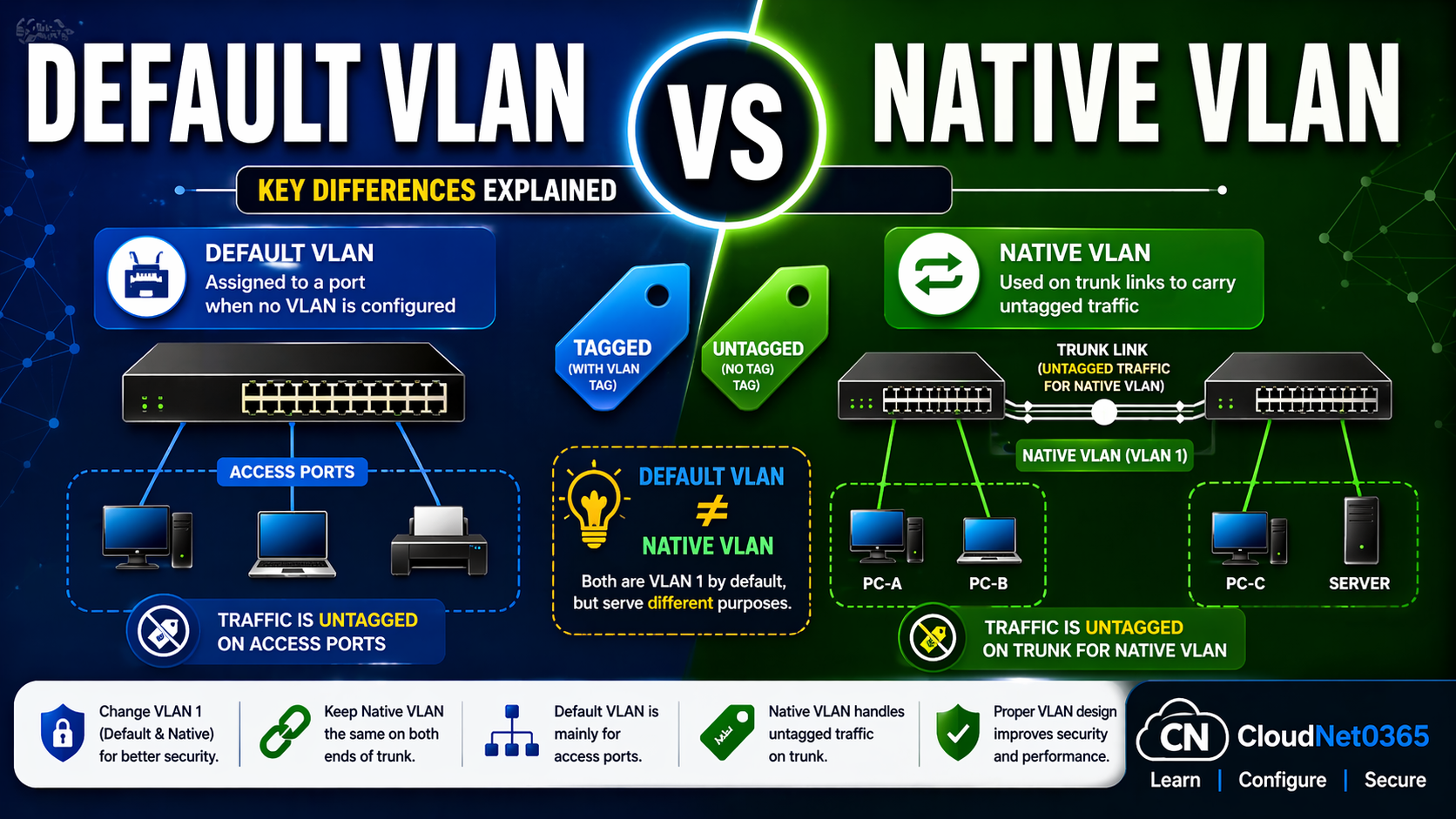
Default VLAN is the VLAN where all ports belong by default (VLAN 1).
Native VLAN is the VLAN that carries untagged traffic on trunk ports.
👉 They may have the same ID (VLAN 1), but their purpose is completely different.
🖼️ Visual Understanding
Here below is the difference between Default VLAN vs Native VLAN (Quick Visual Guide).
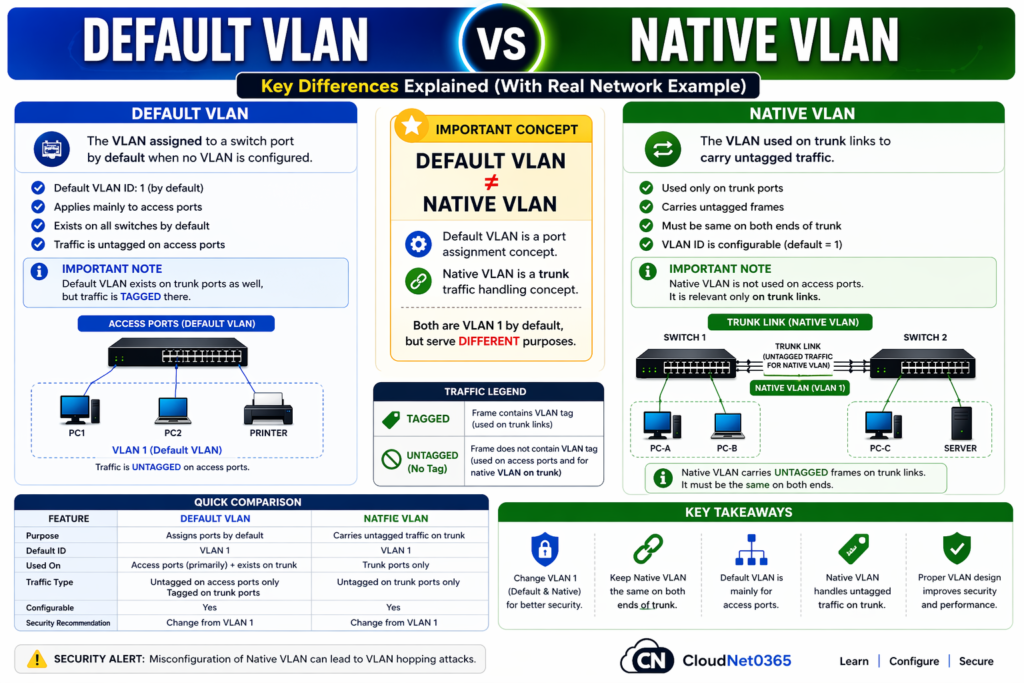
⚠ Misconfiguration of Native VLAN can lead to VLAN hopping attacks.
🔹 What is Default VLAN?
📌 Definition
- The VLAN that all switch ports belong to by default
- Exists automatically on every switch
✔ Key Characteristics
- It is Always VLAN 1
- Exists on every switch
- All ports are initially part of it
- Used for initial communication
- Should NOT be used in production
- Cannot be deleted
⚠️ Best Practice
❌ Never use Default VLAN for production traffic
🔹 What is Native VLAN?
📌 Definition
- The VLAN that carries UNTAGGED traffic on trunk links
✔ Key Characteristics
- Works only on trunk ports
- By Default it is also VLAN 1 (but can be changed)
- Handles frames without VLAN tags
- Can be changed for security reasons
🔬 How It Works (Packet Flow Explanation)
🧠 Scenario:
- PC in VLAN 10 sends traffic
- Switch sends traffic over trunk
👉 What happens?
- Tagged VLAN → travels with VLAN ID
- Untagged traffic → goes via Native VLAN
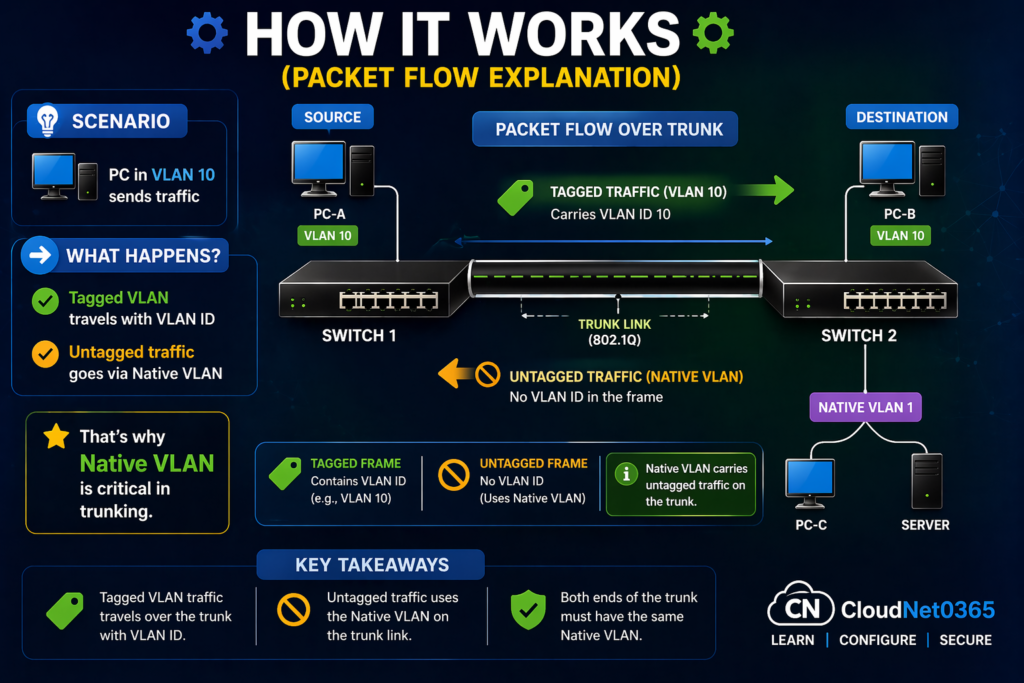
👉 That’s why Native VLAN is critical in trunking.
📊 Difference between Default VLAN vs Native VLAN
Here below is a detailed comparison between Default VLAN vs Native VLAN.
| Feature | ⚪ Default VLAN | 🔵 Native VLAN |
|---|---|---|
| Purpose | Default port assignment | Handles untagged traffic |
| Where Used | Access ports | Trunk ports |
| VLAN ID | Always VLAN 1 | Default 1 (changeable) |
| Function | Basic communication | Frame tagging behavior |
| Security | ❌ Low | ⚠️ Risk if misconfigured |
| Best Practice | Avoid usage | Change from VLAN 1 |
⚠️ Why People Get Confused
👉 Because by default:
- Default VLAN = VLAN 1
- Native VLAN = VLAN 1
👉 So they look the same initially… but their roles are completely different
💻 Configuration Example (Cisco)
🔧 Change Native VLAN
interface g0/1
switchport mode trunk
switchport trunk native vlan 99
👉 Now:
- Untagged traffic → VLAN 99
- VLAN 1 no longer used
🌍 Real-World Example
🏢 Office Network
- VLAN 10 → Employees
- VLAN 20 → Voice
- VLAN 99 → Native VLAN
👉 Result:
- Clean traffic separation
- Better security
- Stable trunk communication
⚠️ Common Mistakes (Avoid This)
- ❌ Using VLAN 1 everywhere
- ❌ Not changing native VLAN
- ❌ Native VLAN mismatch between switches
- ❌ Mixing default and native VLAN concepts
🔗 Internal Linking (SEO Boost)
👉 Continue learning on CloudNet0365:
- Types of VLAN Explained
- VLAN Tagging (802.1Q)
- VLAN Security (VLAN Hopping)
- VLAN Troubleshooting Guide
👉 One can also refer to Default VLAN vs Native VLAN – Explained by Geeksforgeeks
❓ FAQs
1. Is Default VLAN same as Native VLAN?
👉 No — They are different and serves different purpose.
2. Can Native VLAN be changed?
👉 Yes it can be changed and also recommended for security purpose.
3. Why is Native VLAN important?
👉 It is important because it handles untagged traffic in trunk links.
4. Should I use VLAN 1?
👉No and it’s better to avoid in production environment.
✅ Conclusion
👉 Default VLAN = default port membership
👉 Native VLAN = untagged traffic handler
Understanding this difference is critical for real-world networking.