
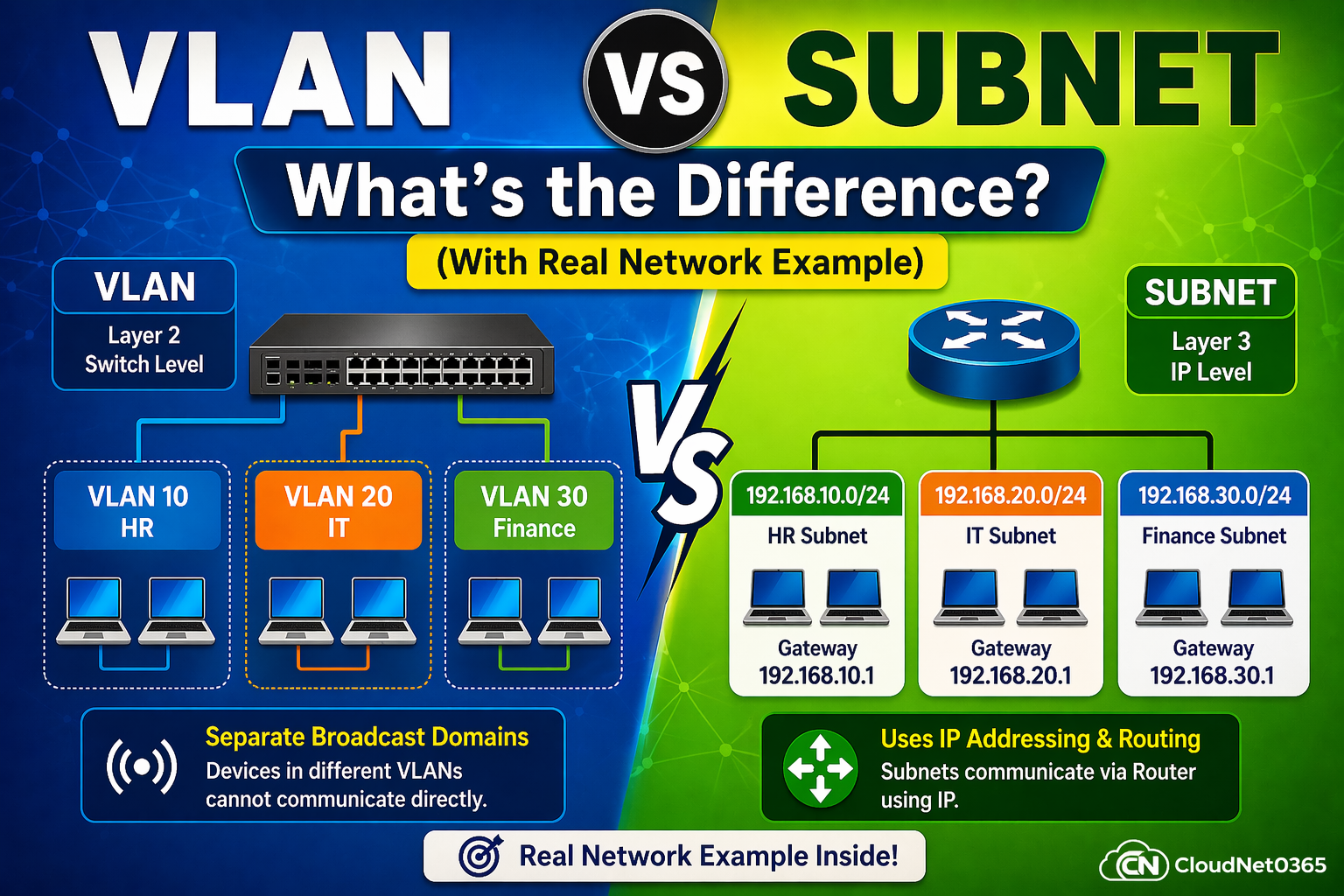
🌐 VLAN vs Subnet – What’s the Difference? (With Real Network Example)
🚀 Introduction (Real Problem You Face Daily)
You created VLANs… but devices still can’t communicate.
You configured IP addresses… but network is still broken.
👉 Sound familiar?
That’s because many admins mix up VLAN vs Subnet.
- VLAN controls network separation
- Subnet controls IP communication
🔥 If you don’t understand this properly, your network will fail — even if configs look correct.
Many beginners and even working professionals get confused between VLAN and Subnet, because both are used to divide networks.
👉 Common questions include:
- Are VLAN and Subnet the same?
- When should I use VLAN vs Subnet?
- Do they work together or separately?
👉 This confusion can lead to:
- Poor network design
- Communication issues
- Security risks
👉 In real environments, misunderstanding VLAN and Subnet can break network connectivity completely.
This guide will clear confusion completely and you will get to know the exact difference between VLAN and Subnet with real examples, visuals, and practical configurations.
📊 Visual Understanding (Must See)
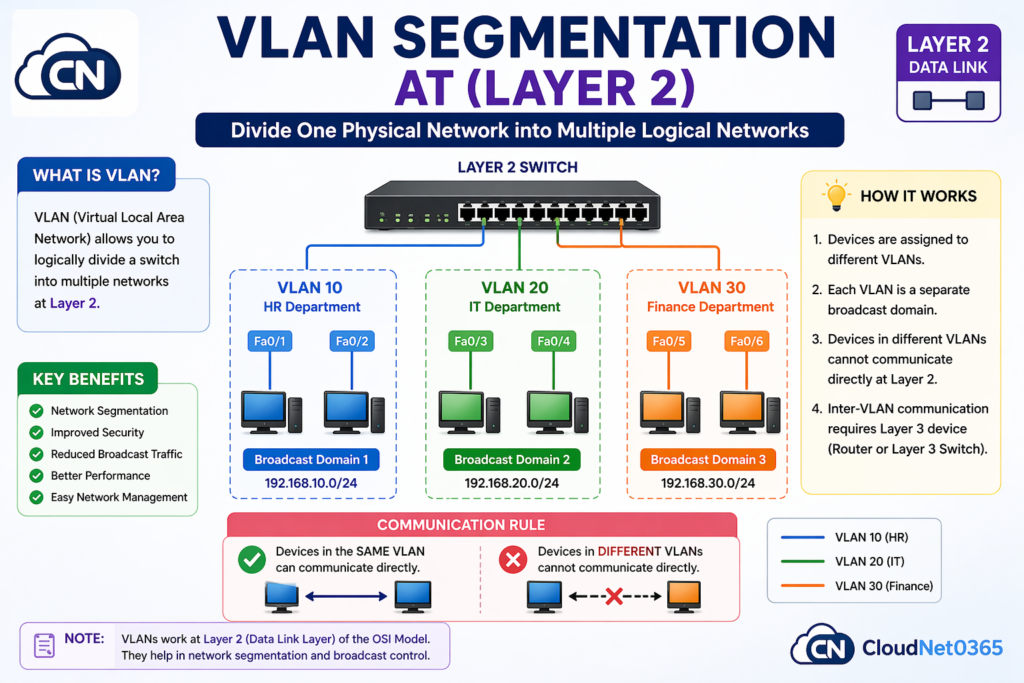
🧩 VLAN Segmentation (Layer 2)
Here below is a graphical image of VLAN segmentation, which happens at Layer 2.
One can quickly have a look on the below pic, and will get to know about What is VLAN ?,how VLAN works ?, it’s benefits and much more.
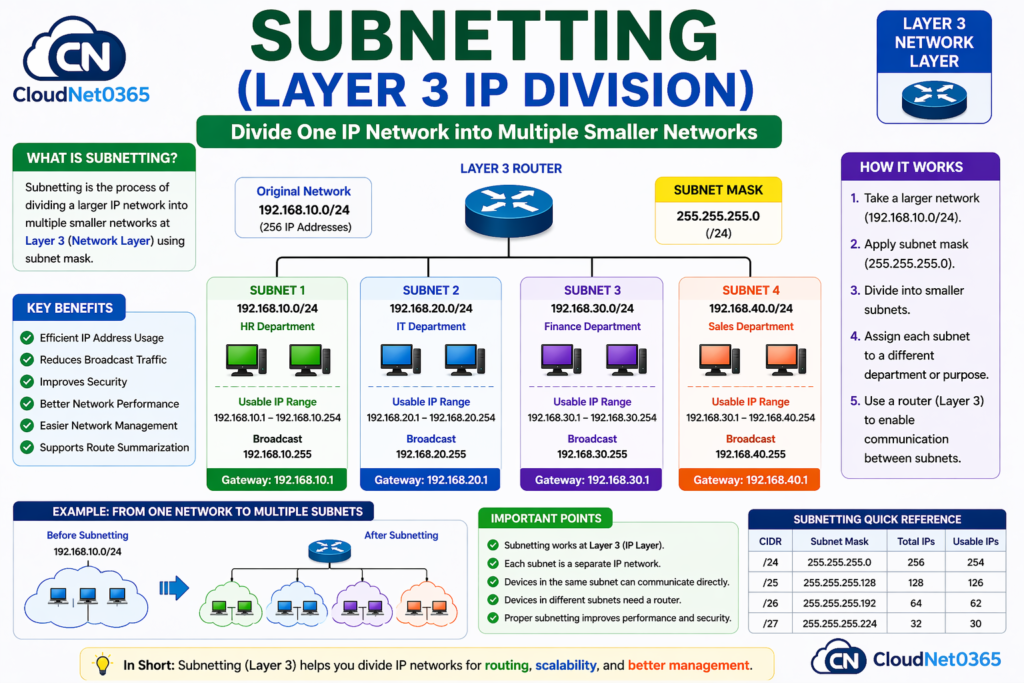
🌐 Subnetting (Layer 3 IP Division)
Here below is a graphical image of subnetting, which explains what is subnet, how it is done, how it works, it’s key benefits and etc.
📘 What is VLAN? (Quick Recap)
A VLAN (Virtual LAN) is used to logically separate devices within the same physical network.
🔹 Key Features:
- Works at Layer 2
- Creates separate broadcast domains
- Improves security & performance
🛠️ Example:
- VLAN 10 → HR
- VLAN 20 → IT
👉 Devices in different VLANs cannot communicate directly
👉 Learn full concept:
➡️ What is VLAN (Complete Guide)
📘 What is Subnet?
A Subnet is used to divide a network into smaller IP-based networks using IP addressing.
🔹 Key Features:
- Works at Layer 3
- Defines IP ranges
- Enables routing
🛠️ Example:
- 192.168.1.0/24 → split into multiple subnets
✔ Helps manage IP addresses efficiently
📊 Difference between VLAN vs Subnet – Practical Comparison
Here below is a detailed comparison between VLAN and Subnet.
| Feature | 🔷 VLAN | 🟢 Subnet |
|---|---|---|
| OSI Layer | Layer 2 (Data Link) | Layer 3 (Network) |
| Based On | Switch Ports / MAC | IP Address |
| Main Purpose | Network Segmentation | IP Organization |
| Isolation Type | Broadcast Domain | IP Network Layer |
| Communication | Needs Routing | Uses Routing |
| Device Required | Managed Switch | Router / Layer 3 Switch |
| Configuration | VLAN ID (e.g., VLAN 10) | IP + Subnet Mask |
| Best Use Case | Department separation (HR, IT) | IP planning & routing |
| 💡 Key Idea | Separates devices | Defines communication |
⚡ VLAN vs Subnet (Quick Comparison)
- VLAN → Logical separation at Layer 2 or Layer 2 segmentation (Switch Level)
- Subnet → Network division at Layer 3 or Layer 2 segmentation (IP Level)
- VLAN uses switch ports
- Subnet uses IP addressing
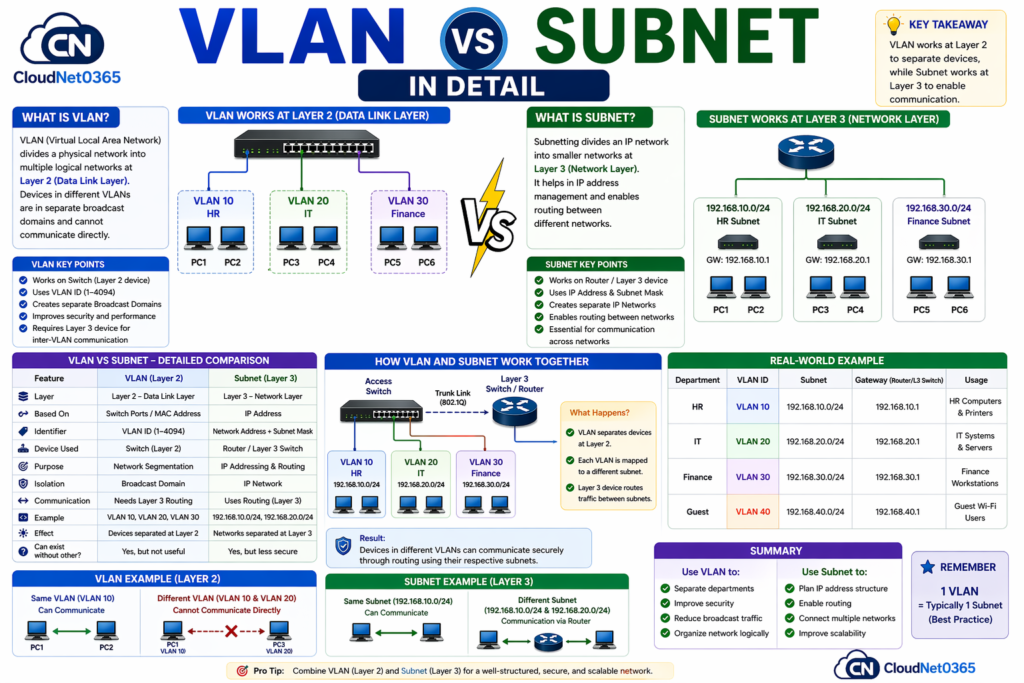
👉 Key Insight: VLAN controls who can communicate, while Subnet controls how communication is addressed.
🔥 Remember: VLAN separates devices physically/logically, Subnet defines how devices communicate using IP — both are required in real networks.
🔧 VLAN Configuration (Cisco Practical Example)
enable
configure terminal

vlan 10
name HR

interface fastethernet 0/1
switchport mode access
switchport access vlan 10
🔧 Subnet + Routing Configuration
interface vlan 10
ip address 192.168.10.1 255.255.255.0
no shutdown
👉 This enables:
- Gateway for VLAN
- Communication across VLANs
🌍 Real-World Network Example (Office Setup)
In a company network:
🏢 Scenario:
| Department | VLAN | Subnet |
|---|---|---|
| HR | VLAN 10 | 192.168.10.0/24 |
| IT | VLAN 20 | 192.168.20.0/24 |
| Finance | VLAN 30 | 192.168.30.0/24 |
🔸 Step 1: VLAN Setup
- HR → VLAN 10
- IT → VLAN 20
🔸 Step 2: Subnet Assignment
- VLAN 10 → 192.168.10.0/24
- VLAN 20 → 192.168.20.0/24
🔄 Packet Flow Explained:
- HR PC → HR PC
✅ Works (same VLAN + subnet) - HR PC → IT PC
❌ Fails (different VLAN) - After Inter-VLAN Routing
✅ Works via router / Layer 3 switch
👉 Result:
- VLAN separates traffic at Layer 2
- Subnet organizes IP addresses at Layer 3
✔ Both work together for efficient networking
🔥 Pro Tip:
💡 Key Insight:
In enterprise networks, each VLAN is typically mapped to a unique subnet for easier routing and management.
In real networks, 1 VLAN = 1 Subnet (best practice)
🔄 How VLAN and Subnet Work Together
One can quickly learn the concept as how How VLAN and Subnet Works Together, by just giving a look on the below graphical picture.
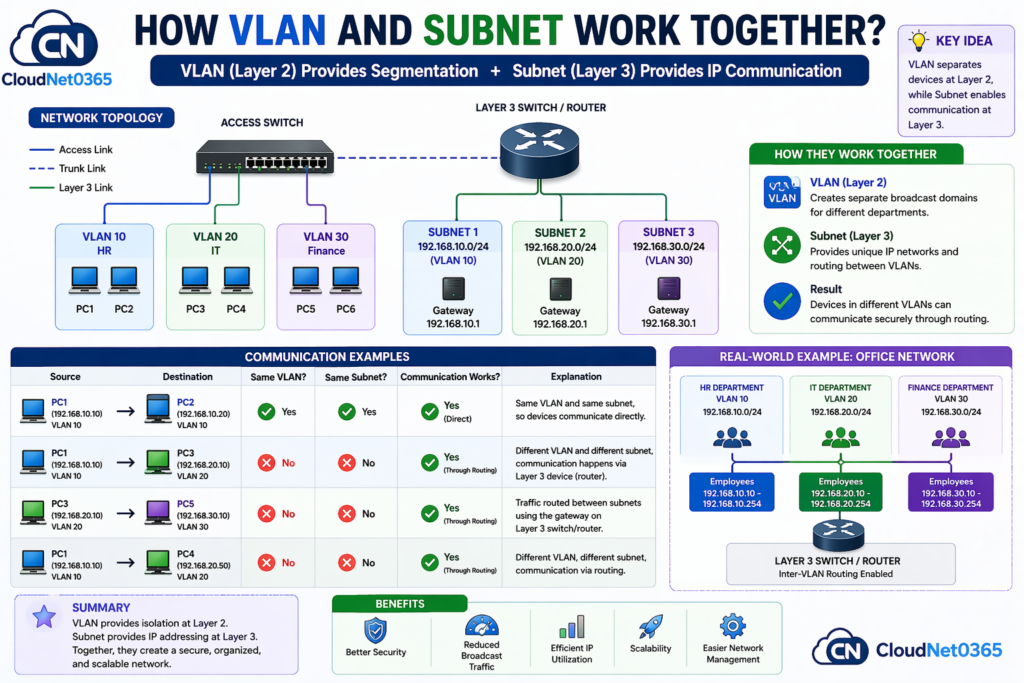
In real networks:
- Each VLAN is assigned a subnet
- Routing is required between VLANs
👉 Example:
- VLAN 10 ↔ VLAN 20
➡ Requires Inter-VLAN Routing
👉 Learn more:
➡️ Inter-VLAN Routing Guide
🎯 When to Use VLAN and Subnet ? (Decision Guide)
👉 Use VLAN when:
- You want to separate departments
- Improve network security
- Control or reduce broadcast traffic
👉 Use Subnet when:
- Managing IP addresses or when designing IP structure
- Designing scalable networks
- Controlling IP allocation
- you need routing
🔥 Best Practice:
👉 Always Use VLAN + Subnet together for a complete network design.
🎯 Interview Questions
- What is the difference between VLAN and Subnet?
- Can VLAN work without subnet?
- Why are both used together?
⚠️ Real Troubleshooting Scenario (VERY IMPORTANT)
❌ Problem:
- Devices have same subnet
- Still cannot ping
🔍 Root Cause:
- Devices are in different VLANs
✅ Solution:
- Check VLAN assignment:
show vlan brief
- Enable routing:
ip routing
⚠️ Warning:
Same subnet across multiple VLANs = Network Disaster
⚠️ Common Mistakes to Avoid
❌ Thinking VLAN and Subnet are the same
👉 They operate on different OSI layers
❌ Using VLAN without subnet planning
👉 Can cause IP conflicts
❌ Ignoring routing
👉 Devices cannot communicate
🔗 Related Topics (Recommended Reading)
👉 Read next on CloudNet0365:
➡️ VLAN Configuration in Cisco Switch
➡️ VLAN Tagging (802.1Q)
➡️ Inter-VLAN Routing Explained
➡️ VLAN Troubleshooting
Also check article on VLAN vs Subnet – Explained by GeeksforGeeks
👉 These will help you move from basic → advanced networking
❓ FAQs
1. Is VLAN same as subnet?
✔ No, VLAN works at Layer 2 and Subnet works at Layer 3.
2. Can VLAN exist without subnet?
✔ Yes, but not useful without IP and not practical in real networks.
3. Can subnet exist without VLAN?
✔ Yes, but less secure
4. Why VLAN cannot communicate directly?
✔ Because VLANs are isolated broadcast domains
5. What is best practice?
✔ 1 VLAN = 1 Subnet
6. Why use VLAN and subnet together?
✔ For complete network segmentation and efficient communication.
🏁 Conclusion
Understanding VLAN vs Subnet is essential for designing modern networks.
If you remember one thing:
🔥 VLAN controls logical separation.
🔥 Subnet controls communication and IP organization.
👉 Both are NOT competitors
👉 They are partners in network design
Master this, and you move from:
- Beginner ❌
to - Network Engineer mindset ✅
👉 Together, they create a secure, scalable, and efficient network architecture