
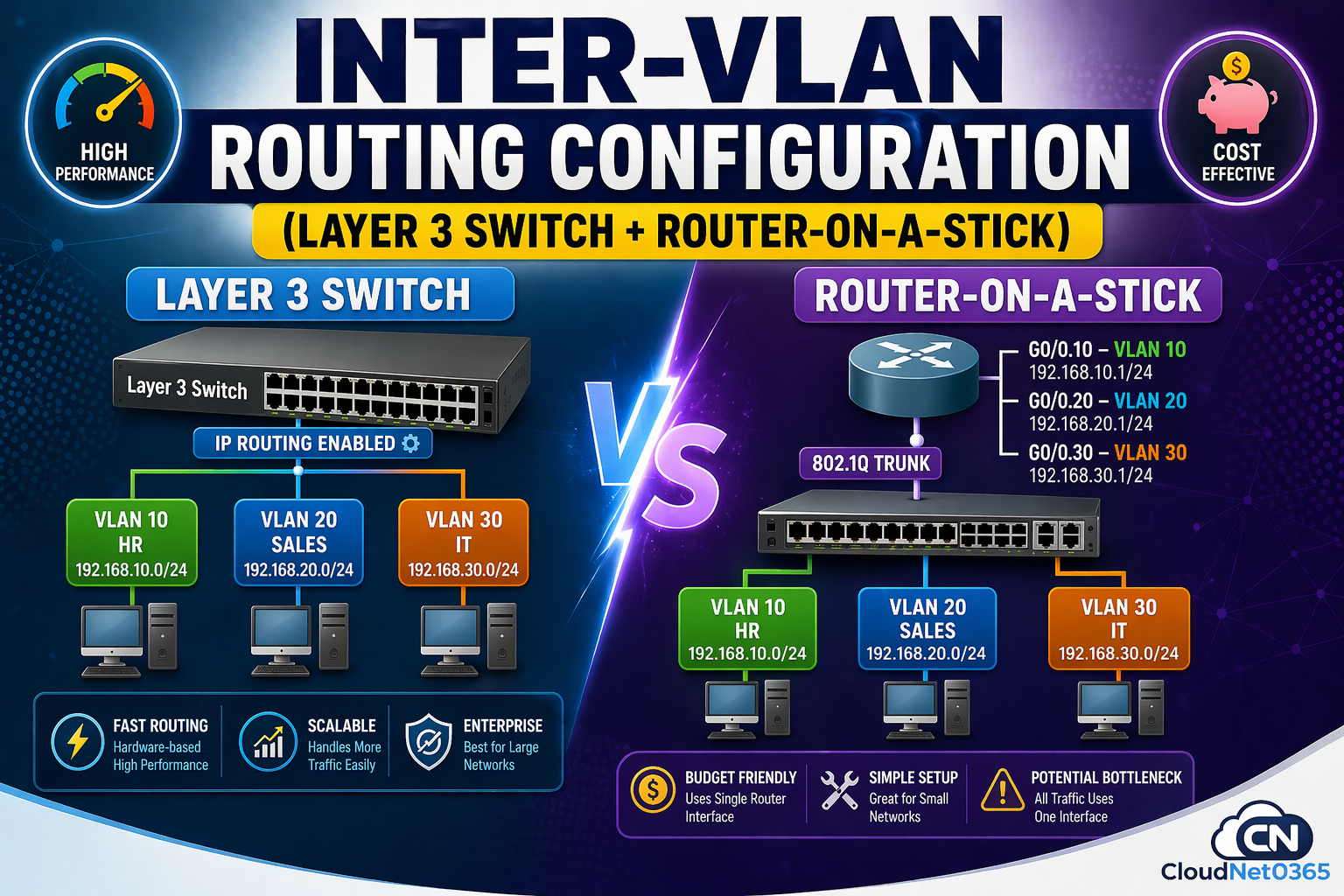
🚀 Inter-VLAN Routing Configuration (Layer 3 Switch + Router-on-a-Stick)
🔥 Introduction (Real Problem You Might Face)
You created VLANs perfectly… but:
- ❌ HR cannot access Sales server
- ❌ IT team cannot manage other VLANs
- ❌ Ping fails between departments
👉 Devices in different VLANs cannot communicate.
👉 Everything looks correct—but communication is blocked.
For example:
- HR (VLAN 10) cannot ping IT (VLAN 20)
👉 This is expected behavior — VLANs are isolated by design.
But in real-world networks:
- Departments need to share resources
- Applications must communicate
- Servers must be accessible
👉 Without proper routing, your network becomes partially unusable.
Root Cause:
VLANs isolate traffic at Layer 2. Without routing, they are completely separate networks.
✔️ Solution: This is where Inter-VLAN Routing becomes essential.
⚡ Inter-VLAN Routing (Quick Answer)
Inter-VLAN Routing allows communication between different VLANs using a Router or a Layer 3 switch.
🧠 What is Inter-VLAN Routing?
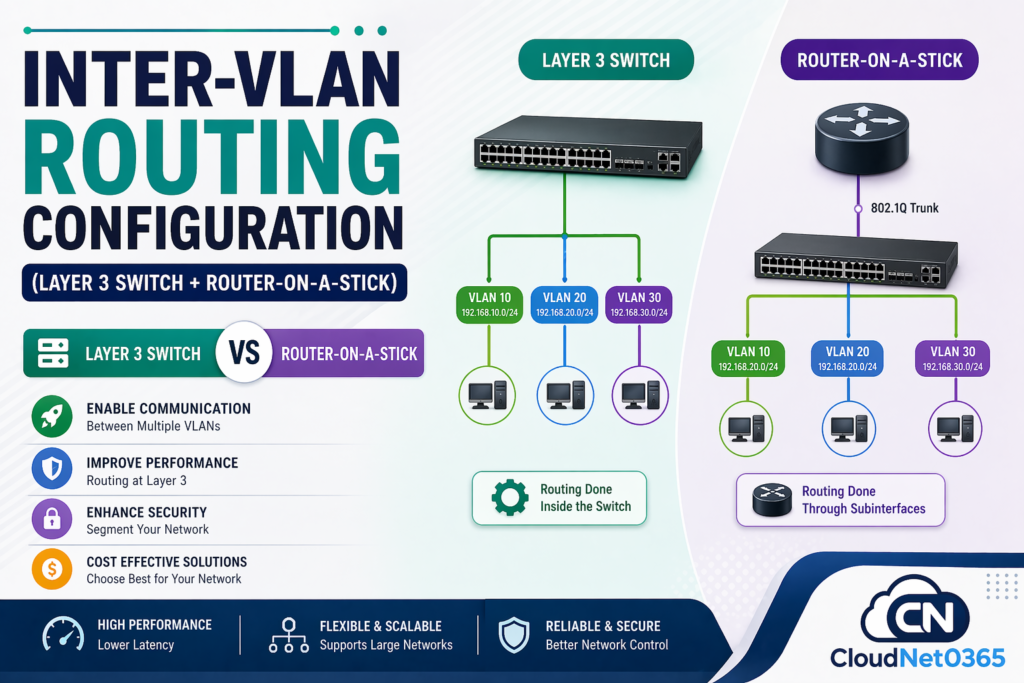
Inter-VLAN Routing is the process of enabling communication between VLANs using a Layer 3 device.
👉 It solves the problem of VLAN isolation by:
- Allowing controlled communication
- Connecting multiple VLAN networks
- Enabling real-world applications
Simple Understanding:
- VLAN = separate network
- Router/L3 Switch = connects networks
👉 💡 Key Insight:
Without Inter-VLAN Routing, VLANs remain isolated and Devices in different VLANs cannot exchange data.
🔄 Why Inter-VLAN Routing is Needed ?
Without routing:
- VLAN 10 → isolated
- VLAN 20 → isolated
👉 With routing:
✔ Devices communicate
✔ Applications work
✔ Network becomes functional
🏢 Real-World Network Scenario
| VLAN | Department | Network |
|---|---|---|
| VLAN 10 | HR | 192.168.10.0/24 |
| VLAN 20 | Sales | 192.168.20.0/24 |
| VLAN 30 | IT | 192.168.30.0/24 |
👉 Requirement:
- All departments should communicate securely
- Maintain VLAN isolation + controlled access
🛠️ Methods of Inter-VLAN Routing
There are two main methods:
- Router-on-a-Stick
- Layer 3 Switch Routing
🛠️ Method 1: Router-on-a-Stick Configuration
📌 What is Router-on-a-Stick?
👉 A single physical router interface is divided into multiple subinterfaces. It uses trunk link (802.1Q tagging).
👉 Best for: Small networks / budget setups and labs
👉 Each subinterface represents a VLAN
⚙️ Configuration (Cisco)
🔹 Switch Configuration
enable
configure terminal

vlan 10
name HR

vlan 20
name SALES

interface fastethernet 0/1
switchport mode access
switchport access vlan 10

interface fastethernet 0/2
switchport mode access
switchport access vlan 20

interface gigabitethernet 0/1
switchport mode trunk
🔹 Router Configuration
enable
configure terminal

interface gigabitethernet 0/0
no shutdown

interface gigabitethernet 0/0.10
encapsulation dot1Q 10
ip address 192.168.10.1 255.255.255.0

interface gigabitethernet 0/0.20
encapsulation dot1Q 20
ip address 192.168.20.1 255.255.255.0
🔄 Packet Flow (VERY IMPORTANT 🔥)
👉 Example: VLAN 10 → VLAN 20
- PC1 sends packet → Switch (untagged)
- Switch adds VLAN tag → sends via trunk
- Router receives → identifies VLAN 10
- Router routes to VLAN 20
- Sends back via same interface
- Switch forwards to PC2
⚠️ Important:
All traffic goes through ONE router interface → possible bottleneck
⚠️ Limitations
- ❌ Single point of failure
- ❌ Bandwidth bottleneck
- ❌ Not scalable
🛠️ Method 2: Layer 3 Switch (SVI Routing)
📌 What is Layer 3 Switching?
👉 Layer 3 switch
- Performs routing inside switch hardware
- Uses SVI (Switched Virtual Interface)
- Does not require any external router
👉 Best for: Medium to large networks
👉 Switch acts as both switch and router
⚙️ Configuration (Cisco)
enable
configure terminal

ip routing

vlan 10
name HR

vlan 20
name SALES

interface vlan 10
ip address 192.168.10.1 255.255.255.0
no shutdown

interface vlan 20
ip address 192.168.20.1 255.255.255.0
no shutdown

interface fastethernet 0/1
switchport mode access
switchport access vlan 10

interface fastethernet 0/2
switchport mode access
switchport access vlan 20
🔄 Packet Flow (High-Speed Routing ⚡)
- PC sends packet → switch
- Switch routes internally
- No external device involved
- Packet delivered instantly
👉 Result: Ultra-fast communication
⚖️ Difference between Router-on-a-Stick vs Layer 3 Switch
Here below is a detailed comparison between Router on a stick and Layer 3 Switch.
| ⚙️ Feature | 🟡 Router-on-a-Stick | 🟢 Layer 3 Switch |
|---|---|---|
| 💰 Cost | Low (Budget Friendly) | Higher (Enterprise) |
| ⚡ Performance | Moderate (CPU-based routing) | High (Hardware ASIC routing) |
| 📈 Scalability | Limited | Excellent |
| ⏱️ Latency | Higher | Very Low |
| 🔌 Interface Usage | Single Interface (Trunk) | Multiple SVIs (Virtual Interfaces) |
| 🧠 Complexity | Medium | Easy |
| 📊 Traffic Handling | Bottleneck Risk | Handles High Traffic Easily |
| 🏢 Best Use Case | Small Networks / Labs | Enterprise Networks |
| 🚀 Speed | Slower | Ultra Fast |
👉 “For production networks, Layer 3 switch is always recommended due to performance and scalability.”
🌍 Real-World Use Cases
🏢 Office Network
- Department isolation
- Controlled communication
🏫 Educational Institutes
- Student vs Admin VLAN separation
🏭 Data Centers
- Server segmentation
- High-speed routing
☁️ Enterprises
- Secure multi-department architecture
🎯 When to Use Which Method?
👉 Use Router-on-a-Stick when:
- Network is small
- Budget is limited
- Learning or lab setup
👉 Use Layer 3 Switch when:
- Network is large
- High performance required
- Multiple VLANs exist
👉 💡 Key Insight:
Layer 3 switches are preferred in modern networks due to speed and scalability.
🧯 Troubleshooting Inter-VLAN Routing
If inter VLAN routing is not working, check:
🔍 VLAN Status
show vlan brief🔍 Check trunk status
show interfaces trunk
🔍 Interface Status
show ip interface brief
🔍 Trunk Configuration
show interfaces trunk
🔍 Check routing table
show ip route
🔍 Check VLAN configuration
show vlan brief👉 💡 Pro Tip:
Always verify VLAN, trunk, and IP addressing before debugging routing issues.
⚠️ Common Mistakes to Avoid
- ❌ Missing
ip routing(L3 switch) – Layer 3 switch will not route - ❌ Wrong VLAN assignment
- ❌ Trunk not configured – VLAN traffic will not reach router
- ❌ Incorrect default gateway on PCs
- ❌ Subinterface encapsulation missing
- ❌ Wrong IP addressing – Devices will not communicate
💡 Pro Tips (Real Admin Insights)
- ✅ Always use Layer 3 switch in production
- ✅ Use Router-on-a-Stick only for labs
- ✅ Plan VLAN IP scheme before deployment
- ✅ Monitor traffic to avoid congestion
- ✅ Keep VLAN design simple
🔗 Related Topics (Recommended Reading)
➡️ What is VLAN
➡️ VLAN Tagging (802.1Q) Explained
➡️ VLAN Troubleshooting Steps
➡️ VLAN Security Best Practices
➡️ You can also refer to Inter-VLAN Routing Configuration – Explained by networklessons
🎯 Interview Questions
- What is Inter-VLAN Routing?
- What is Router-on-a-Stick?
- Difference between Layer 2 and Layer 3 switch?
❓ FAQs
1. Why devices in different VLANs cannot communicate?
👉 Because VLANs are isolated at Layer 2.
2. Which method should I use?
👉 Based on the size and budget. So if ,
- Small setup → Router-on-a-Stick
- Enterprise → Layer 3 switch (better performance)
3. What is SVI?
👉 Virtual interface acting as gateway for VLAN.
4. Can both methods be used together?
👉 Yes
- L3 switch → internal routing
- Router → internet access
5. What is default gateway in VLAN?
- Router subinterface IP address OR
- SVI interface IP address
🎯 Conclusion
Inter-VLAN Routing is essential for enabling communication between VLANs.
👉 It helps:
- Connect networks
- Enable applications
- Improve network functionality
👉 Without it, VLANs remain isolated and unusable in real-world environments.
👉 Key takeaway:
- Router-on-a-Stick → Simple, budget-friendly
- Layer 3 Switch → Fast, scalable, professional