

VLAN Security Explained (VLAN Hopping Attacks & Best Practices)
🔥 Introduction (Problem-Based)
You created VLANs to isolate your network:
- Finance (VLAN 20)
- HR (VLAN 30)
- IT (VLAN 40)
Everything seems secure… until a normal user suddenly accesses another VLAN.
👉 This is the reality:
VLANs do NOT provide security by default.
You may think VLANs provide complete security…
👉 But in reality, :
- VLANs can be attacked
- Traffic can be manipulated
- Unauthorized access is possible
- Network gets compromise
- Data gets breach
👉 One of the most dangerous threats is VLAN Hopping Attack
✔ In this guide, you’ll learn:
- VLAN security fundamentals
- VLAN hopping attacks (with visuals)
- Real Cisco configurations
- Practical security best practices
👉 This is why understanding VLAN security is critical.
⚡VLAN Security Overview
📌 What is VLAN Security?
VLAN Security is the practice of protecting VLAN-based networks from unauthorized access, VLAN hopping attacks, and mis configured trunk or access ports using proper switch configurations, access control, and security policies.
👉 It ensures:
- Safe communication
- Network isolation
- Controlled access
💡 Key Insight:
VLANs reduce broadcast domains—but do not stop attackers unless secured properly
⚠️ What is VLAN Hopping Attack?
VLAN hopping is a method used by attackers to gain access to another VLAN without authorization. The attacker bypasses network segmentation.
👉 This breaks VLAN isolation
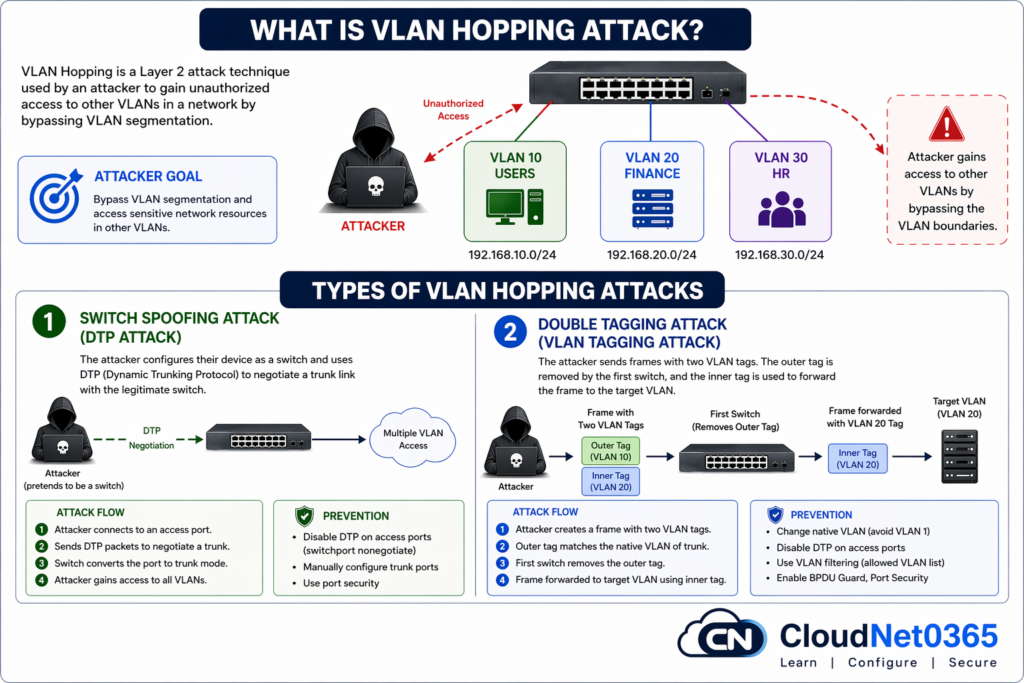
🔍 Types of VLAN Hopping Attacks
1️⃣ Switch Spoofing Attack
👉 Attacker pretends to be a switch
- Attacker mimics a switch
- Tricks switch into trunk mode
- Uses DTP (Dynamic Trunking Protocol)
⚠️ Result:
- Gain access to multiple VLANs
2️⃣ Double Tagging Attack
👉 Attacker sends frames with two VLAN tags
- First tag removed by switch
- Second tag used to enter another VLAN
⚠️ Result:
- Unauthorized data injection
👉 💡 Key Insight:
VLAN hopping exploits misconfigured trunk ports and native VLAN settings.
🌍 Real-World Attack Scenario
👉 In a company network:
- Attacker connects to access port
- Spoofs as switch
- Gains trunk access
👉 Result:
- Access to multiple VLANs
- Sensitive data exposure
💥 Sensitive data exposed without detection
🛠️ VLAN Security Configurations (Cisco Commands)
Here below we will see as how to secure VLAN and prevent VLAN Hopping attacks. To do this, we need to :
✅ 1. Disable DTP (Dynamic Trunking Protocol) on all access ports
Switch(config)# interface fastEthernet 0/1
Switch(config-if)# switchport mode access
Switch(config-if)# switchport nonegotiate
✔ Prevents trunk negotiation
✔ Stops switch spoofing
✅ 2. Configure Trunk Ports Manually
Switch(config)# interface gigabitEthernet 0/1
Switch(config-if)# switchport mode trunk
Switch(config-if)# switchport nonegotiate
✔ Eliminates dynamic trunk risks
✅ 3. Change Native VLAN from default
Switch(config-if)# switchport trunk native vlan 999
⚠️ Never use VLAN 1
✅ 4. Restrict Allowed VLANs
Switch(config-if)# switchport trunk allowed vlan 10,20,30
✔ Reduces attack surface, Restrict VLAN access based on policies
✅ 5. Disable Unused Ports
Switch(config)# interface range fastEthernet 0/10-24
Switch(config-if-range)# shutdown
✔ Prevents unauthorized connections
✅ 6. Enable Port Security
Switch(config)# interface fastEthernet 0/2
Switch(config-if)# switchport port-security
Switch(config-if)# switchport port-security maximum 1
Switch(config-if)# switchport port-security violation restrict
Switch(config-if)# switchport port-security mac-address sticky
✔ Locks devices to ports
🔎 Verification Commands
Switch# show vlan brief
Switch# show interfaces trunk
Switch# show port-security interface fastEthernet 0/2
✔ Confirms real implementation
🔐 How to Secure VLAN
Here below is a quick checklist.
- Disable DTP on all access ports
- Use manual trunk configuration
- Change native VLAN from default
- Restrict allowed VLANs
- Enable port security
🌍 Real-World Use Cases
🏢 Enterprise Networks
- VLAN 10 → Employees
- VLAN 20 → Finance
✔ Prevents internal data leaks
🏫 Educational Institutions
- Student VLAN
- Admin VLAN
✔ Restricts access to sensitive systems
☁️ Data Centers
- Tenant isolation
✔ Prevents cross-customer data exposure
⚖️ Secure vs Insecure VLAN Setup
| Feature | ❌ Insecure | ✅ Secure |
|---|---|---|
| Trunking | Dynamic (DTP enabled) | Manual |
| Native VLAN | VLAN 1 | Custom VLAN |
| VLAN Access | All VLANs | Restricted |
| Port Security | Disabled | Enabled |
| Unused Ports | Active | Shutdown |
| Risk Level | 🔴 High | 🟢 Low |
📊 VLAN Security Best Practices
| Practice | Benefit |
|---|---|
| Disable DTP | Prevent spoofing |
| Change native VLAN | Avoid attacks |
| Disable unused ports | Reduce risk |
| Use strong policies | Improve control |
🔗 Related Topics
👉 Continue learning on CloudNet0365:
- ➡️ VLAN Basics Explained (Complete Beginner Guide)
- ➡️ VLAN Trunking Explained (802.1Q Practical Guide)
- ➡️ Inter-VLAN Routing Explained (Layer 3 Switching)
👉 One can also refer to VLAN Security – Explained by n-able
💡 Pro Tips (From Real Experience)
💡 In real enterprise audits, misconfigured trunk ports are one of the most common causes of VLAN breaches.
💡 Always disable DTP on access ports
💡 Never allow all VLANs on trunk links
💡 Combine VLANs with ACLs and firewalls
💡 Regularly audit VLAN configuration to prevent security issues.
⚠️Common Security Mistakes
- Leaving ports in dynamic mode, this enables attacks.
- Using default VLAN, VLAN 1 for all traffics.
- Allowing all VLANs on trunk
- Not changing native VLAN, Vulnerable to double tagging
- Ignoring port security
👉 These mistakes cause real-world attacks
🎯 Interview Questions
- What is VLAN hopping?
- How to prevent VLAN attacks?
- What is native VLAN?
❓ FAQs (Schema Ready)
Q1: Is VLAN enough for security?
No, VLAN provides segmentation but not complete security.
Q2: What is VLAN hopping attack?
An attack where users gain access to other VLANs.Unauthorized access to another VLAN.
Q3: Why avoid VLAN 1?
It is default and commonly targeted.
Q4: Can VLAN hopping be prevented?
Yes, by disabling DTP and securing trunk ports.
Q5: Best VLAN security practice?
Use static VLANs, restrict trunks, enable port security.
Q6: How to secure VLAN?
👉 Use proper configuration and disable unnecessary features.
Q7: Is VLAN fully secure?
👉 No, proper security practices are required.
🧠 Conclusion
VLANs are powerful—but not secure by default. VLAN security is essential for protecting modern networks.
If misconfigured:
- Attackers can bypass segmentation
- Sensitive data can be exposed
✔ Secure your network by:
- Disabling DTP
- Restricting VLANs
- Using port security
- Auditing regularly
👉 By following best practices, you can secure your VLAN infrastructure effectively.
🔐 A secure network is built by configuration, not assumption.