
🧠 VLAN Tagging Explained (802.1Q Tagging) – How It Works + Real Example + Troubleshooting
🚀 Introduction
In modern networks, multiple VLANs share the same physical infrastructure. But how does a switch identify which traffic belongs to which VLAN?
👉 The answer is VLAN Tagging (802.1Q).
VLAN tagging allows network devices to separate and identify traffic from different VLANs using a special tag inside Ethernet frames.
You configure VLANs correctly… but devices still can’t communicate across switches.
Or worse — traffic leaks into the wrong VLAN.
Imagine this:
- Your office has multiple departments (HR, Finance, IT)
- All are connected to the same switch
- Suddenly… sensitive data is visible across departments
👉 That’s a network design failure
Now add:
- Multiple switches
- VLANs configured… but still traffic leaking or not reaching correctly
💥 The real issue?
Improper VLAN tagging and trunk configuration
In real networks:
- Multiple VLANs travel over one physical cable
- Switches must identify which VLAN each frame belongs to
- That’s where 802.1Q tagging comes in
If you don’t understand tagging:
- ❌ Inter-VLAN communication breaks
- ❌ Security risks increase
- ❌ Trunk links fail silently
👉 This guide will give you a deep, practical understanding of VLAN tagging (802.1Q), so you can design and troubleshoot like a pro.
⚡ VLAN Tagging (Quick Answer)
VLAN tagging is the process of adding a VLAN ID to Ethernet frames so that switches can correctly identify and forward the traffic between VLANs.
🧠 What is VLAN Tagging?
VLAN tagging is the process of adding VLAN ID information to Ethernet frames so switches can identify which VLAN the traffic belongs to.
VLAN tagging :
- Works at Layer 2 (Data Link Layer)
- Uses IEEE 802.1Q standard
- Enables multiple VLANs on a single link
So the switches know:
👉 “Which VLAN does this traffic belong to?”
🔍 Simple Definition:
VLAN tagging = Adding a VLAN ID inside the Ethernet frame
Key Concept:
- VLAN = Logical segmentation
- Tagging = Identification mechanism
👉 This allows switches to:
- Identify VLAN membership
- Forward traffic correctly
- Maintain network separation
👉 💡 Key Insight:
Without VLAN tagging, switches cannot distinguish traffic from different VLANs.
⚙️ How VLAN Tagging Works (Step-by-Step)
IEEE 802.1Q is the global standard for VLAN tagging.
It defines:
- How VLAN information is added to frames
- How switches process tagged frames
- How VLAN IDs are assigned
How It Works:
- It Adds a 4-byte tag inside the Ethernet frame
- It Contains:
- VLAN ID (VID)
- Priority (QoS)
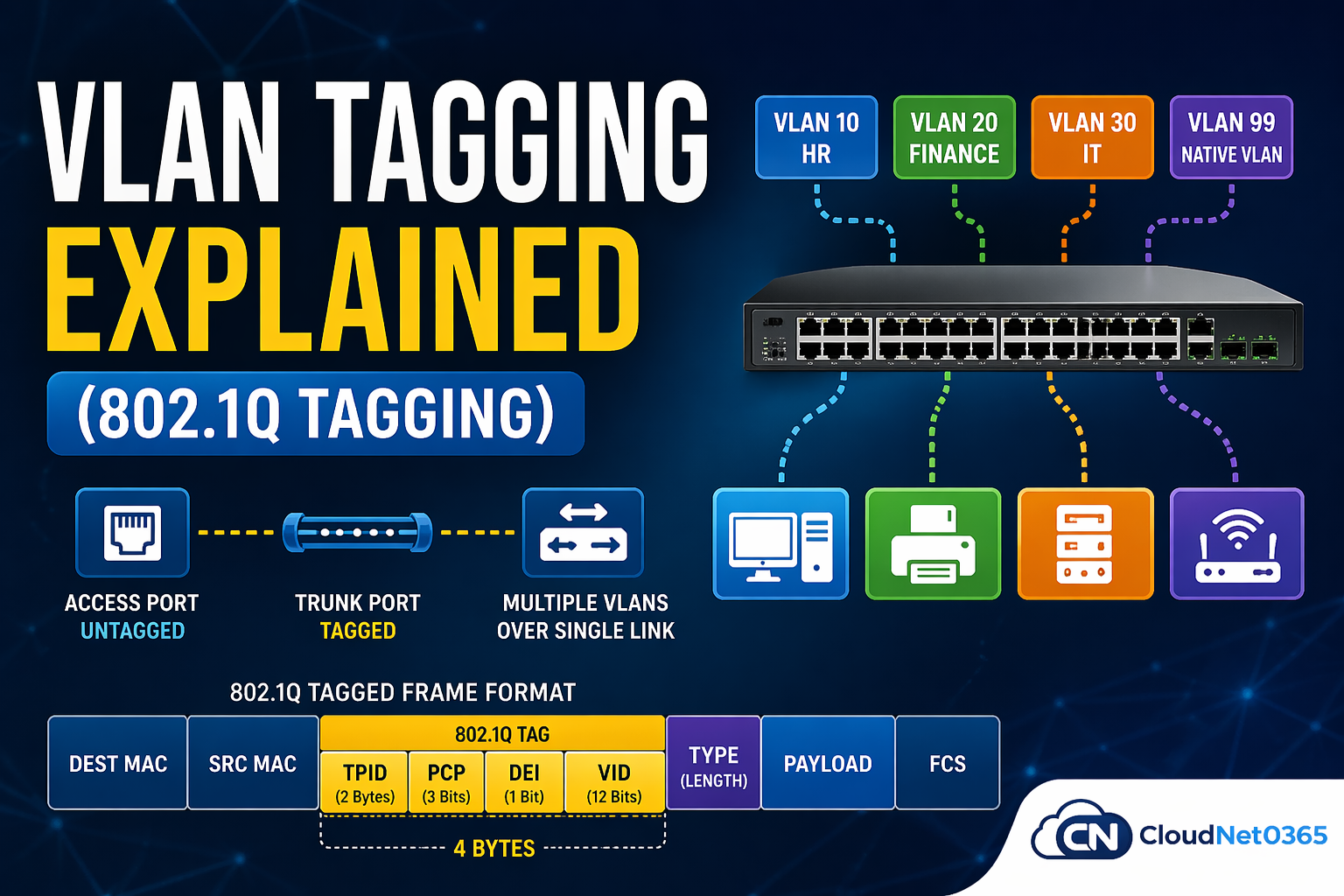
The VLAN tag is 4 bytes (32 bits) added inside the Ethernet frame.
🔑 Fields:
- TPID (Tag Protocol Identifier) → Identifies frame as tagged (0x8100)
- PCP (Priority Code Point) → Traffic priority (QoS)
- DEI (Drop Eligible Indicator) → Drop preference
- VLAN ID → Range: 1–4094
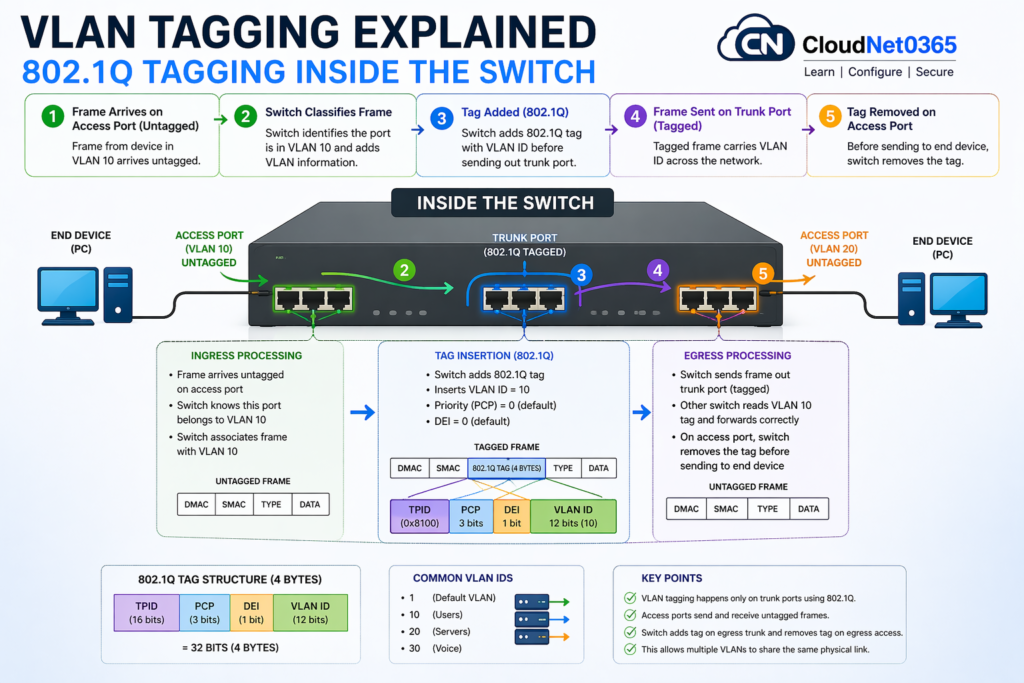
Here below are the steps as how Vlan tagging works inside the network.
- Device sends data → frame is untagged
- Switch receives frame on access port
- Switch assigns VLAN ID internally
- Frame exits via trunk port → tag is added
- Next switch reads VLAN tag and forwards correctly
- At destination access port → tag is removed
👉 Learn full packet flow:
➡️ How VLAN Works (Step-by-Step Guide)
📘 What is IEEE 802.1Q?
IEEE 802.1Q is the international networking standard that defines how VLAN information is added to Ethernet frames.
👉 In simple words:
It is the technology that makes VLAN tagging possible.
🧠 Simple Explanation (IEEE 802.1Q)
Normally, an Ethernet frame has no VLAN information.
IEEE 802.1Q inserts a small tag inside the frame so switches can identify:
- Which VLAN the traffic belongs to
- How to forward it correctly
Without VLAN tagging, switches cannot distinguish traffic from different VLANs.
⚙️ How It Works (Quick Idea)
- Device sends data → untagged frame
- Switch receives it → assigns VLAN
- On trunk link → 802.1Q tag is added
- Next switch reads the tag → forwards correctly
- Before reaching device → tag is removed
🧩 802.1Q Tag Structure (VERY IMPORTANT)
The tag is 4 bytes (32 bits) and includes:
- VLAN ID (1–4094) → Identifies the VLAN
- PCP (Priority) → Used for QoS
- DEI → Drop eligibility
- TPID (0x8100) → Identifies it as a tagged frame
🧩 Frame Structure (Simplified)
🔌 Where Is It Used?
- ✅ Trunk ports (between switches/routers)
- ❌ Not used on access ports (end devices)
🎯 Why IEEE 802.1Q Is Important
- Allows multiple VLANs on one cable
- Improves network efficiency
- Enhances security and segmentation
- Essential for modern enterprise networks
🏁 Final Understanding
Without IEEE 802.1Q, VLANs would require separate physical networks.
👉 With it, a single link can carry multiple isolated networks using tagging.
👉 This 802.1Q tagging allows multiple VLANs to travel across a single link.
When a frame travels across a trunk link, the switch inserts a tag into the Ethernet frame.
🔄 Tagged vs Untagged Frames
| Feature | Tagged Frame | Untagged Frame |
|---|---|---|
| VLAN Info | Present | Not present |
| Used On | Trunk Ports | Access Ports |
| Purpose | Carry multiple VLANs | Single VLAN |
| Tag Size | 4 bytes | No tag |
🔌 Access vs Trunk Port (Quick Understanding)
This is important because VLAN tagging only happens on trunk links.
🔹 Access Port
- Connects end devices (PC, printer)
- Carries only one VLAN
- Frames are untagged
🔹 Trunk Port
- Connects switches/routers
- Carries multiple VLANs
- Frames are tagged using 802.1Q
👉 💡 Pro Tip:
Always ensure trunk ports allow required VLANs.
🎯 When to Use Access vs Trunk
👉 Use Access Port:
- For PCs, printers, IP phones
👉 Use Trunk Port:
- Between switches
- Between switch and router
👉 💡 Key Insight:
Access ports simplify connectivity, while trunk ports enable VLAN communication across networks.
🧷 Native VLAN Explained (Very Important Concept)
The Native VLAN is the VLAN whose traffic is sent without tagging on a trunk port.
🔑 Key Points:
- Default = VLAN 1
- Frames in native VLAN are untagged
- Must match on both sides of trunk
⚠️ Native VLAN mismatch can cause serious network issues
🌐 Real Network Example
Imagine:
- VLAN 10 → HR
- VLAN 20 → IT
Both VLANs use the same cable between switches.
👉 Without tagging → traffic gets mixed
👉 With 802.1Q tagging → each frame carries VLAN ID → proper separation
💻 VLAN Tagging Configuration (Cisco CLI)
🟢 Step 1: Create VLANs
Switch(config)# vlan 10
Switch(config-vlan)# name SALES

Switch(config)# vlan 20
Switch(config-vlan)# name IT
🟢 Step 2: Configure Access Port
Switch(config)# interface fastEthernet 0/1
Switch(config-if)# switchport mode access
Switch(config-if)# switchport access vlan 10
🔵 Step 3: Configure Trunk Port
Switch(config)# interface fastEthernet 0/24
Switch(config-if)# switchport mode trunk
Switch(config-if)# switchport trunk allowed vlan 10,20
⚠️ Step 4: Set Native VLAN
Switch(config-if)# switchport trunk native vlan 99
🔍 Verification Commands
show vlan brief
show interfaces trunk
show running-config interface fa0/24
🧩 What is Native VLAN?
Native VLAN is the VLAN that carries untagged traffic on trunk ports.
The Native VLAN is a special VLAN on a trunk port:
👉 Frames in this VLAN are sent WITHOUT TAGS
Why It Exists:
- For backward compatibility with older devices
Example:
- VLAN 10, 20, 30 → tagged
- VLAN 99 → native → untagged
👉 Native VLAN = VLAN whose frames are sent without tagging on a trunk port
👉 By default:
- VLAN 1 is native VLAN
⚠️ Important Note
👉 Frames in native VLAN are not tagged
👉 Native VLAN mismatch can cause:
- Connectivity issues
- Security risks
⚡ Key Behavior:
- Native VLAN traffic is:
- ❌ NOT tagged
- ✔️ Sent as normal Ethernet frames
🚨 Why It Matters
If native VLAN mismatches:
- ❌ Traffic goes to wrong VLAN
- ❌ VLAN hopping attacks possible
🧩 Example:
- Switch A native VLAN = 10
- Switch B native VLAN = 20
👉 Result:
- Untagged traffic gets misinterpreted → network chaos
📊 VLAN Tagging vs No Tagging
| Feature | With VLAN Tagging | Without VLAN |
|---|---|---|
| Traffic Separation | Yes | No |
| Efficiency | High | Low |
| Scalability | Excellent | Poor |
| Security | Better | Weak |
🛠️ Troubleshooting VLAN Tagging
🔍 Check trunk status
show interfaces trunk
🔍 Check VLAN configuration
show vlan brief
👉 💡 Pro Tip:
Verify trunk configuration before checking deeper network issues.
🔗 Related Topics (Recommended Reading)
➡️ What is VLAN
➡️ VLAN Troubleshooting
➡️ You can also refer to esecurityplanet for more details.
👉 These will help you build complete networking expertise
🎯 Interview Questions
- What is VLAN tagging?
- What is 802.1Q?
- Difference between access and trunk port?
- What is native VLAN?
❗ Common Mistakes (Avoid These)
- ❌ Forgot to allow VLANs on trunk – VLAN traffic fails or traffic not passing.
- ❌ Native VLAN mismatch – Causes communication failure
- ❌ Using VLAN 1 everywhere (security risk)
- ❌ Not verifying trunk status
- ❌ Incorrect VLAN allowed list – Some VLANs won’t pass
- ❌ Forgetting tagging concepts
- ❌ Incorrect Tagging
- Devices unable to communicate
❓ FAQs
Q1: What is VLAN tagging in simple words?
It is a way to label network traffic so switches know which VLAN it belongs to.
Q2: Does tagging happen on access ports?
No, tagging happens only on trunk ports.
Q3: What is the size of VLAN tag?
4 bytes
Q4: Is VLAN tagging required on all ports?
👉 No. Only trunk ports use tagging. Access ports do not.
Q5: What happens if tagging is missing on trunk?
👉 Switch cannot identify VLAN → traffic fails.
Q6: Can native VLAN be changed?
👉 Yes, and it should be changed for security reasons.
Q7: What is VLAN ID range?
- Normal: 1–1005
- Extended: 1006–4094
Q8: Is 802.1Q the only tagging method?
👉 Mostly yes today. Older ISL is obsolete.
Q9: Why VLAN tagging is needed?
👉 To identify VLAN traffic across switches.
Q10: What is native VLAN?
👉 VLAN that carries untagged traffic.
Q11: Does access port use tagging?
👉 No, it sends or carries untagged traffic or frames.
Q12: Why is trunk port needed?
👉 To carry multiple VLANs over a single link
Q13: What happens if native VLAN mismatches?
⚠️ Traffic issues + security risks
Q14: Is 802.1Q used everywhere?
✔ Yes — it’s the industry standard
🏁 Conclusion
VLAN tagging (802.1Q) is the backbone of modern network segmentation. It allows multiple VLANs to share the same physical infrastructure while keeping traffic isolated and secure.
👉 VLAN tagging is not just theory — it’s a very important concept in networking.
✔ 802.1Q enables multiple VLANs over a single link
✔ Trunk ports carry tagged traffic
✔ Native VLAN handles untagged frames
👉 VLAN tagging is essential for maintaining VLAN separation across networks.
It helps:
- Identify VLAN traffic
- Enable communication
- Maintain network stability
👉 Master this and you eliminate:
- VLAN misconfigurations
- Security gaps
- Network instability
👉 Understanding tagging, trunk ports, and native VLAN is essential for any network engineer.