
🧩 Introduction (Real Problem Scenario)
In large VLAN-based networks, unnecessary broadcast traffic can silently kill performance.
If you’ve ever managed a network where switches seem overloaded for no clear reason,then there’s a high chance of unnecessary VLAN traffic which might be the culprit.
Even switches that don’t need certain VLANs still receive their traffic — wasting bandwidth, CPU and network slows down.
This is where VTP Pruning becomes a powerful optimization feature.
It automatically stops unnecessary VLAN traffic from flowing where it’s not needed — improving efficiency without manual configuration.
📘 What is VTP Pruning? (Simple Definition)
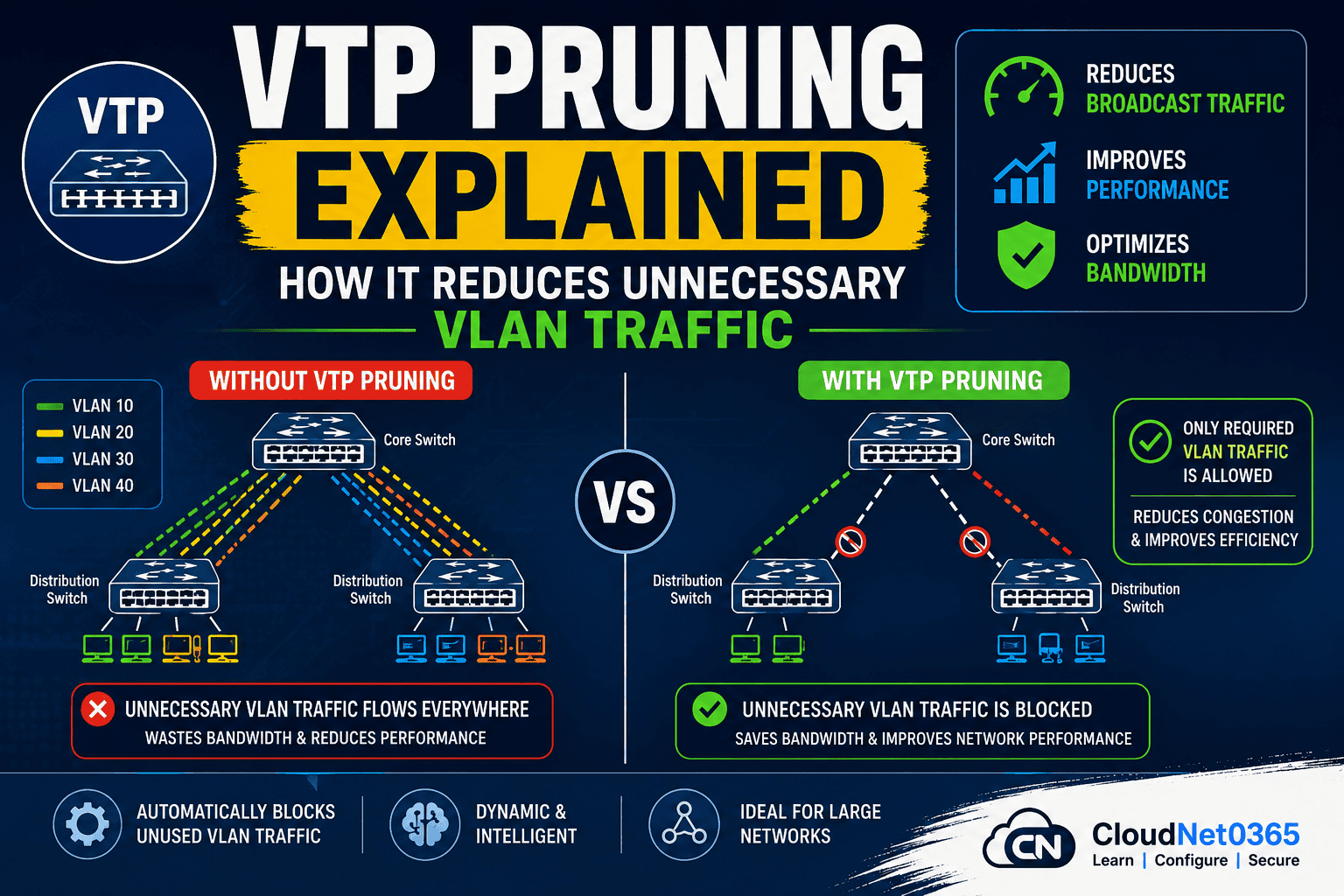
VTP Pruning is a feature in VLAN Trunking Protocol that prevents or stops unnecessary VLAN broadcast traffic from traveling across trunk links.
- It dynamically identifies which switches actually need a VLAN
- It allows only active VLAN traffic to pass
- Then it blocks that VLAN traffic on trunks where it’s not required
- Works automatically once enabled in a VTP domain
👉 In short:
👉 In simple terms:
VTP Pruning = Smart traffic filtering for VLANs , It prevents traffic from going where it’s not needed.
❓ Why VTP Pruning is Important ?
Without pruning, all VLAN traffic travels everywhere — even where it’s useless.
⚙️ How VTP Pruning Works (Step-by-Step)
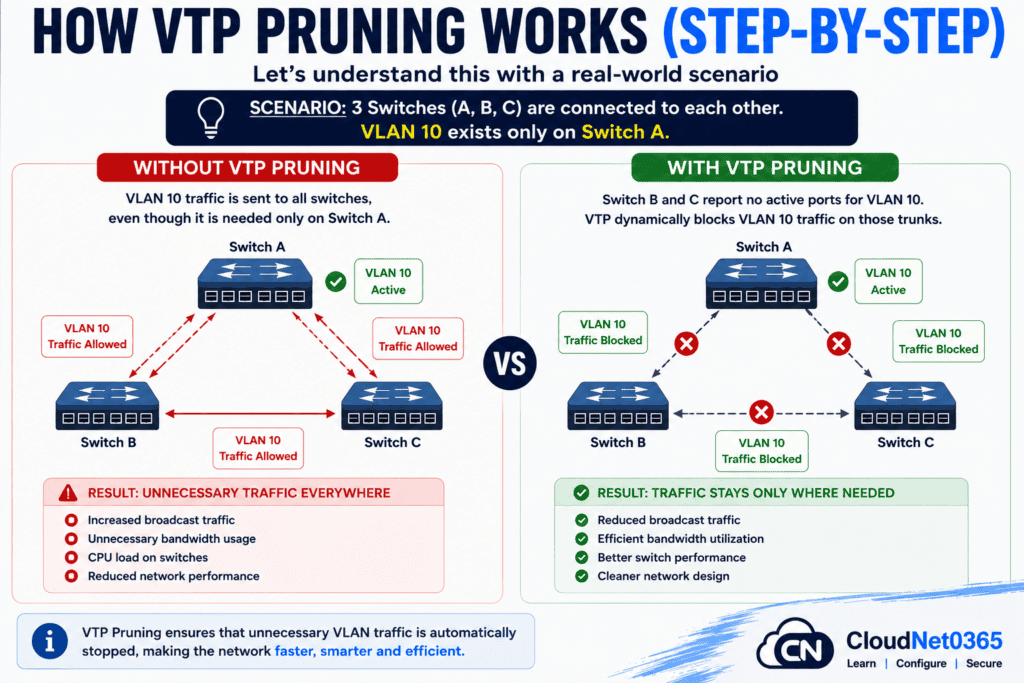
Let’s understand this with a real-world scenario 👇
Problems Without Pruning:
Sippose there are 3 switches A, B, and C and all are connected to each other. VLAN 10 exists only on Switch A but still, VLAN 10 traffic is sent to B and C.
The result is Unnecessary traffic everywhere.
This leads to:
- Increased broadcast traffic
- Unnecessary bandwidth usage
- CPU load on switches
- Reduced network performance
Benefits With Pruning:
When VTP Pruning is enabled, Switch B and C reports no active ports for VLAN 10. VTP dynamically blocks VLAN 10 traffic on those trunks.
The result is, traffic stays only where needed and network becomes efficient.
This leads to:
- Reduced broadcast traffic
- Efficient bandwidth utilization
- Better switch performance
- Cleaner network design
Here below is a graphical representation of How VTP Pruning Works ?.
Default Behavior of VTP Pruning
Here below is the default behavior of VTP Pruning.
- Disabled by default
- Must be enabled manually
- Works only in VTP Server mode
💻 VTP Pruning Configuration (Cisco Commands)
Enable VTP Pruning:
Switch(config)# vtp pruning
Verify VTP Pruning Status:
Switch# show vtp status
Output Example:
VTP Pruning Mode: Enabled
Disable VTP Pruning:
Switch(config)# no vtp pruning
👉 Simple but powerful — just one command enables automatic optimization.
Manually Control VLANs (Advanced):
Switch(config-if)# switchport trunk pruning vlan remove 10
💡 Pro Tip:
Use manual pruning only when you need strict control. Otherwise, let VTP handle it dynamically.
Important Technical Insight
🔒 VLANs That Cannot Be Pruned:
- VLAN 1 (default VLAN)
- Reserved VLANs (1002–1005)
👉 This means pruning is not absolute filtering, but selective optimization.
🛠️ Troubleshooting VTP Pruning (Real time Issues)
❌ Problem: Pruning not working
- Check VTP mode (must be Server/Client)
- Verify domain name matches
❌ Problem: VLAN still flooding traffic
- VLAN might be active on remote switch
- Check using:
show vlan brief
❌ Problem: No pruning effect
- Ensure pruning is enabled on VTP Server
- Confirm trunk links are properly configured
📊 VTP Pruning vs Manual VLAN Filtering
| Feature | VTP Pruning | Manual Filtering |
|---|---|---|
| Configuration | Automatic | Manual |
| Scalability | High | Low |
| Maintenance | Minimal | High |
| Traffic Optimization | Dynamic | Static |
| Flexibility | Moderate | High |
| Error Risk | Low | High |
👉 Best Practice:
Use VTP Pruning for large networks, manual filtering for critical control.
VTP Pruning is smarter and more scalable.
🌍 Real-World Use Cases
🏢 Enterprise Networks
- Departments use different VLANs
- Prevents unnecessary cross-traffic
- Improves performance in large networks
🏫 Campus Networks
- VLANs across multiple buildings
- Different buildings using different VLANs
- Avoids unnecessary inter-building traffic
- Keeps traffic localized
🖥️ Data Centers
- High VLAN density
- Thousands of VLANs across switches
- Reduces broadcast storms
- Keeps traffic localized
🌐 ISP Networks
- Optimizes backbone traffic
- Reduces backbone congestion
- Improves scalability
❓ When NOT to Use VTP Pruning ?
Even though it’s useful, it’s not always recommended.
Avoid in:
- Networks not using VTP
- Transparent mode environments
- Highly controlled networks requiring manual filtering
- Security-sensitive environments (use ACLs instead)
⚠️ Common Mistakes to Avoid !
Here below are some common mistakes that a network admin should avoid which configuring VTP Pruning.
- Forgetting to enable VTP globally
- Using VTP pruning in transparent mode
- Not verifying pruning status
- Assuming it replaces VLAN security
- Enabling pruning without understanding VTP mode
- Expecting pruning to block all VLAN traffic
- Ignoring VLAN 1 limitation
- Not verifying trunk configuration
💡 Best Practices
- Enable pruning only in VTP Server mode
- Avoid using in transparent mode networks
- Use in large VLAN environments
- Combine with proper VLAN planning
- Regularly monitor using:
show vtp statuscommand - Avoid mixing with manual pruning unless needed
- Don’t rely on pruning for security (use ACLs instead)
❓ FAQs
1. Is VTP Pruning enabled by default?
👉 No, it is disabled by default and must be enabled manually using the vtp pruning command.
2. Does VTP Pruning work in transparent mode?
👉 No, it only works in VTP Server and Client modes.
3. Can VTP Pruning improve network performance?
👉 Yes, by reducing unnecessary broadcast traffic, it improves overall performance and efficiency.
4. Is VTP Pruning a security feature?
👉 No, it is a performance optimization feature.
5. Can VLAN 1 be pruned?
👉 No, VLAN 1 cannot be pruned.
6. Does pruning affect VLAN creation?
👉 No, it only controls traffic flow — not VLAN configuration.
🧾 Conclusion
VTP Pruning is one of those features that delivers instant network optimization with minimal effort.
Instead of upgrading hardware, you can significantly improve performance just by controlling unnecessary VLAN traffic in the network.
By dynamically restricting traffic only where it’s needed, it improves efficiency, reduces load, and enhances overall performance.
👉 If your network is growing and performance is dropping or If you’re managing medium to large networks, enabling VTP Pruning is a quick win optimization with minimal effort.
🔗 Related Articles
You can also refer to below articles:
- What is VLAN ? – In detail
- What is VTP? VLAN Trunking Protocol Explained Simply (With Examples & Commands)
- VTP Modes Explained with Examples (Server vs Client vs Transparent) – Detailed Explanation
You can also refer to VTP Pruning Explained: How It Reduces Unnecessary VLAN Traffic, in more detail – Explained By Cisco
🔥 Final Expert Tip
Before blaming slow network performance on hardware —
Check if unnecessary VLAN traffic is flooding your trunks.
In many cases, VTP Pruning alone can fix it. Try to enable VTP Pruning before upgrading hardware.