

🚀 Introduction (Real Problem Scenario)
Managing VLANs manually across multiple switches is a nightmare in real-world networks.
Imagine adding a new VLAN and then configuring it on 20+ switches one by one — time-consuming and error-prone.
Their might be:
- High chance of mistakes
- Time-consuming
- Inconsistent configurations
👉 This is exactly where VLAN Trunking Protocol (VTP) comes into play.
It automates VLAN management and ensures consistency across your network.
⚡ Featured Snippet Answer (Quick Answer)
VTP (VLAN Trunking Protocol) is a Cisco protocol that simplifies VLAN management by automatically synchronizing VLAN information between switches over trunk links.
📘 What is VTP? (VLAN Trunking Protocol)?
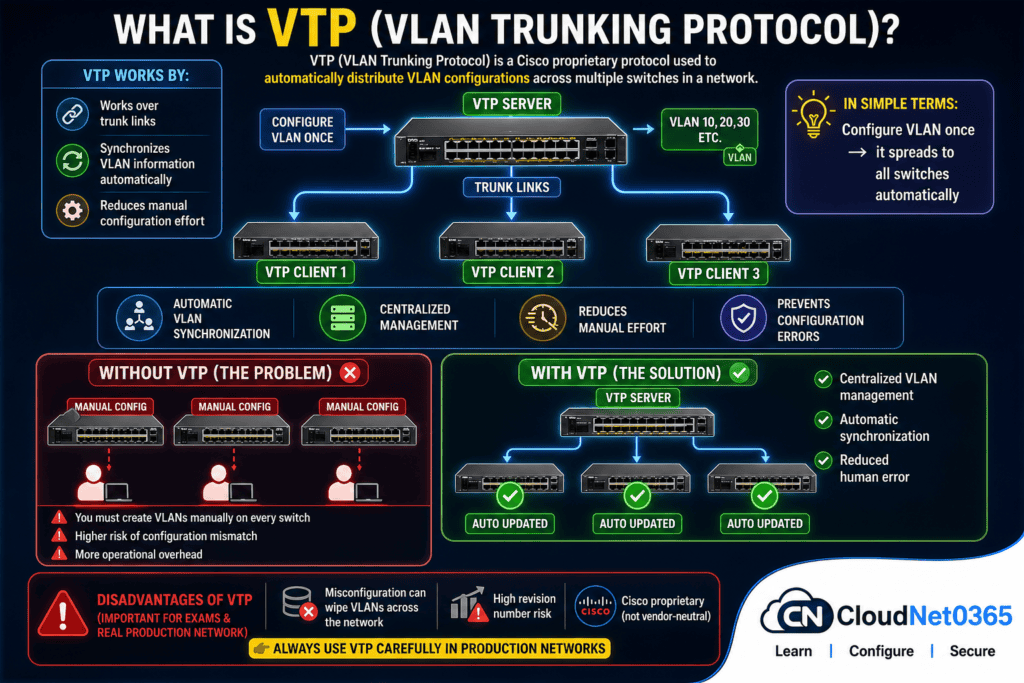
VTP (VLAN Trunking Protocol) is a Cisco proprietary protocol used to automatically distribute VLAN configurations across multiple switches in a network.
VTP:
- works over trunk links
- Synchronizes VLAN information automatically
- Reduces manual configuration effort
💡 In simple terms:
Configure VLAN once → it spreads to all switches automatically
❓ Why VTP is Important in Networking ?
Without VTP:
- You must create VLANs manually on every switch
- Higher risk of configuration mismatch
- More operational overhead
With VTP:
- Centralized VLAN management
- Automatic synchronization
- Reduced human error
🧠 How VTP Works (Step-by-Step)
- A switch in Server mode creates a VLAN
- VTP increases its revision number
- Update is sent through trunk links
- Client switches compare revision numbers
- If newer → VLAN database is updated
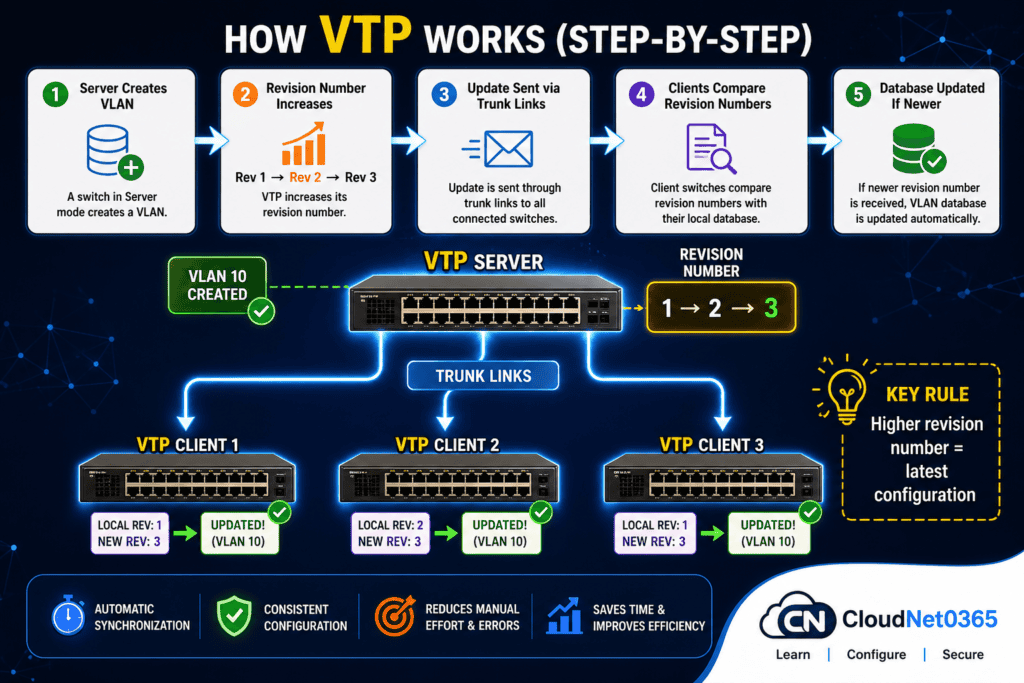
👉 Key Rule: Higher revision number = latest configuration
🖥️ VTP Modes Explained (With Practical Use)
VTP operates in 3 main modes:
🔵 1. Server Mode (Default)
- Can create, modify, delete VLANs
- Sends updates to all switches
- Stores VLAN database
👉 Used in core/distribution switches , and best for central management.
🟢 2. Client Mode
- Cannot create or delete VLANs
- Receives updates from server
- Automatically syncs VLANs
👉 Used in access switches
🟡 3. Transparent Mode
- Does NOT participate in VTP
- Forwards VTP messages only
- Manual VLAN configuration required
👉 Best for security & control
⚙️ VTP Configuration Commands (Cisco CLI)
Step 1: Set VTP Domain
Switch(config)# vtp domain CloudNet0365
Step 2: Set VTP Mode
Switch(config)# vtp mode server
Switch(config)# vtp mode client
Switch(config)# vtp mode transparent
Step 3: Set VTP Password (Optional but Recommended)
Switch(config)# vtp password secure123
Step 4: Verify VTP Status
Switch# show vtp status
So VTP is configured as of now.
Now if you create a Vlan, it will propagate to all clients in that network.
Step 5: Create VLAN (on Server)
Switch(config)# vlan 10
Switch(config-vlan)# name SALES
👉 This VLAN will automatically propagate to clients.
🧪 Real Lab Scenario
🎯 Scenario:
You have:
- 1 Core Switch (Server)
- 3 Access Switches (Clients)
🔧 Without VTP:
- Configure VLAN 10 manually on all switches ❌
⚡ With VTP:
- Configure VLAN only on Core Switch ✅
- Automatically syncs to all clients
👉 Saves 90% time + avoids errors
🏢 Real-World Use Cases
1. ✔ Enterprise Office Network
- Centralized VLAN management across multiple floors with many switches
- Central VLAN control from server, this reduces admin workload
2. ✔ Data Centers
- Fast VLAN deployment
- Consistent VLAN configuration across racks
3. ✔ Campus Networks
- Easy VLAN expansion
- Quick changes without downtime
4.✔ Large Organizations
- Avoid misconfiguration across hundreds of switches
- Standardized network design
Advantages of VTP
- Saves time in VLAN configuration
- Reduces manual errors
- Centralized management
- Easy scalability
Disadvantages of VTP (Important for Exams & In Real Production network)
- Misconfiguration can wipe VLANs across network
- High revision number risk
- Cisco proprietary (not vendor-neutral)
👉 Always use VTP carefully in production
Common Mistake (Very Important)
👉 Adding a switch with higher revision number can overwrite entire VLAN database
Solution:
Delete VLAN database before connecting📊 VTP Version Comparison (VTPv1 vs VTPv2 vs VTPv3)
Here below is a quick comparison between different versions of VTP. VTP has 3 versions, VTPv1,VTPv2 and VTPv3.
| Feature | VTP v1 | VTP v2 | VTP v3 |
|---|---|---|---|
| VLAN Support | Standard | Standard | Extended VLANs |
| Authentication | Basic | Basic | Enhanced |
| Configuration Control | Limited | Limited | Advanced |
| Protection | Low | Medium | High (Primary Server) |
👉 Recommendation: Always use VTP v3 in production networks.
⚠️ VTP Risks (VERY IMPORTANT)
🚨 Biggest danger in VTP:
- A switch with higher revision number can overwrite entire VLAN database
🛑 Example:
You connect a new switch →
It has revision number 50 →
Your network has revision 10 →
👉 BOOM 💥 Entire VLAN config replaced
✅ Solution:
Delete VLAN database before connecting new switch
✅ Best Practices for Using VTP (Expert Tips)
- Use VTP v3 only or whenever possible
- Always set a VTP password for security and authentication
- Keep critical switches in transparent mode
- Reset revision number before adding switch
- Test in lab before production
🔗 Related Articles
👉 Read next on CloudNet0365:
- VLAN Basics
- VLAN Trunking(802.1q tagging)
- Spanning Tree Protocol (STP)
- VTP Modes Explained with Examples (Server vs Client vs Transparent)
For more details on VTP – Refer to GeeksforGeeks
❓ FAQs
Q1. Is VTP mandatory in networking?
No, you can configure VLANs manually without VTP. It is optional but useful.
Q2. Is VTP secure?
Not fully. Use passwords and VTP v3 for better security.
Q3. Can VTP work with non-Cisco devices?
No. It is Cisco proprietary.
Q4. What is VTP pruning?
It reduces unnecessary VLAN traffic on trunk links.
Q5. When should I avoid VTP?
In highly secure environments or mixed vendor networks.
Q6. What happens if VTP is disabled?
All VLAN configurations must be done manually on each switch.
Q7. Can VTP work between different vendors?
No. It is Cisco proprietary.
🏁 Conclusion
VTP simplifies VLAN management in large networks by automating configuration across switches.
However, it must be used carefully due to risks like VLAN overwrite.
It reduces manual work and ensures consistency across switches.
However, it must be used carefully to avoid major network failures.
👉 Best approach:
- Use VTP for automation if needed
- Use Transparent mode where control is critical
🚀 Final Tip for CloudNet0365 Readers
If you’re serious about:
- CCNA
- Network Engineering
- Real-world IT jobs
👉 Master VTP with hands-on labs — not just theory.