
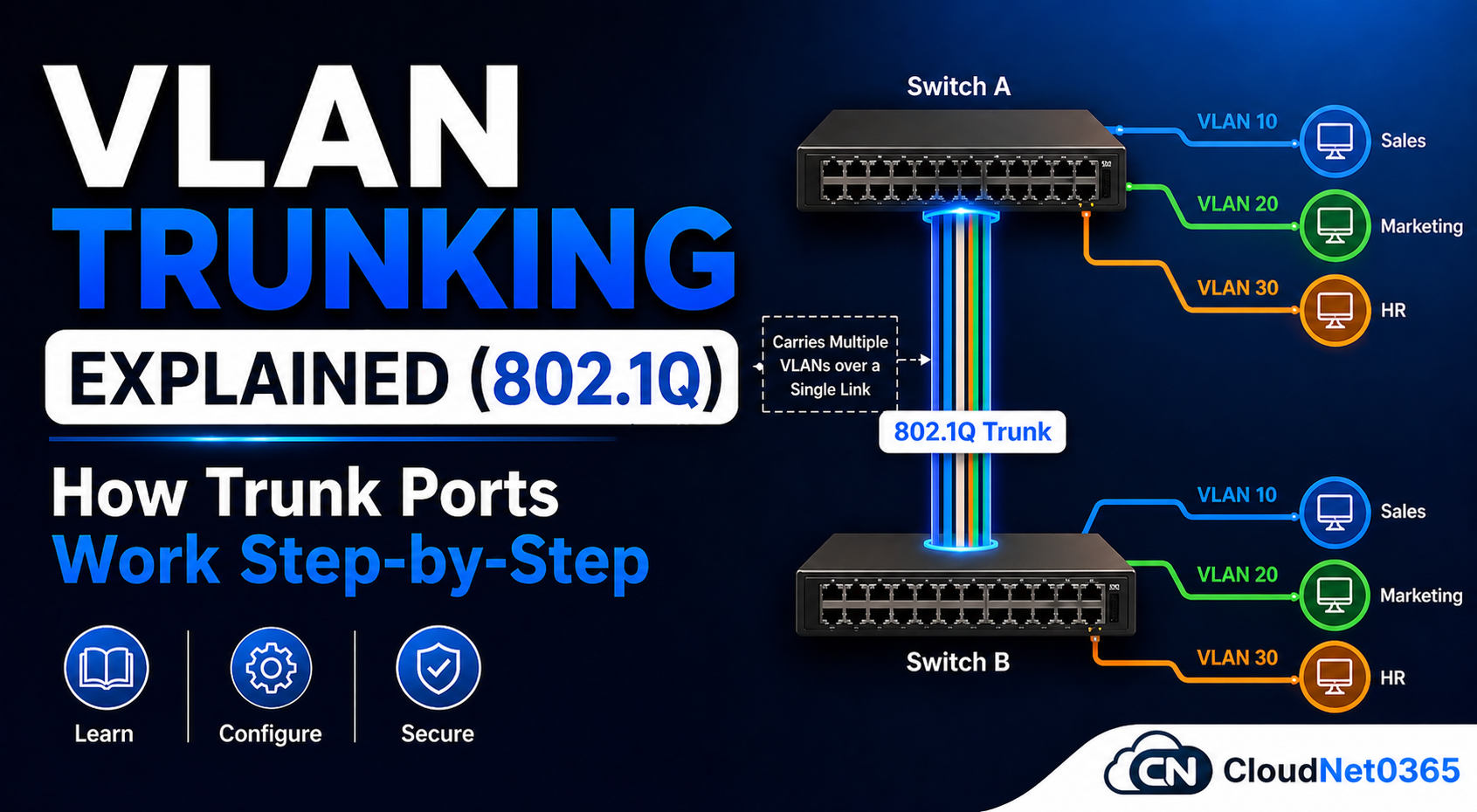
🌐 VLAN Trunking Explained (802.1Q Tagging) – How Trunk Ports Work & Carry Multiple VLANs ( Step-by-Step )
🔥 Introduction: The Real Network Problem Nobody Talks About
Imagine this:
- Your office has 3 floors
- Same department sits on different floors
- All must be in same VLAN
But…
- ❌ One switch for all? Impossible
- ❌ Separate cables for each VLAN? Messy and is not scalable
- ❌ No trunking? No communication
- Connecting all users to one switch → ❌ Not practical
- Running separate cables for each VLAN → ❌ Not scalable
- Same VLAN across switches without trunk → ❌ No communication
👉 Result: Network failure or poor design
In real office networks, users are rarely connected to a single switch.
- Teams sit on different floors
- Switches are distributed across racks
- Yet, users must stay in the same VLAN
👉 Problem:
- Same VLAN users on different switches can’t communicate
- Creating separate cables per VLAN is not scalable
💡 Solution: Use VLAN Trunking — the backbone of modern networks.
👉 This is where trunking becomes the backbone of scalable networking.
📘 What is VLAN Trunking?
Trunking is a technique that is used to carry multiple VLAN traffic over a single physical link between network devices.
- ✔ Allows multiple VLANs on one cable
- ✔ Used between switch-to-switch or switch-to-router links
- ✔ Uses VLAN tagging to differentiate traffic
- ✔ Efficient → Less cabling
- ✔ Scalable → Enterprise-ready
- ✔ Reduces cabling and increases scalability
📌 In simple terms:
👉 Trunking = One Link + Multiple VLANs + Tagged Frames
📌 As explained in practical networking scenarios, trunking enables VLAN traffic to flow between switches efficiently without needing separate links or excessive cabling.
👉 This is where trunking becomes the backbone of scalable networking.
⚙️ How Trunking Works (Frame Tagging Explained)
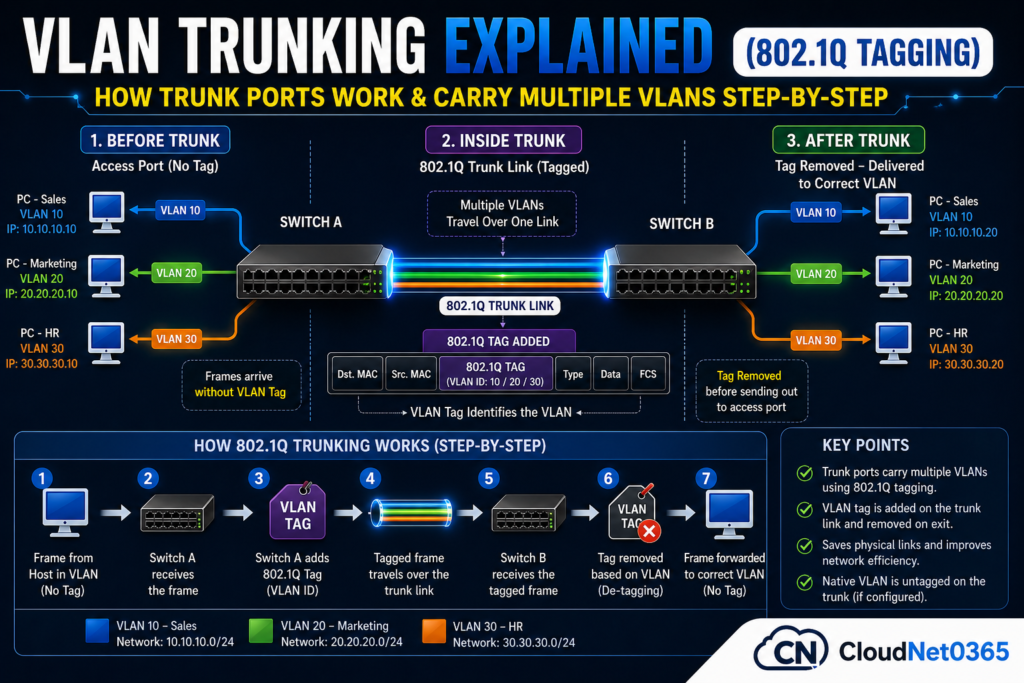
When traffic moves across trunk links, switches use VLAN tagging.
Frame Tagging Process
- Suppose Frame arrives from VLAN 10
- Switch adds VLAN ID tag to frame
- Frame travels over trunk link
- Receiving switch reads VLAN ID
- Frame is forwarded to correct VLAN
- Tag is removed before reaching end device
This is how the traffic flows.
Key Insight:
- Tagging happens only on trunk ports
- Ensures VLAN traffic stays isolated
- End devices never see tagged frames
🔥 Why Trunking is Important in Real Networks
Without trunking:
- ❌ VLAN 10 on Switch A ≠ VLAN 10 on Switch B
- ❌ Communication fails even if IP network is same
- ❌ Network becomes complex and costly
With trunking:
- ✅ VLANs span across switches
- ✅ Clean and scalable design
- ✅ Efficient bandwidth usage
🎯 Key Takeaways:
- Tagging happens only on trunk ports
- End devices never see tags
- Prevents VLAN mixing
👉 This is called 802.1Q VLAN tagging
🔌 Types of Ports in VLAN
Their are 2 types of ports in VLAN, one is access port and the another one is trunk port.
🖥️ Access Port
- Connects end devices (PC, printer)
- Carries single VLAN
- No tagging❌
🔗 Trunk Port
- Connects network devices
- Carries multiple VLANs
- Uses tagging (802.1Q) ✅ Yes
📡 Trunking Protocols (Important for Interviews)
Trunking works using 2 protocols, ISL and 802.1q. ISL protocol is no more used nowadays.
1. ISL (Inter-Switch Link)
- Cisco proprietary
- ❌ Deprecated and not used today
2. IEEE 802.1Q (Dot1Q)
- Industry standard
- Works across all vendors
- ✅ Used in all modern networks
- Adds 4-byte VLAN tag
👉 Always use 802.1Q in production networks
💻 Cisco Trunk Configuration (Step-by-Step)
Here below are Cisco commands to do trunk configurations.
🔹 Enable Trunk Port
Switch(config)# interface fa0/5
Switch(config-if)# switchport trunk encapsulation dot1q
Switch(config-if)# switchport mode trunk
🔹 Allow Specific VLANs
Switch(config-if)# switchport trunk allowed vlan 10,20,30
🔹 Set Native VLAN
Switch(config-if)# switchport trunk native vlan 99
🔹 Verify Configuration
Switch# show interfaces trunk
Switch# show vlan brief
Switch# show running-config interface fa0/5
🏢 Real-World Scenario (Based on Practical Experience)
For example, suppose a company has an IT team that sits in 1st, 2nd and in 3rd floor, and each floor has its own switch and all IT users belong to VLAN 10.
Scene
- Floor 1 → Switch A (VLAN 10)
- Floor 2 → Switch B (VLAN 10)
- Floor 3 → Switch C (VLAN 10)
👉 Without trunk:
- Devices or users cannot communicate ❌
👉 With trunk:
- All VLAN 10 users communicate seamlessly across floors ✅
💡 Practical Benefit:
- Reduced cabling by up to 70%
- Easier network expansion
👉 In real deployments, trunking can reduce cabling complexity by 50–70% and simplifies network design.
🚨 Common Trunking Issues & Fixes (Real Admin Problems)
❌ 1. Trunk Not Forming
- Cause: Mode mismatch,
- One side access, other trunk
- Fix:
switchport mode trunk
⚠️ 2. Native VLAN Mismatch
Errors:
- CDP warning messages
- Fix: Match VLAN on both switches
Fix:
switchport trunk native vlan 99
- Ensure both sides have same native VLAN
❌ 3. VLAN Not Passing or Not Allowed on Trunk
Problem:
- VLAN exists but traffic not passing
- No communication
Fix:
switchport trunk allowed vlan add 10
⚠️ 4. DTP Issues (Dynamic Trunking Protocol)
Best Practice:
- Disable DTP in production:
- Fix:
switchport nonegotiate
❌ 5. Encapsulation Mismatch
- Always use: dot1q on both switches
📊 Access Port vs Trunk Port (Quick Comparison)
Here below is a quick comparison between Access port vs trunk port.
| Feature | Access Port | Trunk Port |
|---|---|---|
| VLAN | Single | Multiple |
| Tagging | No | Yes |
| Use | End devices | Network links |
| Scalability | Low | High |
🛡️ Best Practices for Trunking (Pro Tips)
Points to remember:
- Use only required VLANs (security + performance)
- Avoid using VLAN 1 as native VLAN
- Match configuration on both ends
- Monitor regularly using:
show interfaces trunk
- Disable unused ports
🔗 Related Article
👉 Read next:
Advanced Tip (For Real Engineers)
Use trunking with:
- VMware (vSwitch VLAN tagging)
- Hyper-V virtual networks
- Firewall VLAN segmentation
👉 This is heavily used in data centers and cloud environments
❓ FAQs
Q1: What is a trunk port?
A trunk port that carries multiple VLAN traffic over a single interface using tagging.
Q2: Why is trunking important?
It allows same VLAN communication across multiple switches.
Q3: What is VLAN tagging?
Adding VLAN ID inside Ethernet frames of a particular vlan is called as Vlan tagging.
Q4: What is native VLAN?
The VLANs whose frames are sent without tagging on trunk links are called as Native Vlan. Default is Vlan 1.
Q5: Can trunking work without VLAN?
No — trunking is specifically used to transport VLAN traffic.
Q6: Why is trunking needed?
To allow same VLAN communication across multiple switches.
Q7: What is 802.1Q tagging?
It is a method of adding VLAN ID inside Ethernet frames.
Q8: Can trunking work between different vendors?
Yes, using 802.1Q standard
Q9: Why is VLAN communication failing across switches?
Most common reason:
👉 Trunk not configured properly
Q10: Does trunk port belong to a VLAN?
No, it carries multiple VLANs
Q11: Can I restrict VLANs on trunk?
Yes, using:
switchport trunk allowed vlan
🎯 Conclusion: Why Trunking is a Core Networking Skill
Trunking is not just a concept—it is a core networking skill.
- ✔ Scales networks efficiently
- ✔ Enables VLAN scalability
- ✔ Reduces cabling complexity communication across switches
- ✔Reduces infrastructure complexity
- ✔ Used in all enterprise environments
👉 Without trunking, modern network design becomes inefficient and unmanageable.
👉 If VLANs are not working across switches,
90% of the time → trunk configuration is the issue
🔗 External Resources
You can also refer to documentation on trunking from wikipedia and cisco.
- IEEE 802.1Q Standard Documentation – wikipedia
- VLAN trunking Configuration Guide – Explained by Cisco
💡 Final Expert Tip
Whenever VLAN communication fails between switches:
✔ First check → Trunk configuration
✔ Second check → Allowed VLANs
✔ Third check → Native VLAN mismatch
👉 90% of issues are solved here.