
📌 Introduction
In computer networking, understanding how a switch learns MAC addresses is a fundamental concept, especially for students preparing for CCNP exam.
A network switch operates at Layer 2 (Data Link Layer) of the OSI model and makes forwarding decisions based on MAC (Media Access Control) addresses, and not IP addresses.
In this guide, we will understand how a switch learns MAC address, how the MAC address table works, and how ARP request and reply help in communication.
🧠 How a Switch Learns MAC Addresses (CCNP Switch Guide)
⚙️ Step-by-Step: How a Switch Learns MAC Address
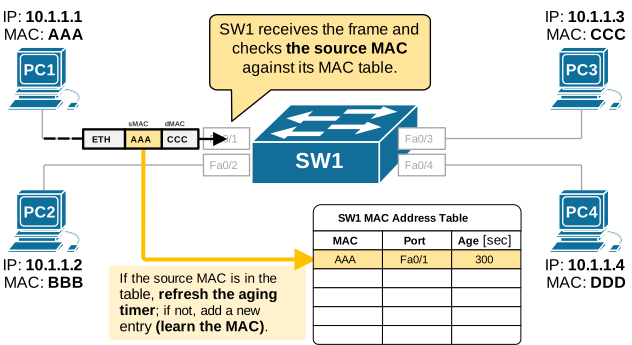
Let’s understand with an example: PC1 (IP: 10.1.1.1) wants to communicate with PC3 (IP: 10.1.1.3).
Initially when we power on the switch, the mac table is empty.
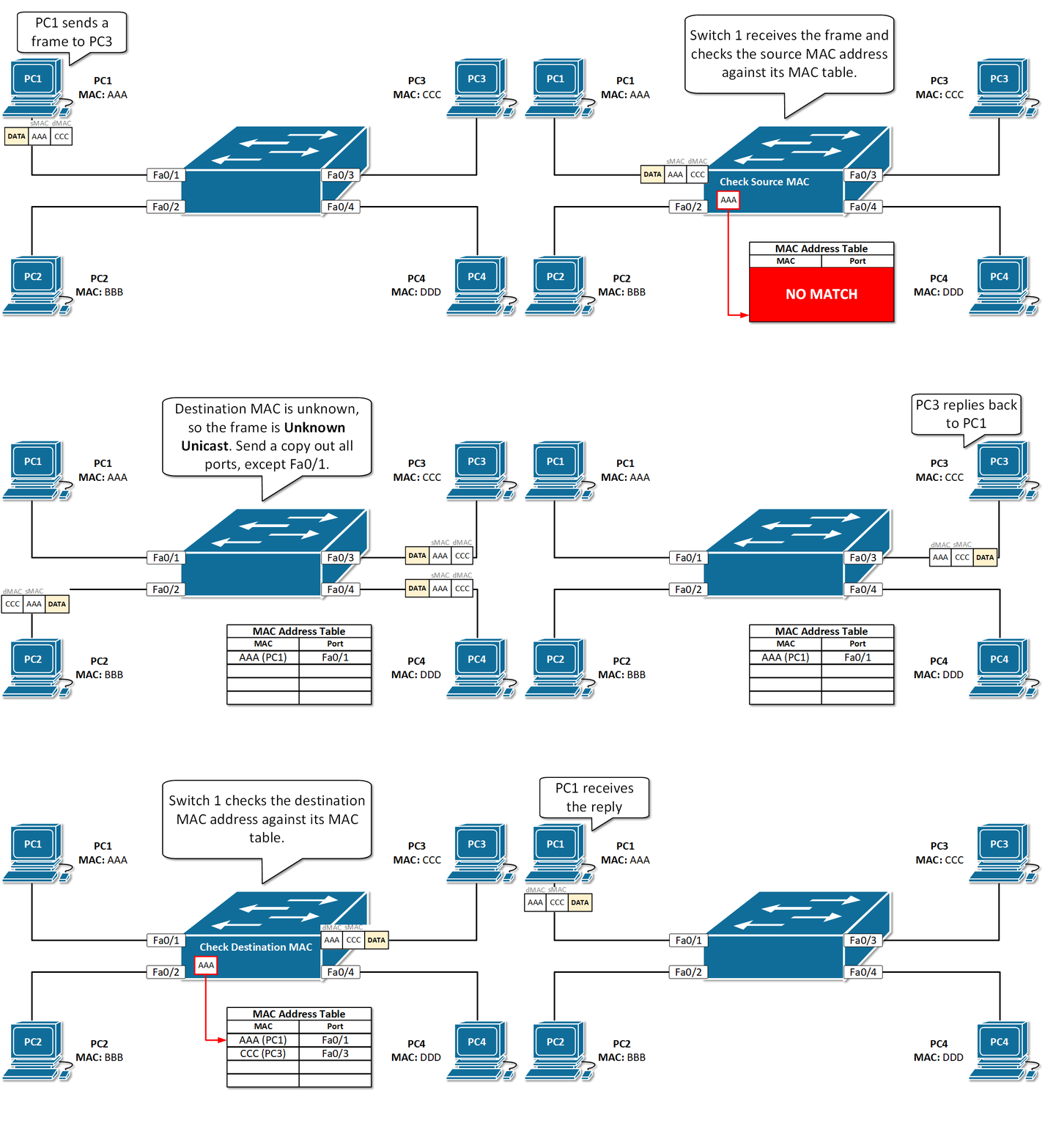
When a User with ip address 10.1.1.1 tries to ping to 10.1.1.3 the switch will look its mac table for the source mac address.If it does not find the source mac address in its mac table,then it will write the source mac address corresponding to the port on which it is connected.
Then it will look for the destination mac address and if it does not find the destination mac address in the mac table,then it will do a broadcast or Flooding to all the ports.
Here Except PC3 (IP: 10.1.1.3) , all other device will simply ignore the broadcast message and only PC3 having IP address 10.1.1.3 will send a reply to the broadcast message.Here the source mac address will be of Device 2 having IP address 10.1.1.3 and the destination mac address will be of Device 1 having IP address 10.1.1.1, from which the request has come from. and this will be a unicast message.
Even though the devices are connected through a switch, ARP is performed by the end devices (PCs). The switch only forwards the ARP request and reply and does not participate in the ARP process.
Next time if it finds the destination mac address in its mac table, it will simply send a unicast message to the destination ip address.
So, this is how the switch learns the MAC address.
Important thing to note that Switch always updates its MAC table based on source address and not on the basis of destination mac address.
🔹 Step 1: PC1(10.1.1.1) wants to ping PC2 (10.1.1.3)
- PC1 only knows IP (10.1.1.3)
- It does NOT know MAC
👉 So it sends:
✔ ARP request (broadcast)
🔹 Step 2: ARP Request sent as (Broadcast)
- PC1/device1 sends an ARP request
- Switch checks its MAC table → No entry found
- Switch broadcasts the request to all ports
📌 This is called flooding
🔹 Step 3: ARP Reply sent as (Unicast)
- Only PC2/Device 2 (10.1.1.3) responds
- It sends its MAC address back to PC1/ Device 1
👉 This response is unicast (one-to-one)
🔹 Step 4: MAC Table Learning
When the switch receives frames:
- It learns source MAC address
- Stores it in MAC table with port number
📌 Important:
Switch always learns from source MAC, NOT destination MAC
🔹 Step 5: Future Communication
- Now switch already knows MAC addresses
- No more broadcast needed
- Communication becomes unicast (direct)
👉 This improves network efficiency.
In real networks, this process happens in milliseconds, so users don’t notice it.
You can check MAC table using show mac address-table command in Cisco devices.
📊 MAC Address Table Explained
- Initially → Empty
- Entries are added dynamically
- Each entry includes:
- MAC address
- Port number
⏱️ MAC Address Aging Time
- Default aging time = 300 seconds (5 minutes)
- If no traffic is seen:
- Entry is automatically removed
👉 This ensures the table stays updated
⚠️ Key Points to Remember
✔ Switch works on MAC address, not IP
✔ ARP is used to resolve IP to MAC
✔ Unknown destination → Broadcast (Flooding)
✔ Known destination → Unicast
✔ Learning is always from source MAC
✔ ARP = protocol
✔ MAC table is dynamic
✔ Broadcast = Delivery Method
✔ ARP → Done by PCs/Routers
✔ Switch → only forwards frames
✔ Communication path → through switch
✔ Logical resolution → between end devices
🧾 Conclusion
Understanding how a switch learns MAC addresses is essential for both real-world networking and CCNP exams.
By using ARP and MAC address tables, switches efficiently forward data within a network while minimizing unnecessary traffic.
📚 References / Further Reading
Some links related to this blog :
- Documentation on ARP (Wikipedia)
- How ARP Works Step-by-Step
- Your blog: MAC Address Table Explained