
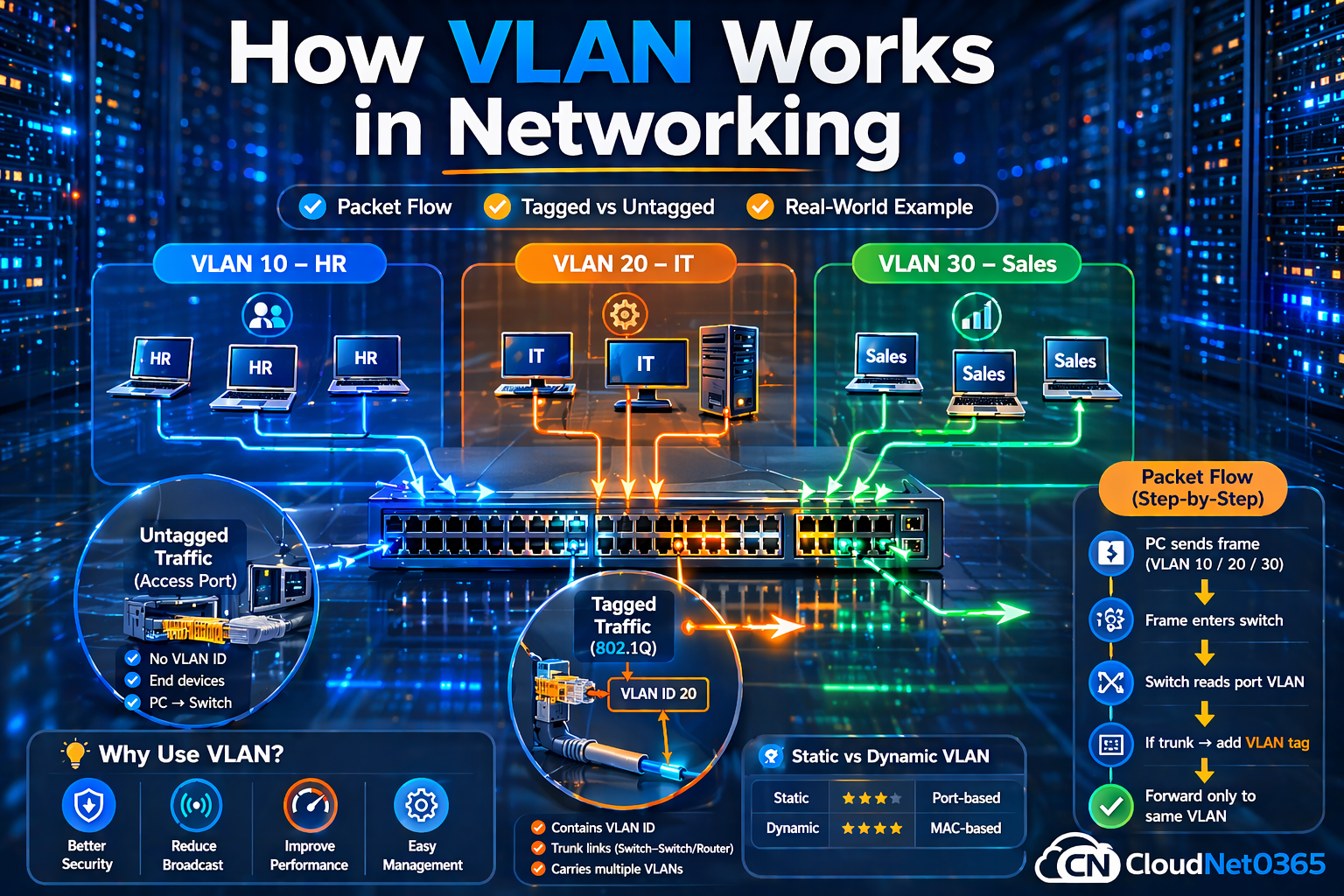
🌐How VLAN Works ? (Packet Flow + Visualization + Tagged vs Untagged frames Explained Visually)
📌Introduction (⚠️ Real-World Problem)
Modern networks often become complex and inefficient as the number of connected devices increases.
Few common problems are :
- Multiple departments sharing the same network
- Increased security risks due to unrestricted access between departments
- Excessive broadcast traffic reduces performance
Imagine an office environment where HR, IT, and Finance operate on the same network — without proper segmentation, sensitive data can be accessed unintentionally, creating both security and performance issues and anyone can access anything. That’s inefficient and risky.
This is where VLAN (Virtual LAN) comes in.
Instead of physically separating networks (which is costly), VLAN lets you logically split one network into multiple secure networks.
💡 The Solution: VLAN (Virtual Local Area Network or LAN)
This is where VLAN (Virtual LAN) comes in and plays a crucial role.
Instead of physically separating networks — which can be expensive and difficult to manage — VLAN allows you to logically divide a single physical network into multiple isolated networks without any extra hardware, controls traffic flow and improves performance and security.This is how VLAN works.
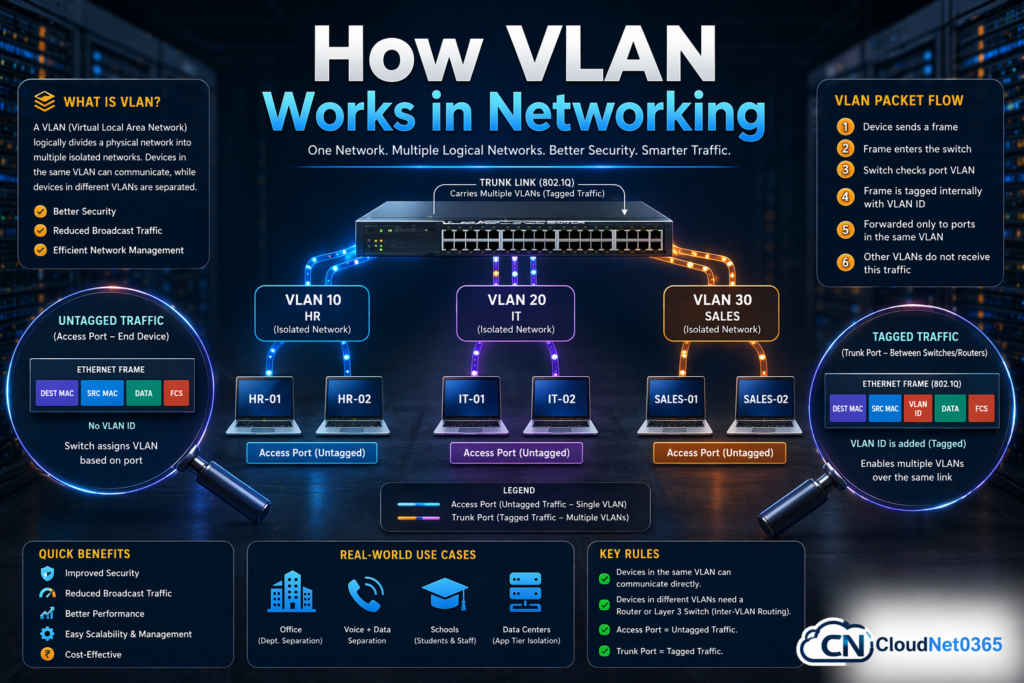
In this guide, you will learn how VLAN works, its types, configuration, and real-world use cases.
🧠What is VLAN? (Definition)
A VLAN (Virtual Local Area Network) is a logical grouping of devices within the same physical network, allowing them to communicate as if they are on a separate network.
🔑Simple understanding:
- One switch → multiple networks
- Same cables → isolated traffic
- Better security + performance
Key Idea:
- One switch → Multiple networks
- Same infrastructure → Isolated communication
⚙️ How VLAN Works (Core Concept)
At its core, VLAN works by tagging traffic and controlling which ports belong to which network.
Key Components:
VLAN works using:
- Switch → VLAN-aware device
- 🆔 VLAN ID (1–4094) → Unique identifiers
- 🔌 Switch Ports → Assigned to VLANs
- 📦 Ethernet Frames
- 🏷️ Frame Tagging (802.1Q) → Tagged or untagged
🔄 Process Overview:
- Device sends data
- Switch assigns VLAN
- Frame forwarded within same VLAN
- Other VLANs are isolated
🔢VLAN Working Process (Step-by-Step)
Let’s break it down practically 👇
🧩1. Create VLANs
You create VLANs on a switch:
- VLAN 10 → HR
- VLAN 20 → IT
🔌2. Port Assignment
- Port 1 → VLAN 10
- Port 2 → VLAN 20
Now devices are isolated even on the same switch.
📦 Step 3: Traffic Handling
- Frame enters switch
- VLAN is assigned
- Forwarded ONLY within that VLAN
📊 VLAN Packet Flow (Deep Explanation🔥)
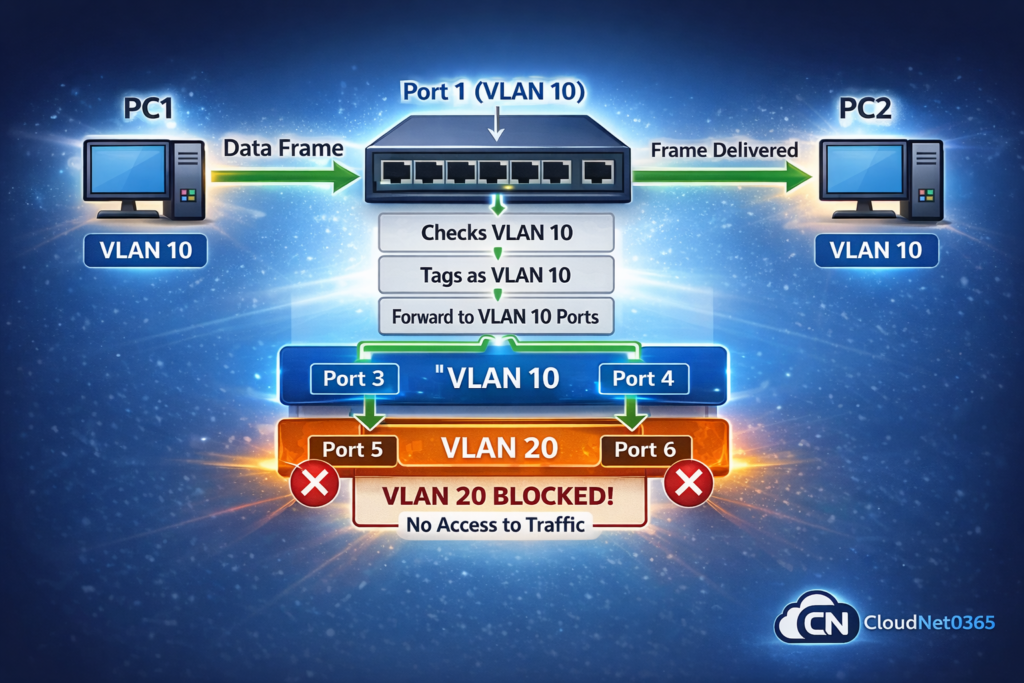
Let’s understand how packets actually move.
🎯 Scenario:
- PC1 (VLAN 10) → wants to talk to PC2 (VLAN 10)
Packet Flow:
- PC1 sends a frame → enters switch via Port 1
- Switch checks that Port 1 belongs to VLAN 10
- Frame is assigned to VLAN 10 internally.
- Switch forwards frame ONLY to Ports in VLAN 10
- PC2 receives it ✅
👉 Devices in VLAN 20 will NEVER receive this traffic.
Tagged vs Untagged Traffic (Critical Concept)
🔹 Untagged Traffic
- Used on access ports
- No VLAN ID inside the frame
- Switch assigns VLAN based on port
👉 Example:
- PC connected to switch → sends untagged traffic
🔹 Tagged Traffic (802.1Q)
- Used on trunk ports
- VLAN ID is inserted inside frame
👉 Example:
- Switch ↔ Switch communication
- Switch ↔ Router
What happens in tagging?
- Switch adds a VLAN tag (4 bytes)
- Tag contains VLAN ID
- Ensures correct delivery across devices
⚡ Quick Visual Thinking (Understand VLAN Easily)
Think of VLAN like separate lanes on a highway:
- Same road (switch)
- Different lanes (VLANs)
- Vehicles (packets) stay in their lane
👉 No mixing = no collision = better performance
Similarly,
Same Switch
 ├── VLAN 10 → HR PCs
 ├── VLAN 20 → IT PCs

Traffic stays inside its VLAN lane.
🏷️ Tagged vs Untagged Traffic (Very Important)
🔹 Untagged Traffic (Access Port)
- No VLAN ID in frame
- Used by end devices
- Switch assigns VLAN based on port
👉 Example:
- PC → Switch communication
🔹 Tagged Traffic (Trunk Port – 802.1Q)
- VLAN ID added inside frame
- Used between switches/routers
- Carries multiple VLANs
📦 What is VLAN Tag?
- 4-byte field added to frame
- Contains VLAN ID
- Helps identify traffic
⚠️ Important Rule:
- Access port → Untagged
- Trunk port → Tagged
💻 VLAN Configuration Commands (Cisco)
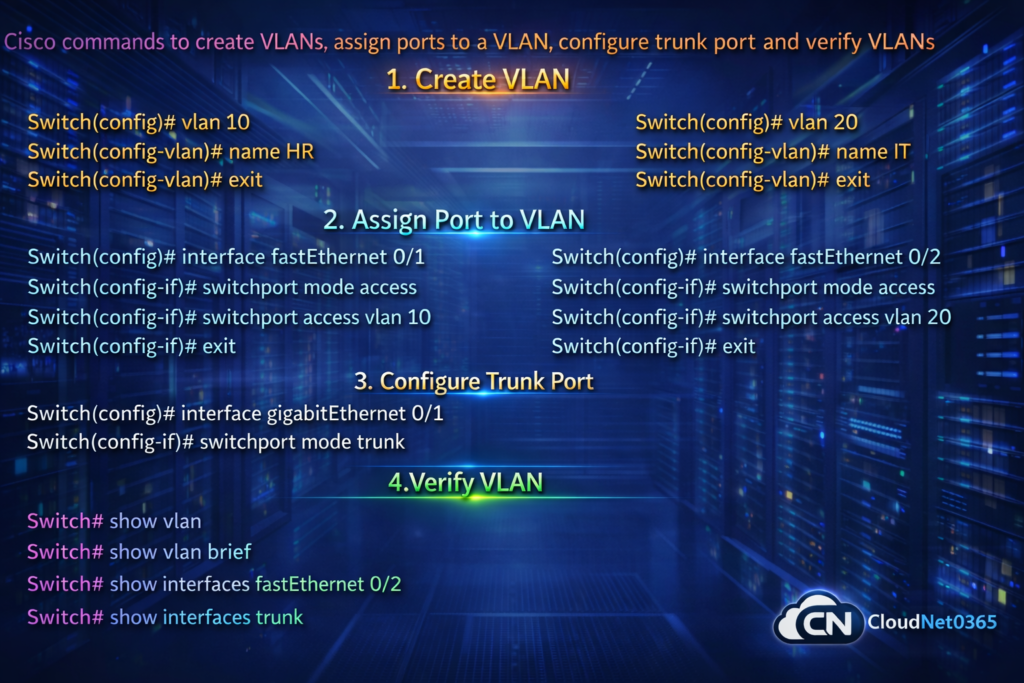
1. Create VLAN
Switch(config)# vlan 10
Switch(config-vlan)# name HR
Switch(config-vlan)# exit
2. Assign Port to VLAN
Switch(config)# interface fastEthernet 0/1
Switch(config-if)# switchport mode access
Switch(config-if)# switchport access vlan 10
3. Configure Trunk Port
Switch(config)# interface gigabitEthernet 0/1
Switch(config-if)# switchport mode trunk
4.🔍Verify VLAN
Switch# show vlan brief
🌍 Real-World Use Cases
1. 🏢 Office Network
- HR → VLAN 10
- IT → VLAN 20
- Finance → VLAN 30
👉 Secure department separation and prevents unauthorized access.
2. 📞 Voice + Data VLAN
- Voice VLAN → IP phones
- Data VLAN → PCs
👉 Better call quality (QoS)
3. 🎓 Schools & Colleges
- Students VLAN
- Staff VLAN
👉 Controlled access
4. 🖥️ Data Centers
- Separate application tiers:
- Web
- App
- Database
👉 Better isolation and High security architecture
📊 Static vs Dynamic VLAN (Quick Comparison)
| Features | Static VLAN | Dynamic VLAN |
|---|---|---|
| Assignment | Manual (port-based) | Automatic (MAC-based) |
| Configuration | Simple | Complex |
| Flexibility | Low | High |
| Example | Office ports | Large enterprise |
| Dependency | Port number | VMPS server |
🎯 Advantages of VLAN
- ✅ Enhanced security through network isolation
- ✅ Improved performance by reducing broadcast traffic.
- ✅ Better control over network traffic flow
- ✅ Easy network management
- ✅ Cost-effective (no additional hardware required)
❓ FAQs
1. How VLAN works internally?
VLAN works by assigning a VLAN IDs to each frame and forwarding traffic only within that VLAN.
2. What is VLAN packet flow?
It is the process where frames are tagged, processed by switches, and delivered only within the assigned VLAN.
3. What is tagged vs untagged traffic?
- Tagged → contains VLAN ID (trunk ports) , that means VLAN ID is included
- Untagged → no VLAN ID (access ports)
4. Can devices in different VLANs communicate?
Yes, but only via Router or Layer 3 Switch and this is called as Inter-VLAN Routing.
5. Why VLAN is used?
To improve security, reduce traffic, and segment networks.
🔚 Conclusion
VLAN is not just a concept — it’s a core networking skill.
👉 If you understand VLAN working process, Packet flow, Tagged vs untagged traffic, then it means you are already ahead of many beginners.
🔑 Final Takeaways:
- VLAN = Logical separation
- Packet flow = Controlled communication
- Tagging = Backbone of VLAN
🔗 Internal Linking (IMPORTANT for SEO)
👉 Also read:
- Types of VLAN
- VLAN Trunking explained
- Static vs Dynamic VLAN