
🧩 Introduction (Real Problem)
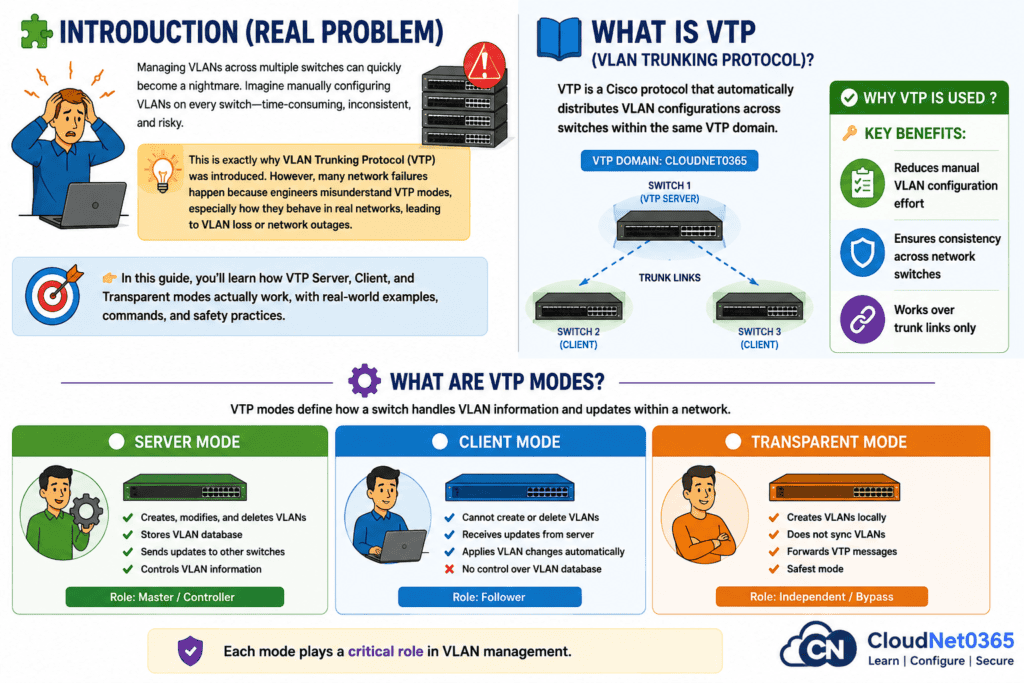
Managing VLANs across multiple switches can quickly become a nightmare. Imagine manually configuring VLANs on every switch—time-consuming, inconsistent, and risky.
This is exactly why VLAN Trunking Protocol (VTP) was introduced. However, many network failures happen because engineers misunderstand VTP modes, especially how they behave in real networks, leading to VLAN loss or network outages.
👉 In this guide, you’ll learn how VTP Server, Client, and Transparent modes actually work, with real-world examples, commands, and safety practices.
📘 What is VTP (VLAN Trunking Protocol)?
VTP is a Cisco protocol that automatically distributes VLAN configurations across switches within the same VTP domain.
✅ Why VTP is used ? 🔑 Key Benefits:
- It Reduces manual VLAN configuration effort
- Ensures consistency across network switches
- Works over trunk links only
⚙️ What are VTP Modes?
VTP modes define how a switch handles VLAN information and updates within a network.
🧠 Three Main Modes:
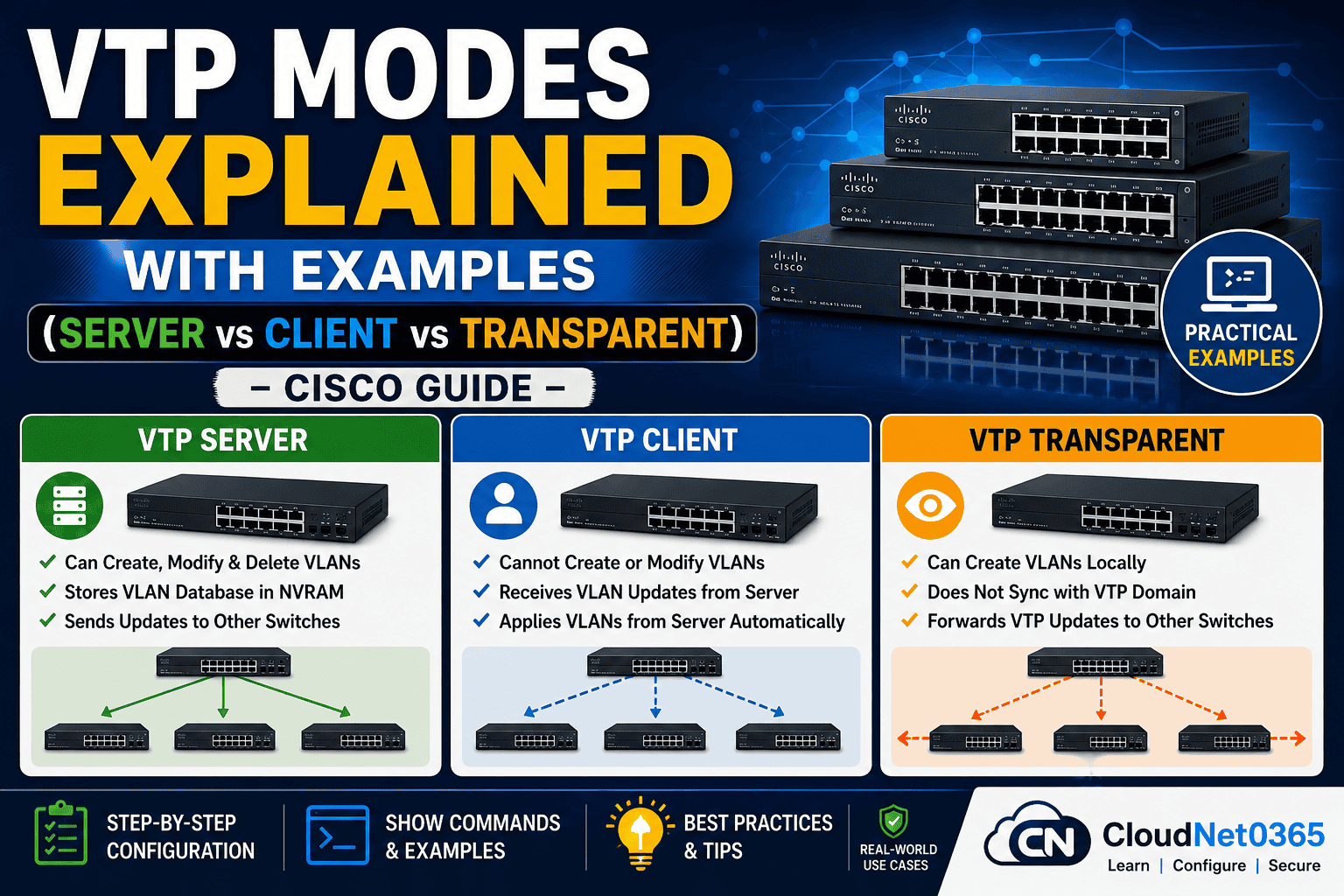
- Server Mode → Controls VLANs
- Client Mode → Follows updates
- Transparent Mode → Ignores sync (safest)
Each mode plays a critical role in VLAN management.
🟢 1. VTP Server Mode (Default Mode)
📌 Definition
The VTP Server is the central controller that can create, modify, and delete VLANs. These changes are then automatically propagated to other switches.
🔑 Key Features:
- ✔ Can create/modify/delete VLANs
- ✔ Stores VLAN database in NVRAM
- ✔ Sends VTP updates to other switches
- ⚠ High risk if misconfigured
💻 Configuration Example:
Switch(config)# vtp mode server
Switch(config)# vtp domain CloudNet0365
Switch(config)# vtp password secure123

Switch(config)# vlan 10
Switch(config-vlan)# name SALES
⚠️ Real Insight:
In real networks, admins keep only 1–2 VTP servers to avoid accidental VLAN overwrites.
In production, I’ve seen a new switch accidentally set as Server with higher revision number, instantly wiping all VLANs network-wide.
👉 Always control who is the server.
🔵 2. VTP Client Mode (Controlled & Safe)
📌 Definition
A VTP Client cannot create VLANs. It simply receives and applies updates from the VTP Server.
🔑 Key Features:
- ❌ Cannot create/delete VLANs
- ✔ Automatically syncs VLANs
- ❌ No NVRAM storage (in older versions), Does not store VLANs permanently (older versions)
- ✔ Safer than server mode
💻 Configuration Example:
Switch(config)# vtp mode client
Switch(config)# vtp domain CloudNet0365
Switch(config)# vtp password secure123
⚠️ Real Insight:
Best used for access layer switches, where you don’t want accidental changes.
🟡 3. VTP Transparent Mode (Recommended)
📌 Definition
Transparent mode does not participate in VTP synchronization but forwards VTP messages to other switches.
🔑 Key Features:
- ✔ Can create VLANs locally
- ❌ Does not sync with domain
- ✔ Forwards VTP updates
- ✔ Safest mode (no risk of VLAN overwrite)
💻 Configuration Example:
Switch(config)# vtp mode transparent

Switch(config)# vlan 20
Switch(config-vlan)# name HR
⚠️ Real Insight: Why Experts Prefer This ?
Modern networks prefer Transparent mode, manual control over automation to avoid unexpected failures.
👉 Transparent mode = Zero risk of VLAN overwrite
🔍 Verification Commands (Must Know)
show vtp status
show vlan brief
show interfaces trunk
📌 What to check:
- VTP mode
- Domain name
- Revision number
- VLAN list
📊 Difference Between VTP Version 1 vs Version 2 vs Version 3
Here below is a detailed comparison between VTP Version 1, Version 2, and Version 3.
| Feature | 🟢 VTP Version 1 | 🔵 VTP Version 2 | 🟣 VTP Version 3 |
|---|---|---|---|
| VLAN Support | Standard VLANs only | Standard + Token Ring VLANs | Standard + Extended VLANs |
| Extended VLANs | ❌ Not Supported | ❌ Not Supported | ✔ Supported |
| Authentication | Basic Password | Basic Password | Enhanced Security |
| Revision Number Protection | ❌ No Protection | ❌ No Protection | ✔ Better Protection |
| Database Management | Basic | Improved | Advanced |
| Advertisement Handling | Standard Advertisements | Better Handling | Enhanced Control |
| VLAN Database Size | Limited | Limited | Large VLAN Database Support |
| Database Storage | Stored in NVRAM | Stored in NVRAM | Improved Database Handling |
| Backward Compatibility | v1 only | v1 & v2 | v1, v2 & v3 |
| Security Level | ❌ Low | ⚠ Medium | ✔ High |
| Enterprise Usage | ❌ Not Recommended | ⚠ Limited Usage | ✔ Recommended |
| Best For | Legacy Networks | Older Cisco Networks | Modern Enterprise Networks |
👉 Recommendation: VTP Version 3 is recommended for modern enterprise networks because it supports extended VLANs, improved security, and better revision protection.
🎯 Quick Analysis
🟢 VTP Version 1
- Oldest version with basic VLAN synchronization
- Suitable only for legacy Cisco environments
🔵 VTP Version 2
- Adds Token Ring VLAN support
- Minor improvements over v1
🟣 VTP Version 3
- Best choice for modern enterprise networks
- Supports extended VLANs and better security
- Prevents accidental VLAN database overwrite
💡 Best Practice Recommendation
👉 For production environments, always use:
Switch(config)# vtp version 3
Because VTP v3 provides:
- ✔ Better control
- ✔ Improved security
- ✔ Safer VLAN management
- ✔ Enterprise-grade reliability
⚠️ CRITICAL: VTP Revision Number (Most Important Concept)
📌 What is it?
VTP uses a revision number to track VLAN updates. The switch with the highest revision number wins.
🚨 Why it’s dangerous:
- A new switch with higher revision → can delete all VLANs
- Happens instantly across the network
🔥 Example Scenario: Real Risk
- Old switch joins network
- Has revision number = 50
- Existing network = revision 10
👉 Result: Entire VLAN database gets overwritten
🛡️ How to Prevent:
- Reset revision before connecting:
delete flash:vlan.dat
reload
🛠️ How to Reset Revision Number
Switch(config)# vtp mode transparent
Switch(config)# vtp mode server
👉 Always reset before adding a new switch.
🔍 VTP Version Comparison (v1 vs v2 vs v3)
| Feature | VTP v1 | VTP v2 | VTP v3 (Best) |
|---|---|---|---|
| VLAN Support | Standard | Token Ring | Extended VLANs |
| Authentication | Basic | Same as v1 | Enhanced |
| Protection | ❌ None | ❌ None | ✔ Prevent overwrite |
| Recommended | ❌ No | ❌ No | ✔ YES |
👉 Always use VTP v3 in production.
📊 VTP Modes Comparison Table
Here below is a VTP mode comparison table.
| Feature | Server Mode | Client Mode | Transparent Mode |
|---|---|---|---|
| Create VLAN | Yes | No | Yes |
| Receive Updates | Yes | Yes | No |
| Forward Updates | Yes | Yes | Yes |
| Store VLANs | Yes | No | Yes |
| Risk Level | High | Medium | Low |
| Best Use Case | Core Switch | Access Switch | Secure Networks |
🌍 Real-World Use Cases
🏢 Enterprise Network:
- Core Switch → VTP Server
- Access Switch → Client
👉 Result: Centralized VLAN management and control
🔐 Secure Network (Recommended):
- All switches → Transparent
- VLANs configured manually
👉 No automatic changes, full control, No risk of VLAN wipeout
🌐 Multi-Site Network:
- Transparent mode everywhere
👉 Prevents cross-site VLAN issues, prevents unwanted VLAN propagation
🛠️ Troubleshooting VTP Issues
1. ❌ VLANs not syncing:
- Check domain name
- Check and Verify trunk links
- Verify password
2. ❌ Updates not working:
- Check VTP password
- Check VTP version
3. ❌ VLANs disappeared:
- Check revision number
- Restore from backup
4. ❌ Wrong VLANs Appearing
- Check revision number
- Reset VTP
5. ❌ No VTP Updates
- Ensure trunk ports
- Check VTP version mismatch
💡 Best Practices
- ✅ Use Transparent Mode whenever possible
- ✅ Limit number of VTP servers (max 1–2)
- ✅ Always set domain + password
- ✅ Reset revision before adding switch
- ✅ Prefer VTP v3
- ✅Test changes in lab
Common Mistakes to Avoid
- ❌ Using multiple VTP servers without control
- ❌ Connecting a switch with higher revision number (can delete VLANs)
- ❌ Not setting VTP password
- ❌ Using VTP in large networks without understanding risks
❓ FAQs
1. Which VTP mode is safest?
👉 Transparent mode is the safest because it does not synchronize VLANs automatically.
2. Can VTP delete VLANs automatically?
👉 Yes, due to revision number mismatch — this is the biggest risk. if a switch with higher revision number joins the network, it can overwrite VLAN database.
3. Is VTP still used today?
👉 Yes, Many modern networks avoid VTP due to risks and prefer manual VLAN configuration.
4. Do all switches need same domain?
👉 Yes, otherwise VTP will not work. domain name must match.
5. What is best practice today?
👉 Use Transparent mode or VTP v3 with strict control.
6. What happens if VTP password mismatches?
👉Switches will not exchange VTP updates.
7. Can Transparent mode forward VTP?
👉 Yes, it forwards but does not apply changes.
🧾 Conclusion
VTP can simplify VLAN management—but it can also destroy your network if misused.
🔑 Final Takeaways:
- Server Mode → Central control but risky
- Client Mode → Follows server, limited control
- Transparent Mode → Most secure and recommended
👉 If you want stability, zero surprises and production-ready network, go with Transparent Mode. This is the best choice to avoid disasters.
🚀 Final Tip (Expert Insight)
Many experienced network engineers avoid VTP completely in production because one mistake can bring down the entire network.
🔗 Related Topics (Recommended Reading)
👉 Read next on CloudNet0365:
➡️ VLAN Configuration in Cisco Switch
➡️ VTP Pruning Explained (How It Reduces Unnecessary Traffic)
➡️ What is VTP? VLAN Trunking Protocol Explained Simply (With Examples & Commands)
You can also refer to VTP modes – Explained by study-ccna
You can also refer to VTP modes -Explained by GeeksForGeeks
📢 Call to Action
If you found this helpful:
👉 Check our VLAN & STP guides on CloudNet0365
👉 Bookmark this for quick revision
👉 Share with your networking friends